3 - 6
Method using the S-SFC
Method using the
S-SFC
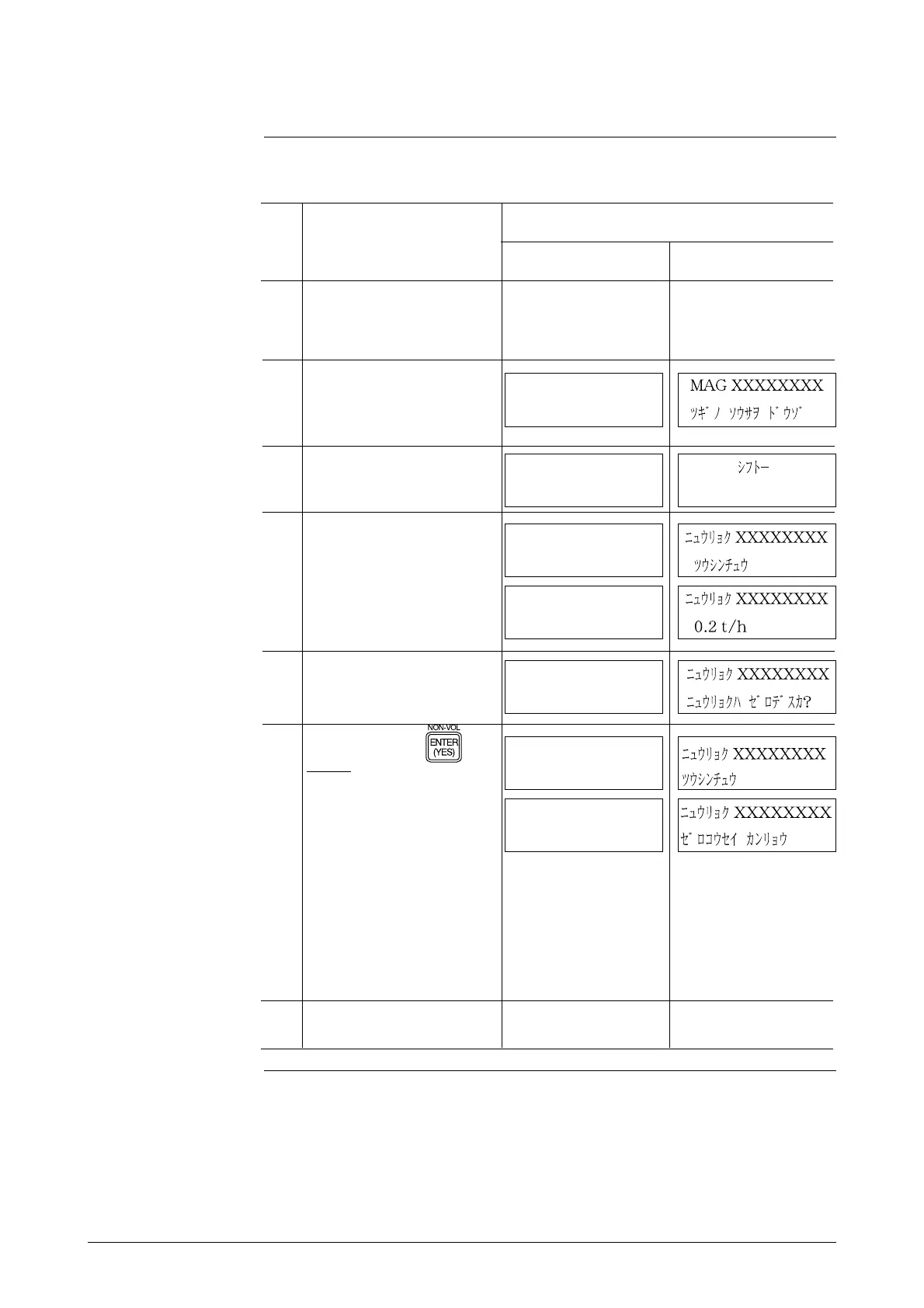
Perform the following steps.
S-SFC screen
Step
Procedure
1
English Japanese
Make sure the fluid to be mea-
sured has been charged and is
standing still in the detector.
3
4
SHIFT-
MAG XXXXXXXX
READY...
5
6
INPUT XXXXXXXX
WORKING
INPUT XXXXXXXX
ZERO INPUT?
INPUT XXXXXXXX
0.2 t/h
INPUT XXXXXXXX
WORKING
INPUT XXXXXXXX
INPUT ZEROED
2
Make sure the S-SFC has
started up and is ready to
communicate with the
flowmeter.
Press the CORRECT key.
Press the SHIFT key.
Press the OUTPUT key.
Press the ENTER ( ) key.
Result:
• The screen will change to
the display shown in the fig-
ure on the upper right-hand
side, and the zero adjust-
ment will start.
• When zero adjustment has
been completed, the screen
will change to the display
shown in the figure on the
lower right-hand side. It
takes about 30 seconds for
zero adjustment.
7
Press the CLR key to return to
the display screen in Step 2.



 To Next Page