4 - 19
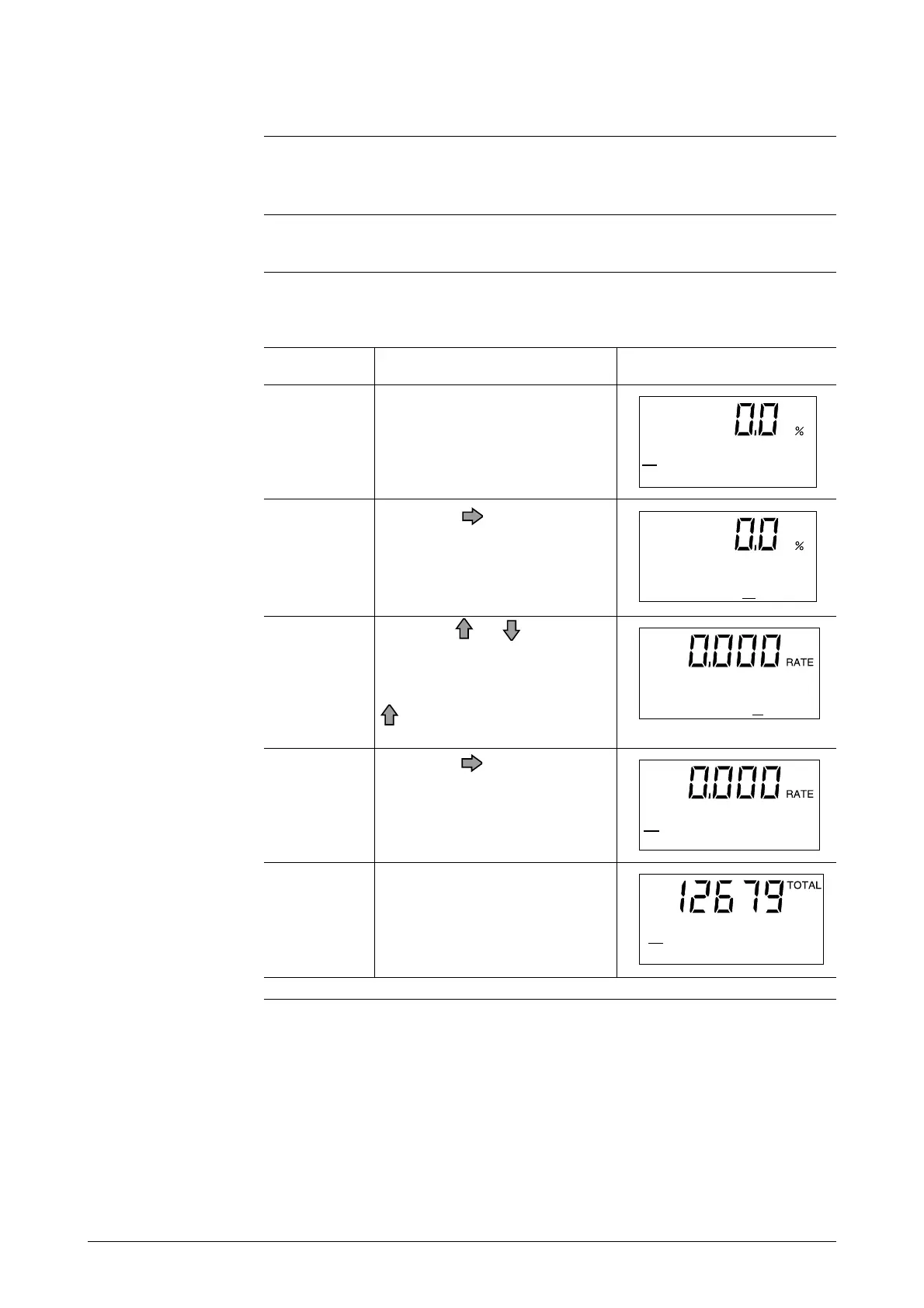
Setting/Changing the Flow Rate Indication
Introduction
Selects the mode of flow rate indication for the main display: from percent
display: actual flow rate display, and integrated value display.
Default setting
The default setting is percent display.
Setting range
Select either “%” (instantaneous percent flow rate), “RATE” (instantaneous
actual flow rate), or “TOTAL” (integrated value).
Open the flow rate display
setup screen by following the
steps to enter the Operator’s
Mode.
Touch the key once.
Touch the or key to select
the desired flow rate display. In
this example, “%” is changed
to “RATE” by one touch of the
key.
Touch the key once.
Perform setting for the “TO-
TAL” display as well.
ScreenProcedureStep
1
2
3
4
5
*
DISPLAY SELECT
%
*
DISPLAY SELECT
%
*
DISPLAY SELECT
RATE
*
DISPLAY SELECT
RATE
*
DISPLAY SELECT
TOTAL



 To Next Page