4 - 11
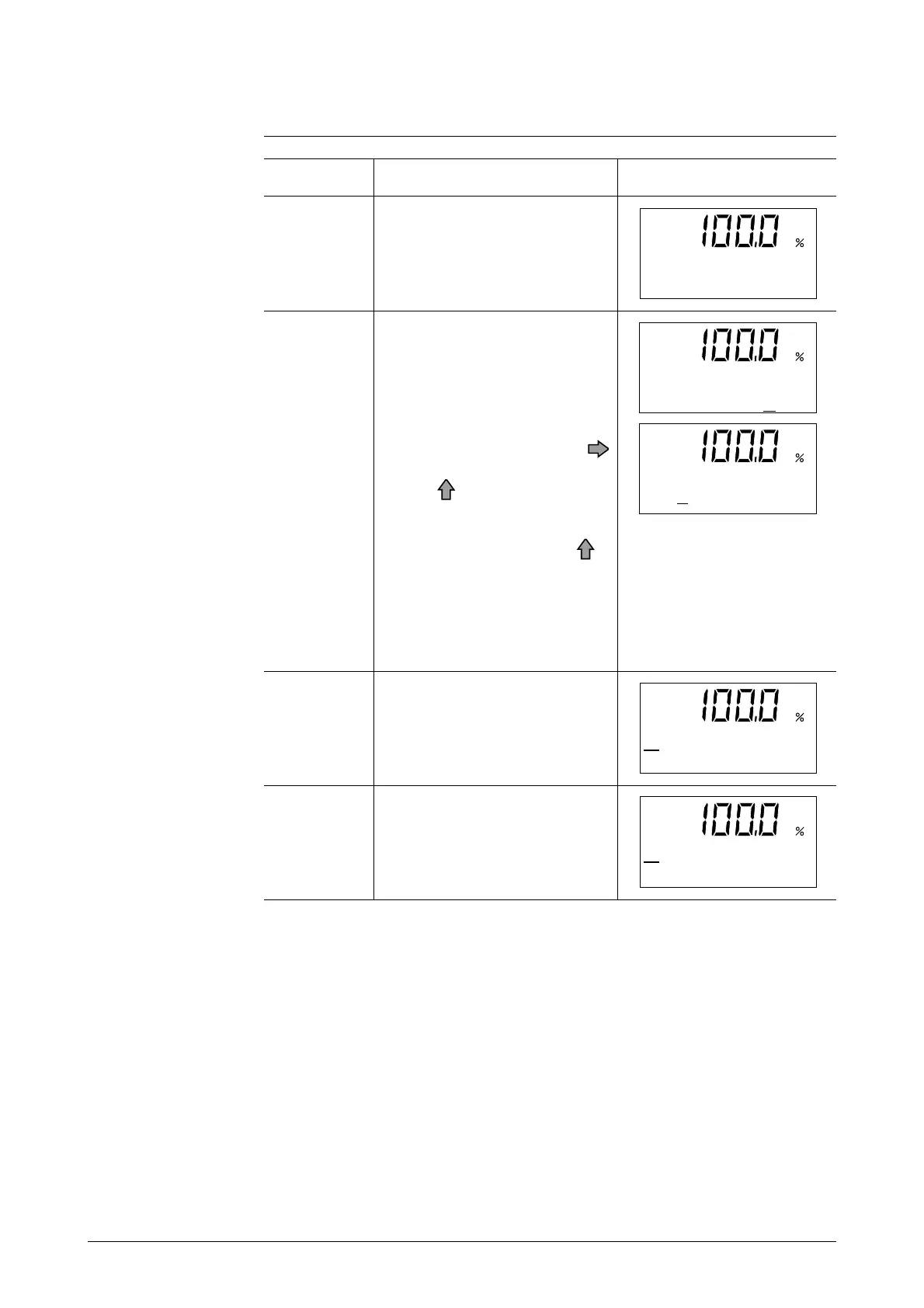
The screen at right shows an
example of display of 10 m3/h,
100% in the Measuring Mode.
Touch the MODE key for
about 3 seconds.
Complete the following opera-
tions within 8 seconds (the
screen at right will be displayed
for about 8 seconds only):
1) To enter the Operator's
Mode, move the cursor un-
der "Y" by touching the
key twice, and then touch
the key.
2) To return to the Measuring
Mode, move the cursor un-
der "N" and touch the
key.
The screen will automati-
cally return to the Measur-
ing Mode (screen shown in
step 1) 8 seconds later.
ScreenProcedureStep
1
2
How to Enter the Operator's Mode
The operation mentioned under
1) in the above step will make
the screen on the right be dis-
played for about 2 seconds.
3
The Damping Setting screen
will be displayed about 2 sec-
onds later.
4
*
OPERATOR'S
MODE
10.00 m 3/h
000032542 TOTAL
ENTER IN OP. MODE
YES OR NO
ENTER IN OP. MODE
YES OR NO
*
DAMPING
003.0S



 To Next Page