6. Operating with DeviceNet Communications
107
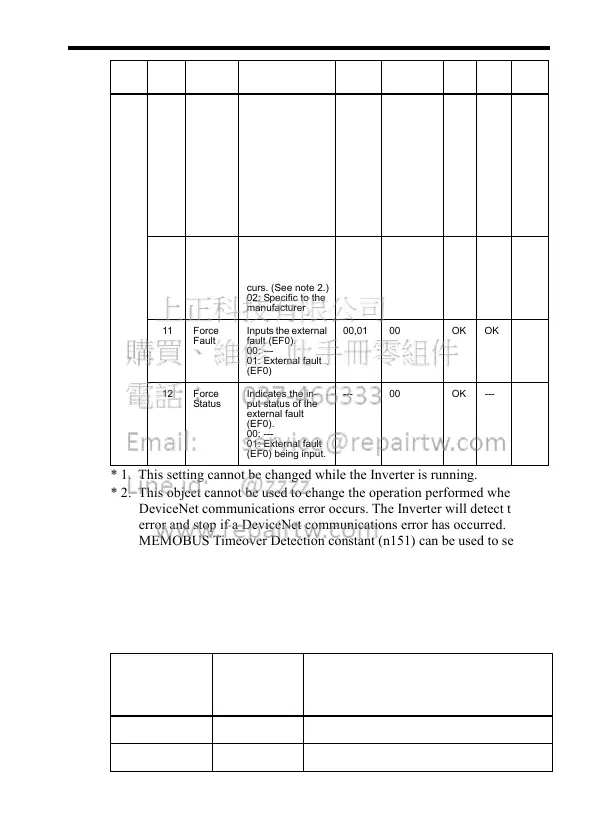
* 1. This setting cannot be changed while the Inverter is running.
* 2. This object cannot be used to change the operation performed when a
DeviceNet communications error occurs. The Inverter will detect the
error and stop if a DeviceNet communications error has occurred. The
MEMOBUS Timeover Detection constant (n151) can be used to set the
method used to stop the Inverter when a communications error has
occurred.
* 3. Fault Code List
• If using software No. 0013 (for Inverters of 4.0 kW or less) or
No. 0101 (5.5/7.5 kW)
01 0F Ctrl
From
Net
Indicates which
RUN command in-
put has been se-
lected in the
Inverter.
00: A RUN com-
mand input other
than DeviceNet is
enabled.
01: The RUN
command input
from DeviceNet is
enabled.
--- 00 OK --- Byte
10 DN Fault
Mode
Indicates the oper-
ation selected
when a De-
viceNet fault oc-
curs. (See note 2.)
02: Specific to the
manufacturer
--- 02 OK --- Byte
11 For ce
Fault
Inputs the external
fault (EF0).
00: ---
01: External fault
(EF0)
00,01 00 OK OK Byte
12 Force
Status
Indicates the in-
put status of the
external fault
(EF0).
00: ---
01: External fault
(EF0) being input.
--- 00 OK --- Byte
DeviceNet
Fault Code
(Hex)
Operator
Fault Dis-
play
Meaning
0000 --- Inverter normal
2200 oL2 Inverter overload
In-
stance
At-
tribute
Name Contents Setting
Range
Factory Set-
ting (Hex)
Read Write Size













 To Next Page