64
MEMOBUS I/O Instances
All of the Inverter’s constants can be referenced and set with a
MEMOBUS I/O instance.
MEMOBUS I/O instances can be used with Yaskawa Inverters only.
They cannot be used with other companies’ DeviceNet-compatible
Inverters.
Five bytes are used for input data and five bytes are used for output
data.
Always execute the ENTER command when changing constants. See
ENTER Command (Write-only Register) on page 126 for details.
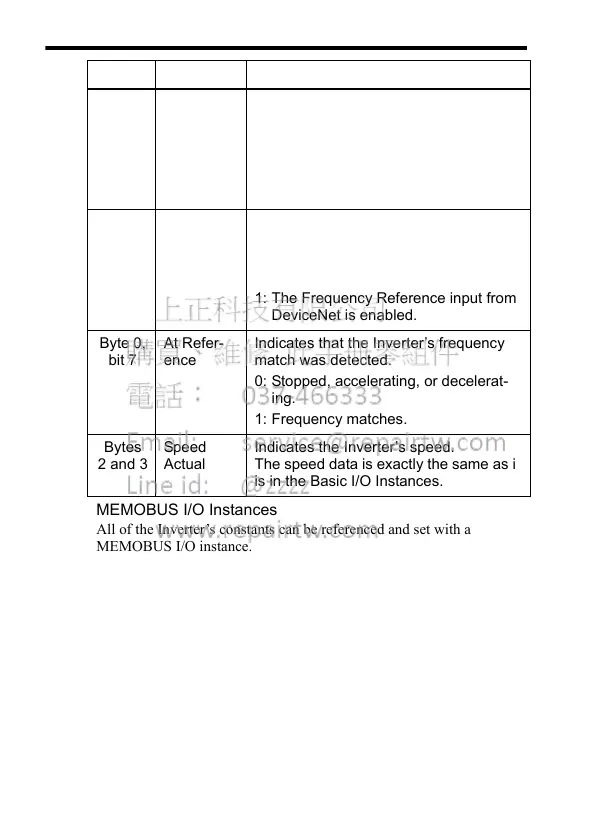
Byte 0,
bit 5
Ctrl From
Net
Indicates which RUN command input
has been selected in the Inverter.
0: A RUN command input other than
DeviceNet is enabled.
1: The RUN command input from
DeviceNet is enabled.
Byte 0,
bit 6
Ref From
Net
Indicates which Frequency Reference
input has been selected in the Inverter.
0: A Frequency Reference input other
than DeviceNet is enabled.
1: The Frequency Reference input from
DeviceNet is enabled.
Byte 0,
bit 7
At Refer-
ence
Indicates that the Inverter’s frequency
match was detected.
0: Stopped, accelerating, or decelerat-
ing.
1: Frequency matches.
Bytes
2 and 3
Speed
Actual
Indicates the Inverter’s speed.
The speed data is exactly the same as it
is in the Basic I/O Instances.
Data Name Contents




 To Next Page