OPERATION
Axio Observer TFT display touchscreen on the Axio Observer 7, 7 materials ZEISS
12/2016 431004-7244-001 137
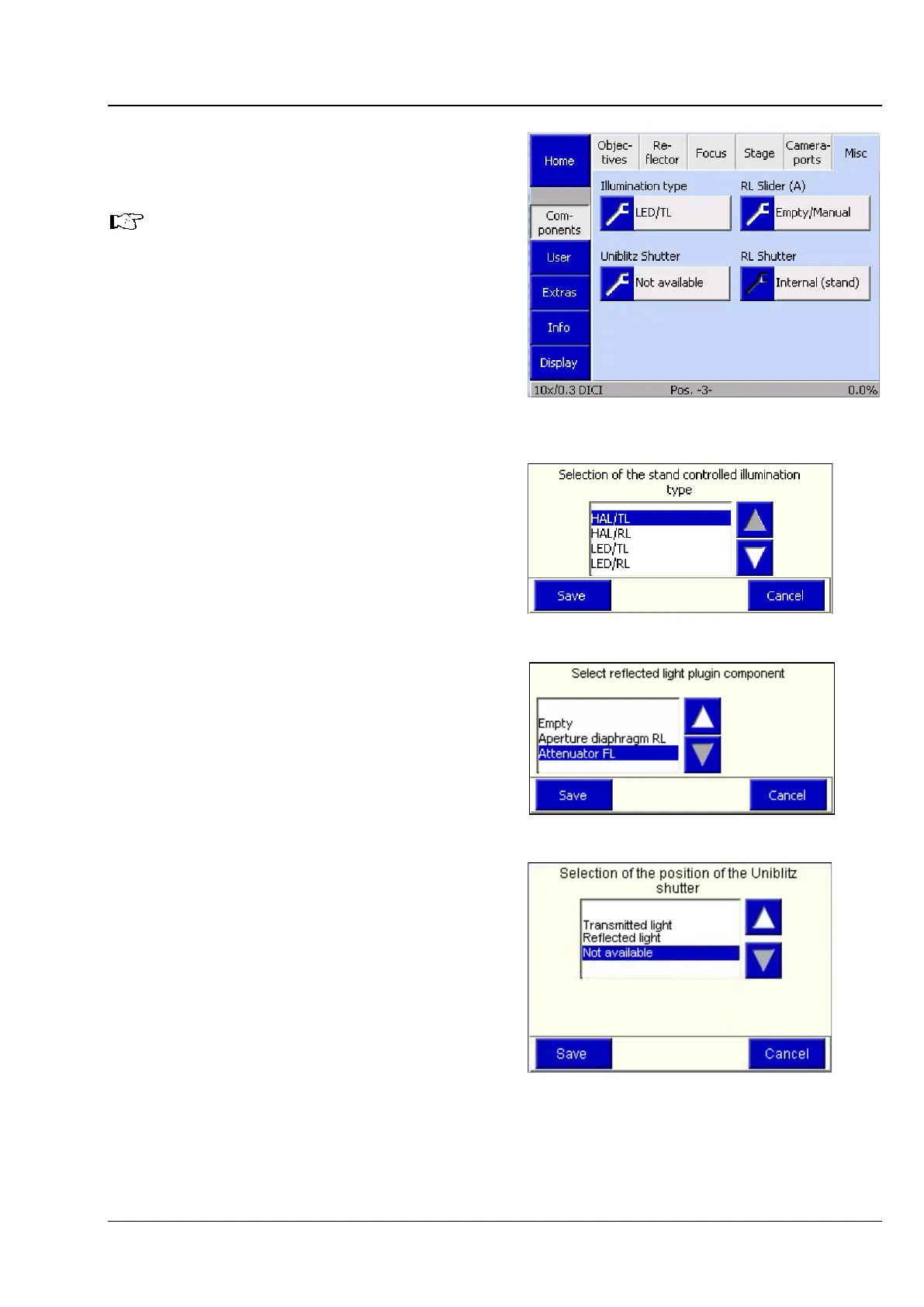
(6) Misc
The Misc tab is used to configure additional,
optional microscope components.
The number of buttons displayed
depends on the components detected
during initialization or when the
Settings -> Components
opened.
• Press the relevant button to configure a
component.
The related selection list will be opened.
• Press the ▲ ▼ keys to select a setting.
• Press the Save button to store the selected
setting. Press the Cancel button to close the
window without any selection.
Illumination type
This is used to enter the type of illuminator you are
working with: halogen illuminator or LED
illuminator.
RL slider (A)
If a motorized diaphragm slider or an FL attenuator
are used in reflected light, these components must
be specified in this window. The settings will be
applied after the microscope has been restarted.
Uniblitz shutter
Here, the user should select whether the Uniblitz
shutter is fitted in the transmitted or reflected light
beam path or if it is not available.
Fig. 130 Settings -> Components -> Misc
page
Fig. 131 Illumination type
Fig. 132 RL slider (A)
Fig. 133 Uniblitz shutter









 To Next Page