INSTALLATION INSTRUCTIONS AND FIRST-TIME SET-UP
ZEISS Attaching the binocular (photo) tube Axio Observer
38 431004-7244-001 12/2016
4.4 Attaching the binocular (photo)
tube
All binocular tubes listed in the system overview
can be fitted to the Axio Observer, Axio Observer
materials stands as described below.
Proceed as follows to fit or change the binocular
tube:
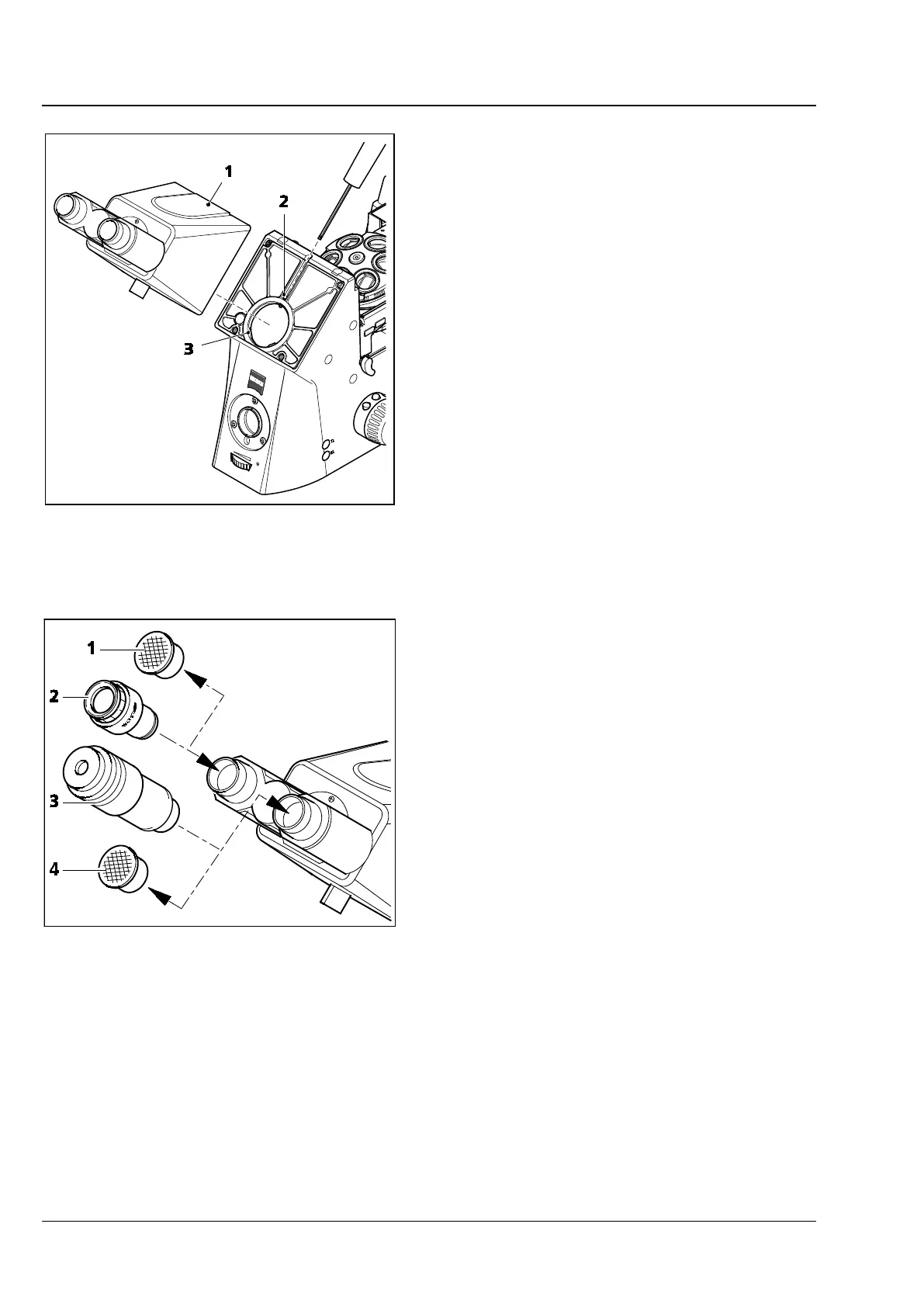
• Loosen Allen screw (Fig. 14/2) using the 3 mm
ball-headed screwdriver. When changing the
binocular tube, hold the tube firmly during
unscrewing and remove it forwards.
• Remove the dust cap from the binocular tube
which is to be attached.
• Insert the binocular tube (Fig. 14/1) with the
dovetail ring into the tube mount (Fig. 14/3) on
the stand, align it with the stand and tighten
the Allen screw (Fig. 14/2) using the ball-headed
screwdriver.
4.4.1 Inserting the eyepieces and
auxiliary microscope
• Remove the two dust caps (Fig. 15/1 and 4)
from the binocular tube.
• Remove the two eyepieces (Fig. 15/2) from their
cases and insert them into the binocular tube as
far as they will go.
• The auxiliary microscope (Fig. 15/3), which is
used to view the aperture stops and phase
stops and to center the phase stops, can be
inserted in one of the tubes in place of one of
the eyepieces. The adjustable eyepiece lens can
be used to focus on these stops.
Fig. 14 Attaching the binocular tube
Fig. 15 Inserting eyepieces









 To Next Page