INSTALLATION INSTRUCTIONS AND FIRST-TIME SET-UP
ZEISS Reflector turret Axio Observer
56 431004-7244-001 12/2016
4.11.3 Changing the filter set in the
reflector module FL P&C
The filter sets for the FL P&C reflector module can
be complied and fitted by the user as required.
Suitable filter sets or complete FL P&C reflector
modules can be ordered from ZEISS.
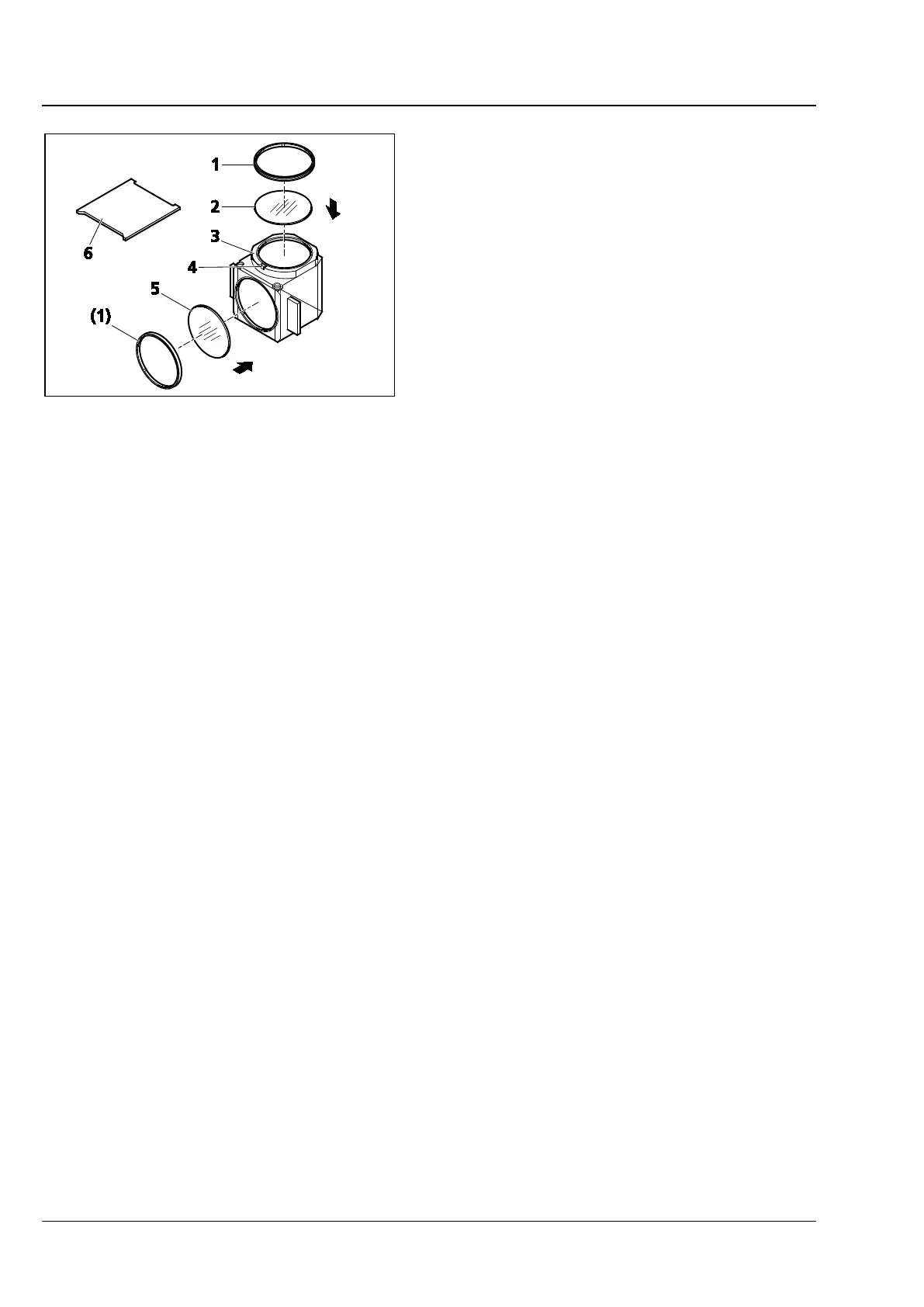
• Remove reflector module FL P&C (Fig. 36/3)
from the reflector turret and put it down (refer
also to section 4.11.2).
• Use mounting plate (Fig. 36/6) from the tool set
to unscrew the retaining ring (Fig. 36/1).
• Turn the reflector module so that the filter
(Fig. 36/2 or 5) falls out on a soft surface.
• Insert the barrier filter (emission filter) at
(Fig. 36/2), and the exciter filter at (Fig. 36/5).
Secure both filters with the retaining rings
(Fig. 36/1).
Barrier filter and exciter filter may bear a designation and an arrow on their circumference. The arrow
indicates the direction in which the filter must be inserted into the reflector module; it must always point
inwards (see arrows in Fig. 36).
To minimize image offset in multiple fluorescence imaging, the emission filter may bear an additional
label indicating the orientation of the wedge angle.
When inserting the respective barrier filter into a reflector module, align this label with the orientation
notch (Fig. 36/4). This will ensure that the wedge angles of the barrier filters used in all reflector modules
in the turret have identical, defined positions. Although image offset between modules is intrinsically very
small with ZEISS filter sets, it can be further minimized or even fully compensated by the above measure.
Fig. 36 Changing the filter set in the
reflector module FL P&C









 To Next Page