CD/MP3/WMA/JPEG OPERATION
Instructions for Insert/Eject, Play/Pause, Stopping Playback, Track Selection, Fast Forward/
Fast Reverse, Scan, and Random Play are the same for DVD, CD and MP3 operation.
Please see the DVD Player Operation section for information about these topics.
The file naming formats listed below are compatible with this unit:
■ ISO 9660 – file name: 12 characters, file extension: 3 characters
■ ISO 9660 – file name: 31 characters, file extension: 3 characters
■ Joliet – 64 characters
If the file or folder name does not conform to ISO 9660 file system standards, it may not be
displayed or played back correctly.
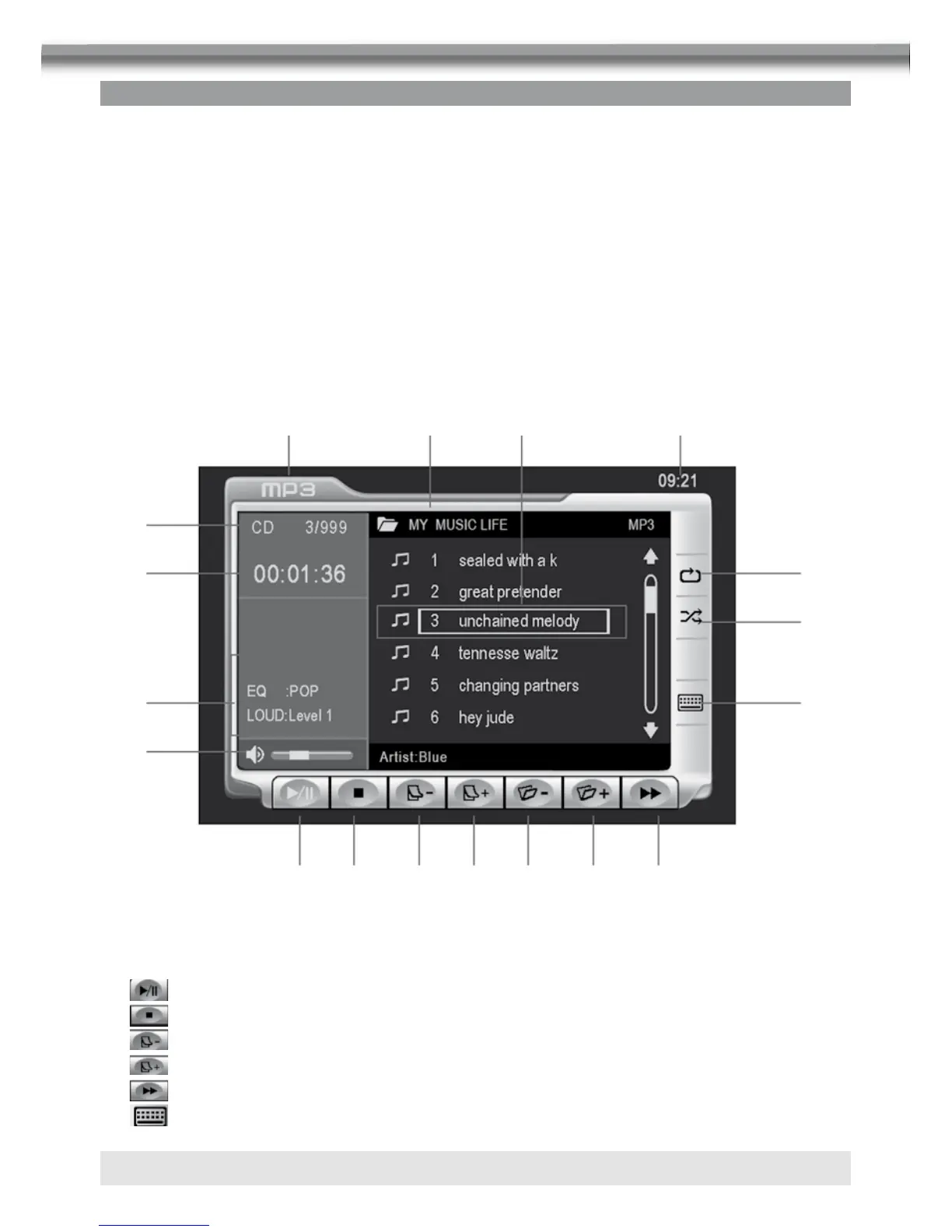
CD PLAYER USER INTERFACE
01. Current source indicator, touch this area to access MAIN menu.
02. Disk title.
03. Track title.
04. Current time.
05. Touch to play/pause disc playback.
06. Touch to stop disc playback.
07. Touch to turn to the previous page.
08. Touch to turn to the next page.
9.
Touch to fast forward current track.
10.
Touch to enter the numeric key pad.
2 3 4
bm
bn
bl
bo
bp
bt
bq
5 6 7 8 br bs 9
1



 To Next Page