112 113
ENGLISH
SD CARD READER OPERATION
Accessing SD card mode
■ Insert the SD card in the slot, and press the SRC button on the front panel to switch to
the SD card mode. You can press the SRC button on the remote control to switch to the
mode.
Using the touchscreen controls
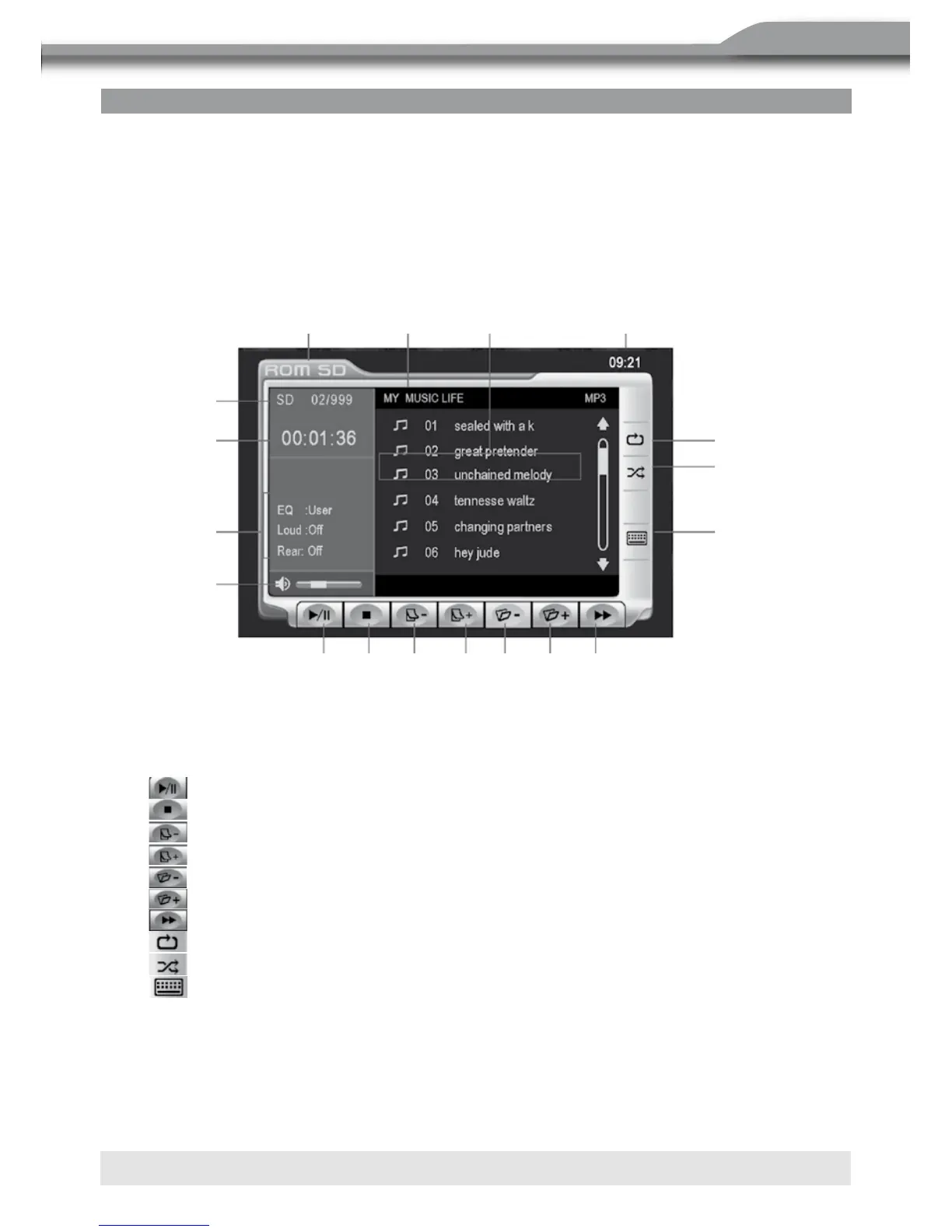
■ The touch keys for SD card playback are described below. The interface is similar as the
MP3 mode.
1. Current source indicator, touch this area to access
MAIN menu.
2. Disc title.
3. Track title.
4. Current time.
5. Touch to play/pause.
6. Touch to stop disc playback.
7. Touch to turn to the previous page.
8. Touch to turn to the next page.
9. Touch to display previous folder.
10. Touch to display next folder.
11. Touch to fast forward current track.
12. Touch to activate/deactivate Repeat Single Mode.
13. Touch to activate/deactivate Random Mode.
14. Touch to display the numeric keypad on the screen to access a track directly.
15. SD card indicator, display the current track and total number of tracks on SD card.
16. Elapsed playing time.
17. Playback information.
18. Volume indicator.
16
1. Current source indicator, touch this area to access MAIN menu.
2. Disc title
3. Track title
4. Current time
5: :Touch to play/pause
6. :Touch to stop disc playback
7: :Touch to turn to the previous page
8: :Touch to turn to the ne xt page
9. :Touch to display previous folder
10. :Touch to display ne xt folder
11. :Touch to fast forward current track
12. :Touch to activate/deactivate Repe at Single Mode
13. :Touch to activate/deactivate Rando m Mode
14. :Touch to displa y the numeric keypad on the screen to ac cess a track directly.
15. SD card indicator, display the cu rrent track and total number of tracks
on disc
16. Elapsed playing time
17. Playback information
18. Volum e indicator



 To Next Page