SYSTEM MENU SETUP
MAIN MENU
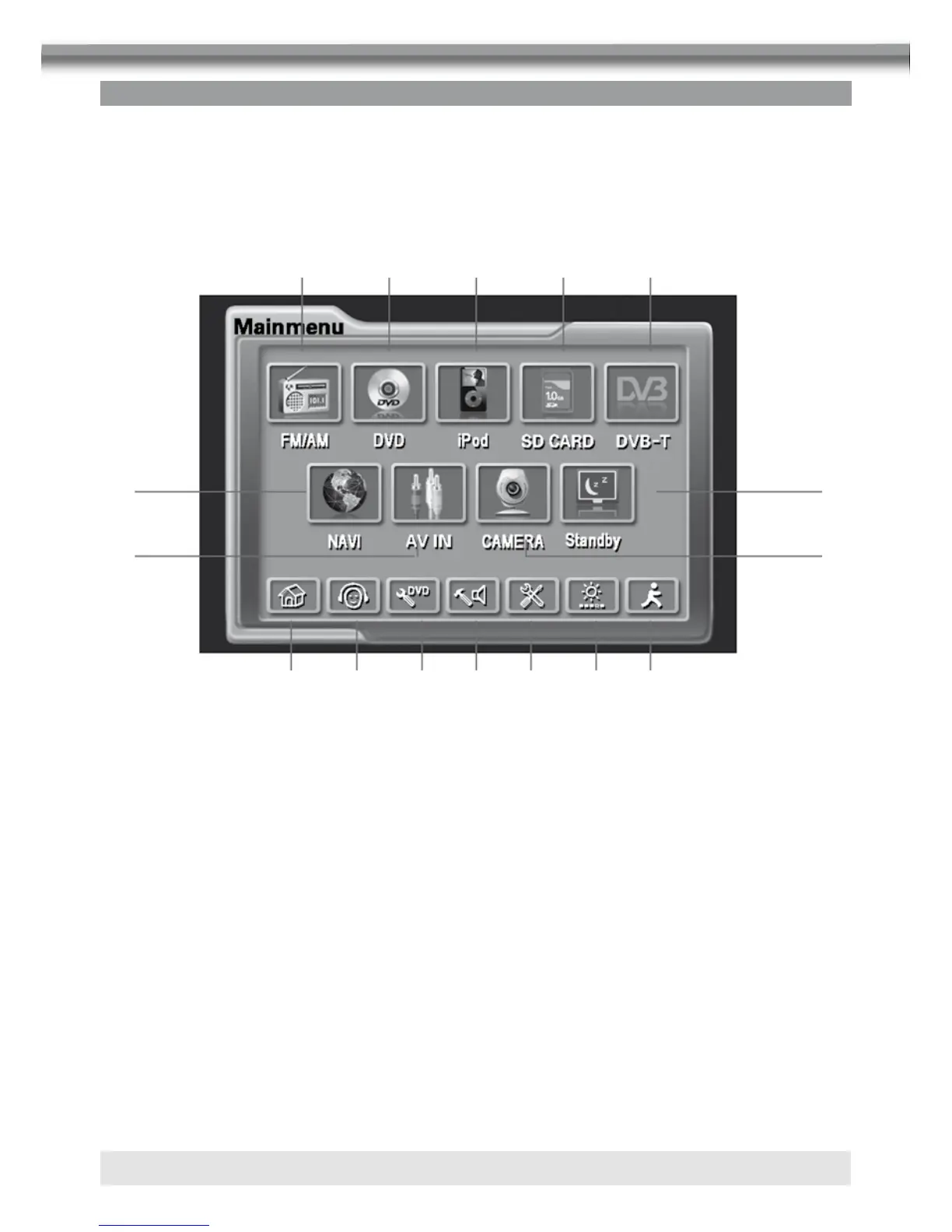
There are three methods to access the MAIN menu.
■ Press the SMART DIAL button on the front panel.
■ Press the MENU button on the remote control.
■ Touch the A area on the touch-screen.
1. Touch to access Front-Zone menu.
2. Touch to access Rear-Zone menu.
3. Touch to access DVD setup.
4. Touch to access ASP setup.
5. Touch to access General setup.
6. Touch to access Screen setup.
7. Touch to Exit menu.
8. Touch to access Tuner mode.
9. Touch to access DVD mode.
10. Touch to access iPod mode.
11. Touch to access SD Card mode.
12. Touch to access DVB-T (DTV) mode.
13. Touch to access Navigation mode.
14. Touch to access AV IN mode.
15. Touch to access Camera mode.
16. Touch to access Standby mode.
NOTE:
Remote control and touch screen operations and buttons on front panel are all useable to
select menu and adjust “SETTING”. The following instructions will show the different ways
to access menus and adjustments.
bo
br
1 2 3 4 5
8 9 bl bm bn
bp
6 7
bq



 To Next Page