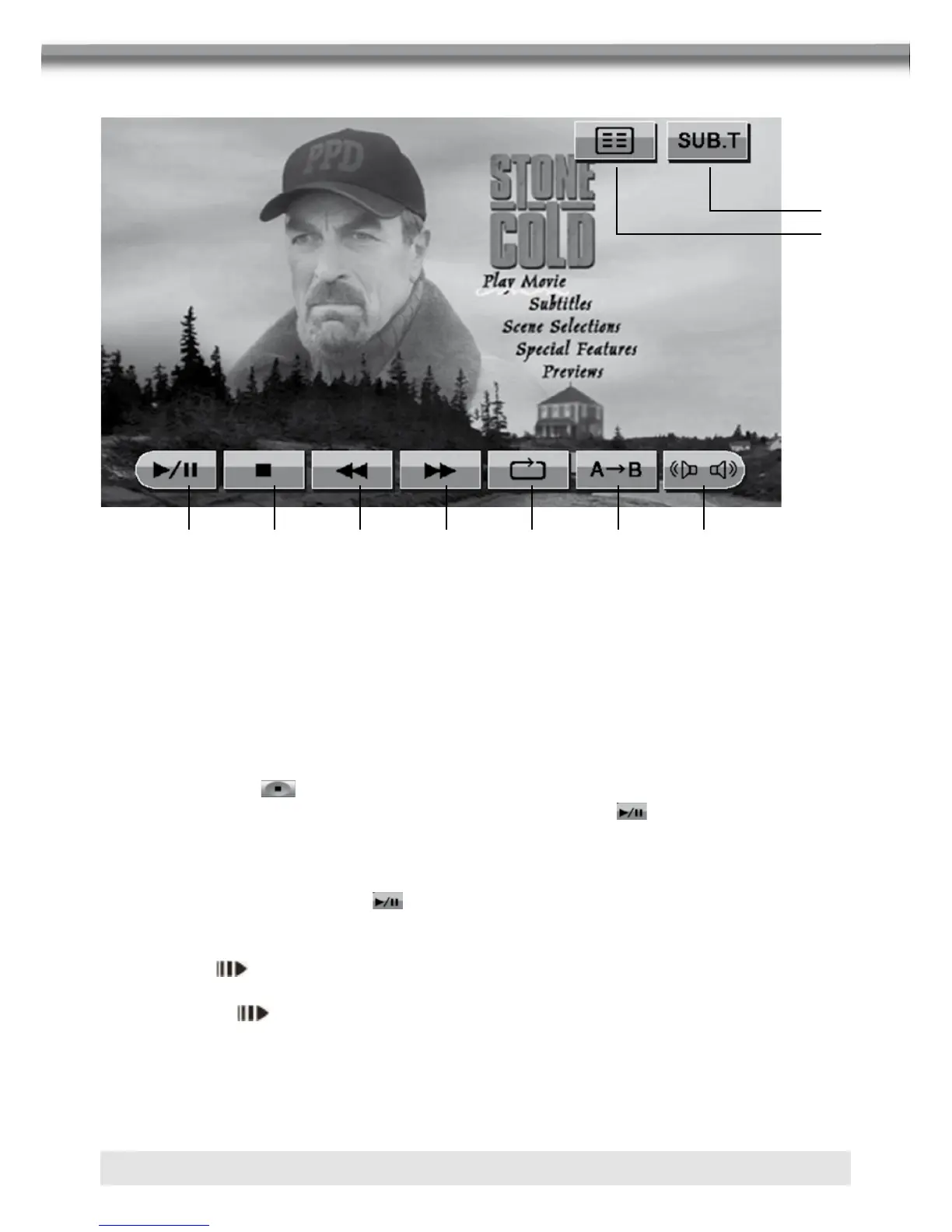
USING THE TOUCH-SCREEN CONTROLS
1. Touch to play/pause. 2. Touch to stop playback.
3. Touch to fast reverse. 4. Touch to fast forward.
5. Touch to repeat playback. 6. Touch to repeat from A to B.
7. Touch to switch among 8. Touch to display subtitle.
LEFT, RIGHT, STEREO. 9. Touch to return to DVD main menu.
CONTROLLING PLAYBACK
Stopping playback
■ Touch the stop button on the screen or press the [■/BAND] button on the remote
control to stop DVD play and touch the play/pause button on the screen or the OK
button on the remote control to resume disc playback.
Pausing playback
■ Touch the play/pause button on the screen to suspend or resume disc playback.
Slow motion playback
■ Press the button on the remote control to play the current title in slow motion at
1/2, 1/4, 1/6 or 1/7, the normal speed. Press OK button to resume normal play. Continue
pressing the button to slow reverse.
8
9
1 2 3 4 5 6 7



 To Next Page