EasyManua.ls Logo

Zenith ADVANCED SYSTEM 3 - Page 57

Zenith ADVANCED SYSTEM 3
82 pages
Print Icon
To Next Page IconTo Next Page
To Previous Page IconTo Previous Page
Loading...
CONNECTIONS FOR YOUR
TV
(CONTINUED)
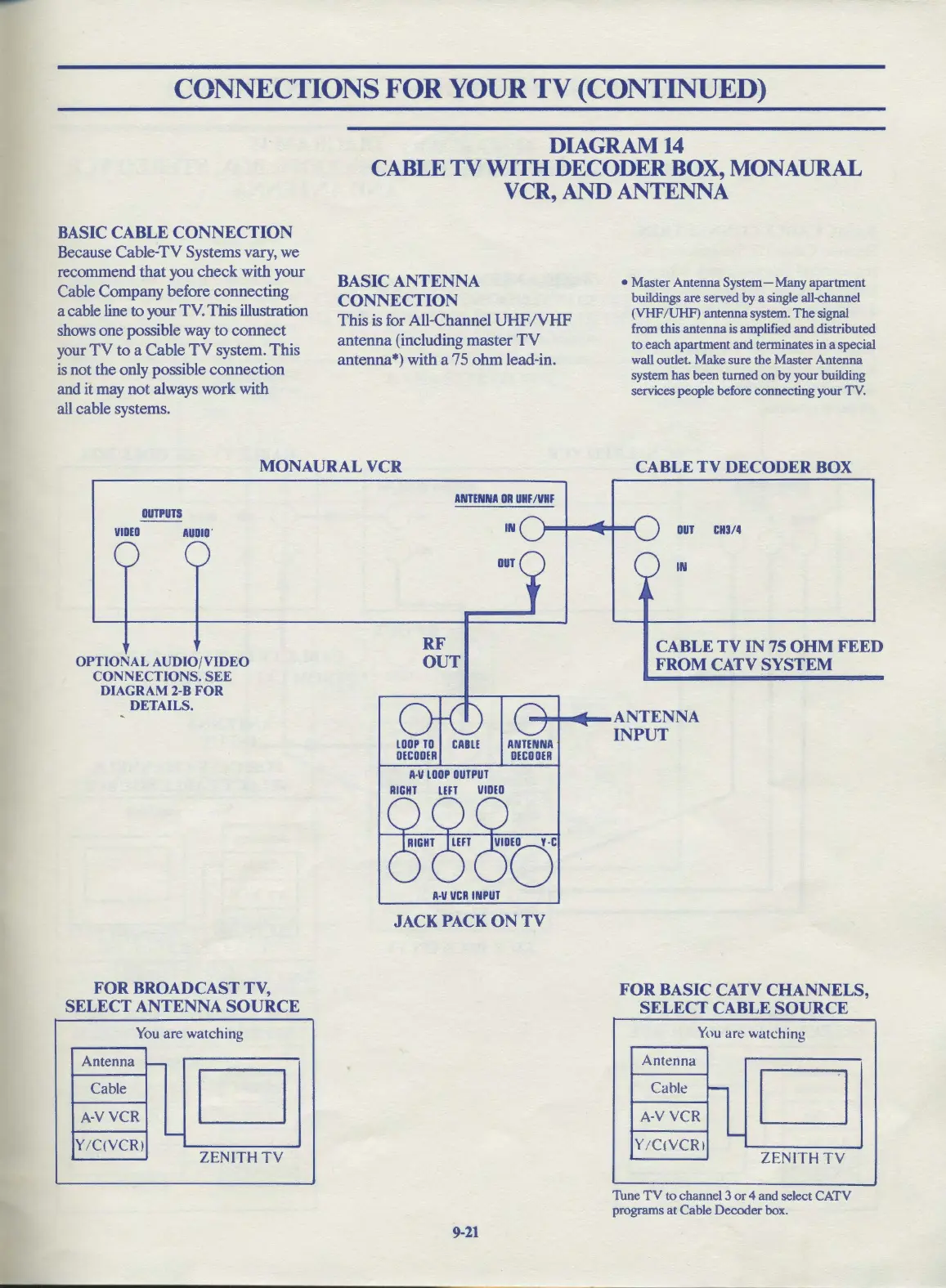
BASIC CABLE CONNECTION
Because Cable-TV Systems vary, we
recommend
that
you
check
with your
Cable Company before connecting
a cable line to your TV. This illustration
shows
one
possible way
to
connect
your
TV
to
a Cable
TV
system.
This
is
not the only possible connection
and it may
not
always work with
all cable systems.
DIAGRAM14
CABLE
TV
WITH DECODER BOX, MONAURAL
VCR,
AND
ANTENNA
BASIC
ANTENNA
CONNECTION
This
is for All-Channel
UHF
/VHF
antenna
(including
master
TV
antenna*) with a 75
ohm
lead-in.
Master
Antenna
System-
Many
apartment
buildings
are
served
by
a single all-channel
(VHF
/UHF)
antenna
system.
The
signal
from this
antenna
is amplified
and
distributed
to
each
apartment
and
terminates
in
a special
wall outlet.
Make
sure
the
Master
Antenna
system
has
been
turned
on
by
your
building
services
people
before
connecting
your
TV.
MONAURAL VCR
CABLE
TV
DECODER BOX
OUTPUTS
VIDEO
AUDIO'
OPTIONAL AUDIO/VIDEO
CONNECTIONS.
SEE
DIAGRAM 2-8 FOR
DETAILS.
FOR BROADCAST TV,
SELECT ANTENNA
SOURCE
You
are watching
Antenna
.....
Cable
D
A-VVCR
.....
Y/C(YCR)
ZENITH
TY
ANTENNA
DR
UHF
/VHF
RF
OUT
IN
OUT
OUT
CH3/4
IN
CABLE TV IN 75
OHM
FEED
FROM
CATV
SYSTEM
-+-+----ANTENNA
RIGHT
LEFT
1/IDED
A-1/
I/CR
INPUT
JACK PACK
ON
TV
9-21
INPUT
FOR BASIC CATV
CHANNELS,
SELECT CABLE
SOURCE
You
are watching
Antenna
Cable
-
D
A-V
VCR
-
Y
/Ct
YCRI
ZENITH
TY
Tune
TV
to
channel
3
or
4
and
select
CATV
programs
at
Cable
Decoder
box.

Related product manuals