EasyManua.ls Logo

Zenith L30W36 - Cable TV Setup

Zenith L30W36
56 pages
Print Icon
To Next Page IconTo Next Page
To Previous Page IconTo Previous Page
Loading...
16
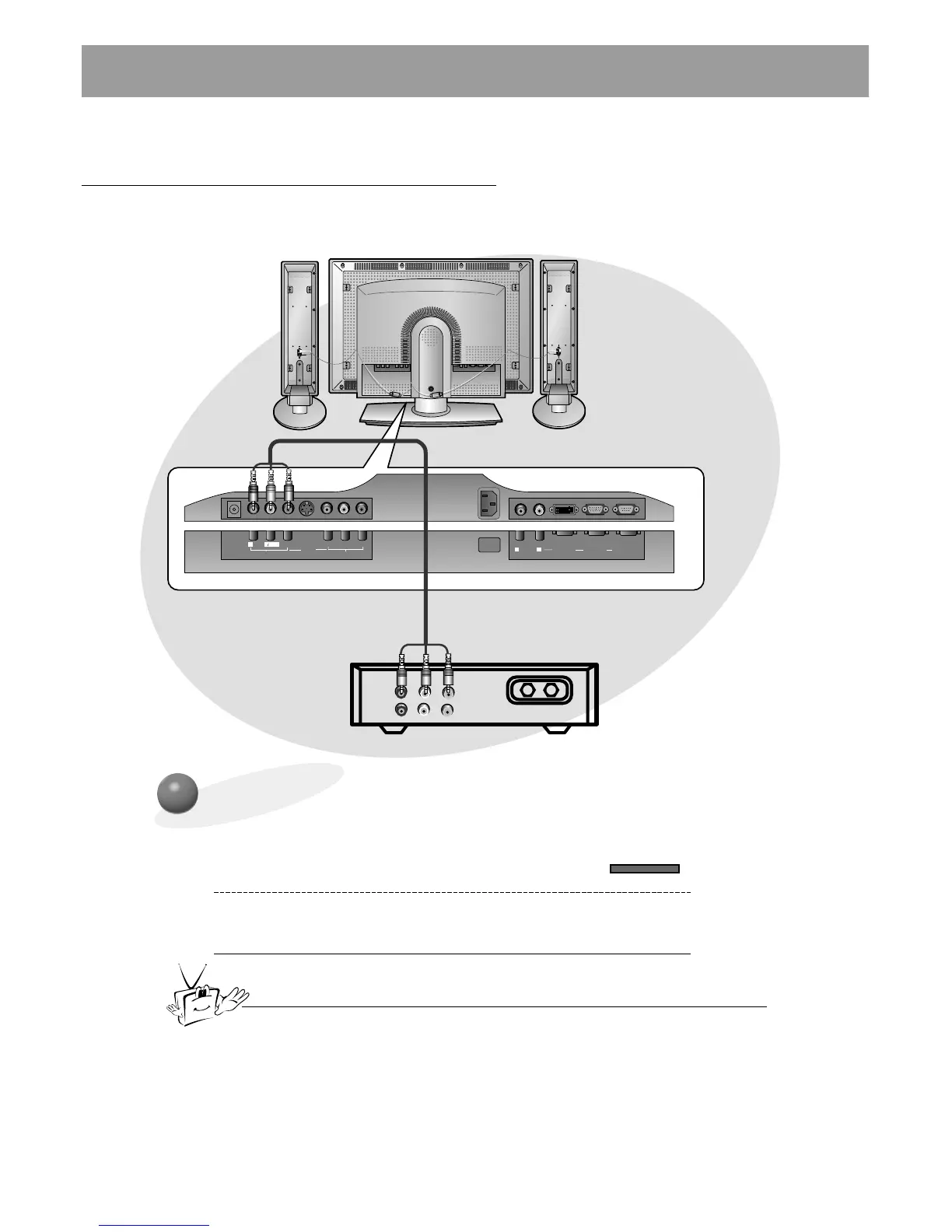
Cable TV Setup
- After subscribing to a cable TV service from a local provider and installing a converter,
you can watch cable TV programming. This monitor cannot display TV programming
without a TV tuner or cable TV converter box.
TV
VCR
RF Cable
(R) AUDIO (L) VIDEO
YPB PR
R
L
MONO
AUDIO
VIDEO
S-VIDEO
AV INPUT
COMPONENT
(DVD/DTV INPUT)
AC INPUT
R
L
AUDIO
RGB 2 INPUT
(DIGITAL RGB INPUT)
RGB 1 INPUT
(PC/DTV INPUT)
RS 232C INPUT
(CONTROL/SERVICE)
DC OUTPUT
(DC 12V)
To Watch Cable TV Programming
Use the INPUT SELECT button on the remote
control to and select the VIDEO source.
1
Tune to cable service provided channels
using the cable box.
2
For further information regarding cable TV service, contact your local
cable TV service provider(s).
Monitor Connections Panel
Cable Box
Connections Panel
INPUT SELECT

Related product manuals