43
5.3.3 Calibrang the ORP sensor
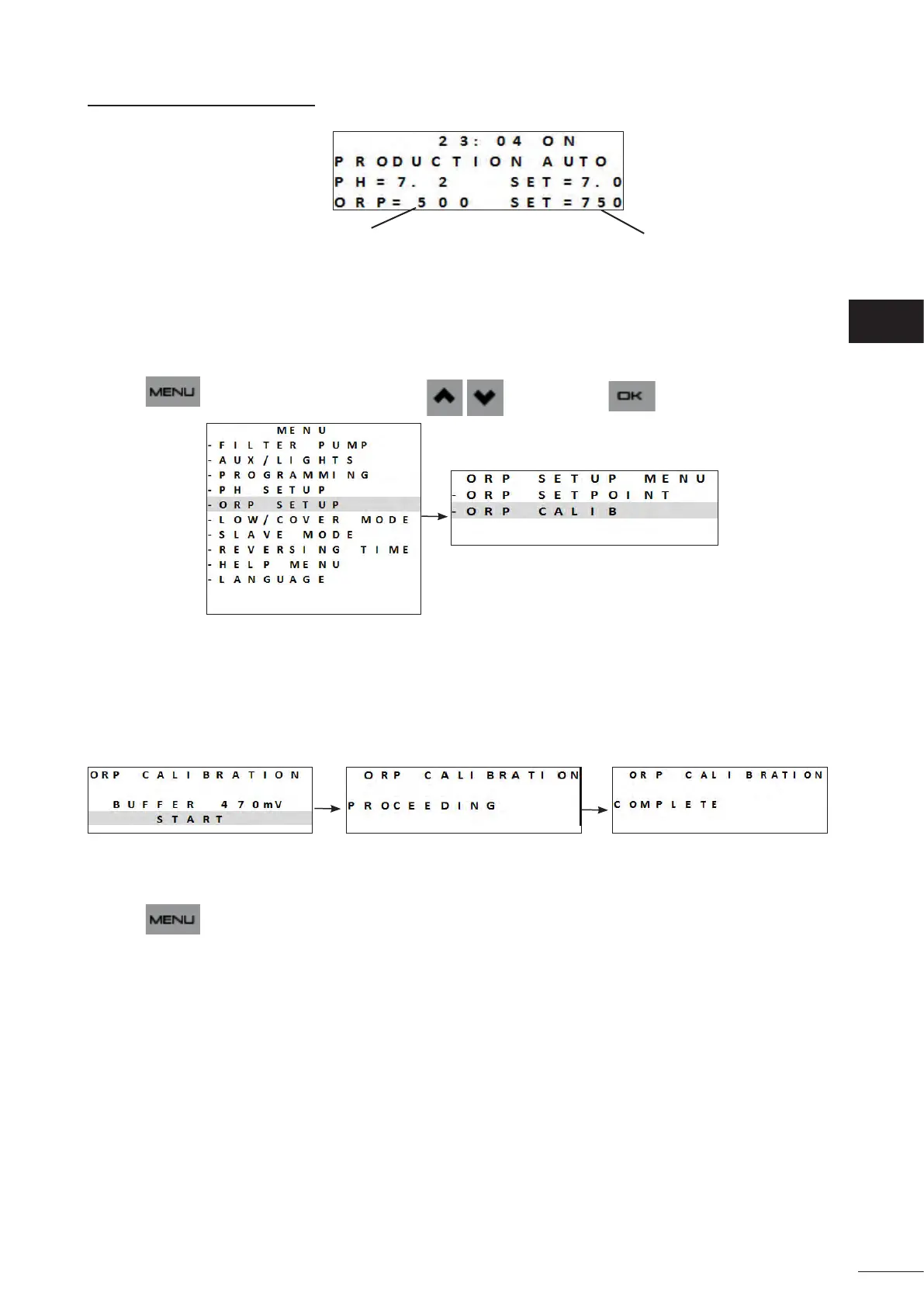
Current sensor measurements
Setpoints
The ORP sensor can be calibrated to 1-point (ORP 470 mV);
The current setpoint is displayed on the home screen when the appliance is switched on.
• Turn on the power supply to the appliance.
• Switch o the pool's pump and close the necessary valves in order to isolate the cell and the sensors.
• Press and browse the menu using the buons. Press to conrm.
(ORP = Oxidaon Reducon Potenal)
• Unscrew and remove the ORP sensor from the POD.
• Rinse the p of the sensor with tap water.
• Shake it to remove any residual water. Do not touch the end of the ORP sensor.
• Place the ORP sensor in the ORP 470 mV soluon for 1 minutes, and follow the on-screen instrucons:
(ORP = Oxidaon Reducon Potenal)
• Once calibraon is complete, replace the sensor on the POD.
• Press to exit.
• If calibraon is unsuccessful, see “8.1 I Appliance behaviour”.
EN














 To Next Page