Home
Zoom
Measuring Instruments
F8n Pro
Page 225
Zoom F8n Pro - Page 225
316 pages
Manual
Save Page as PDF
To Next Page
To Next Page
To Previous Page
To Previous Page
Loading...
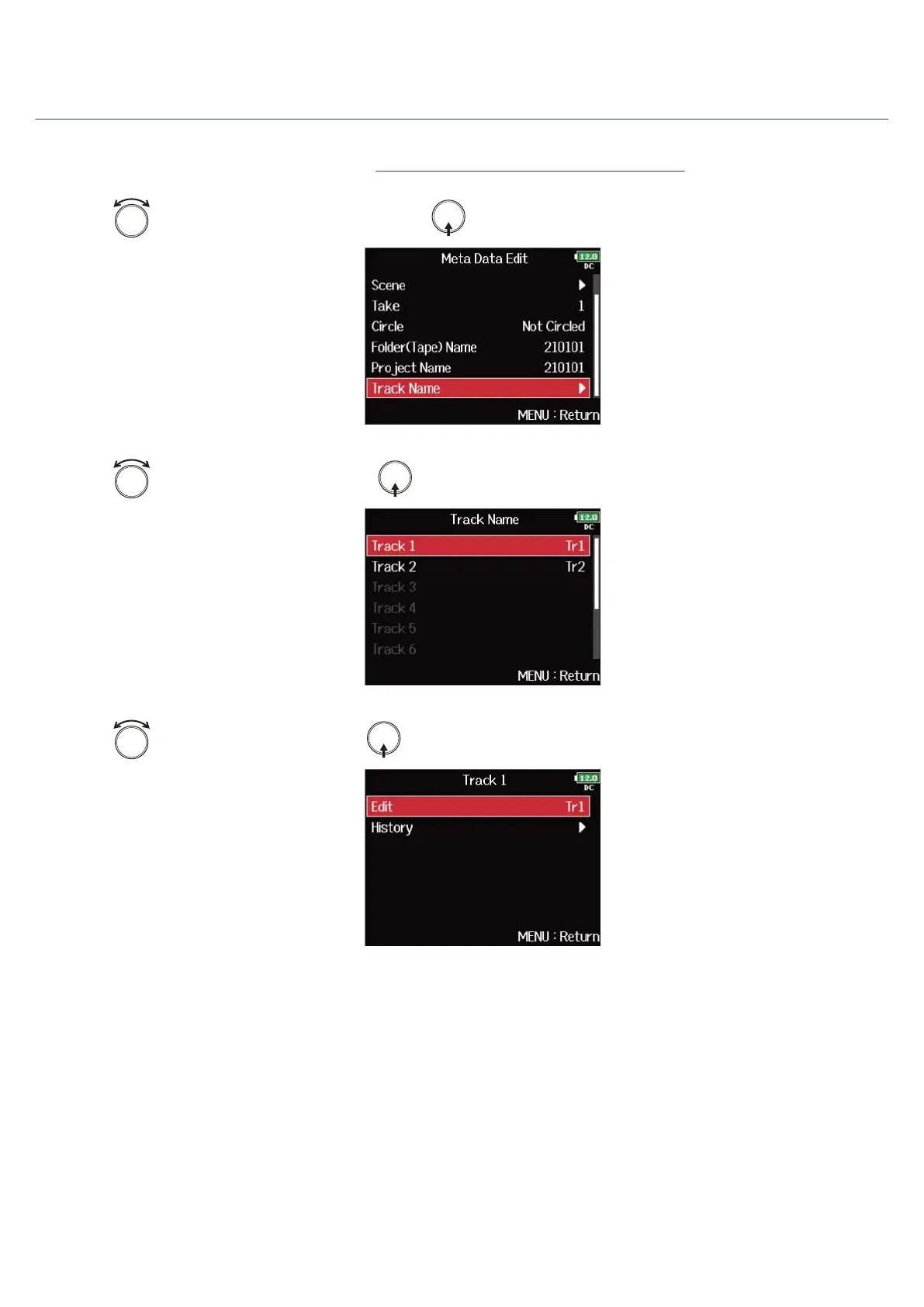
Checking and editing track names
1.
Open the metadata editing screen.
(→
Displaying the metadata editing screen
)
2.
Use
to select “Track Name”, and press
.
3.
Use
to select a track, and press
.
4.
Use
to select “Edit”, and press
.
225
224
226
Table of Contents
Main Page
Notes about this Operation Manual
2
Table of Contents
3
F8N Pro Overview
6
Achieving High Audio Quality Throughout Recording and Editing
6
Functions of Parts
10
Overview of Screens that Are Shown
15
Recording Process
28
Making Preparations
29
Loading an SD Card
29
Supplying Power
30
Connecting Input Equipment
33
Turning the Power On/Off
40
Setting the Date and Time (First Time Starting Up)
41
Making Input Settings
43
Input and Output Signal Flow
43
Adjusting the Input Signal Monitoring Balance
44
Setting the Track Knob Function (Track Knob Option)
45
Adjusting the L/R Track Volume
49
Monitoring the Input Signals of Specific Tracks (PFL/SOLO)
50
Setting the Input Source (Input Source)
51
Setting the Monitoring Sound on the PFL Screen (PFL Mode)
53
Cutting Low-Frequency Noise (HPF)
55
Using the Input Limiter (Input Limiter)
57
Inverting the Input Phase (Phase Invert)
66
Changing the Phantom Power Settings (Phantom)
68
Changing the Plugin Power Setting (Plugin Power)
74
Delaying Input Signals (Input Delay)
75
Converting MID-Side Input to Ordinary Stereo (Stereo Link Mode)
77
Adjusting the Input Levels of Multiple Tracks Simultaneously (Trim Link)
80
Adjusting the Side Level of a MID-Side MIC Capsule (Side MIC Level)
82
Changing the Automatic Mixing Setting (Auto MIX)
83
Setting the Format of Ambisonic Mode
85
Setting the MIC Position Used for Ambisonic Recording (MIC Position)
90
Making Output Setting
93
Setting Signals Sent to Headphones (Headphone Routing)
93
Outputting Alerts through Headphones (Alert Tone Level)
96
Setting the Headphone Output Volume Curve
98
Boosting Headphone Output to Alleviate Interference from Recorded Sound (Digital Boost)
100
Disabling Outputs (Output On/Off)
102
Setting the Standard Output Level (Output Level)
104
Setting Output Levels
106
Delaying Output Signals (Output Delay)
108
Using the Output Limiter (Output Limiter)
110
Selecting Signals Sent to the Main Outputs (MAIN out Routing)
115
Selecting Signals Sent to the Sub Outputs (SUB out Routing)
117
Recording
119
Enabling Recording on SD Cards and Setting File Formats
119
Selecting Inputs and Adjusting Levels
121
Setting the Sampling Rate (Sample Rate)
123
Setting WAV File Bit Depth (WAV Bit Depth)
125
Setting MP3 File Bit Rate (MP3 Bit Rate)
127
Capturing Audio before Recording Starts (Pre Rec)
128
Maximum File Size (File Max Size)
130
Showing Total Recording Times for Long Recordings (Time Counter)
132
Moving the Previously Recorded Take to the FALSE TAKE Folder
134
Using Timecode
135
Setting the Recording Take
162
Using the Slate MIC and Slate Tone
177
Recording
194
Playing Recordings
195
Mixing Takes
196
Monitoring the Playback Signals of Specific Tracks During Playback
198
Changing the Playback Mode (Play Mode)
199
Managing Files
201
Folder and File Structure
201
Take and Folder Operations (FINDER)
204
Overview of Take Information (Metadata) Stored in Files
215
Checking and Editing Take Metadata
216
Writing Sound Reports (Create Sound Report)
227
Using USB Functions
231
Exchanging Data with a Computer (SD Card Reader)
231
Using as an Audio Interface
233
Using the FRC-8
244
Using the FRC-8 as a Controller (Connect)
244
Setting the Type of Keyboard Connected to the FRC-8 (Keyboard Type)
246
Setting FRC-8 Fader and Knob Operation (Knob/Fader Mode)
248
Setting User Keys for the FRC-8 (User Key)
250
Setting the Power Supply Used by the FRC-8 (Power Source)
252
Powering the FRC-8 with USB Bus Power (USB Bus Power)
254
Setting the FRC-8 LED Brightness (LED Brightness)
256
Updating the FRC-8 Firmware
258
Controlling the F8N Pro from a Smartphone/Tablet
261
Making Various Settings
262
Setting How Timecode Is Shown (Home Timecode Display Size)
262
Setting Level Meter Appearance (Level Meter)
264
Setting the LED Brightness (LED Brightness)
270
Making Display Settings (LCD)
271
Adding Marks When Recording/Playing (PLAY Key Option)
274
Setting the Keys Held (Key Hold Target)
276
Setting the Date and Time (Date/Time (RTC))
278
Disabling the Automatic Power Saving Function (Auto Power Off)
281
Setting the Power Supply Used (Power Source)
283
Backing up and Loading F8N Pro Settings (Backup/Load Settings)
286
Restoring Factory Default Settings
290
Managing SD Cards
291
Checking SD Card Information (Information)
291
Testing SD Card Performance (Performance Test)
292
Formatting SD Cards (Format)
296
Managing the Firmware
298
Checking the Firmware Versions
298
Updating the Firmware
299
About the F8N Pro Shortcut Function
300
Checking the F8N Pro Shortcut Function (Shortcut List)
300
List of Shortcuts
301
Appendix
303
Troubleshooting
303
Detailed Product Diagrams
305
Metadata List
307
Specifications
312
Other manuals for Zoom F8n Pro
Supplementary Manual
6 pages
Firmware Update Guide
10 pages
Quicktour
16 pages
Related product manuals
Zoom F2
16 pages
Zoom F2-BT
12 pages
Zoom F8n
198 pages
Zoom H6
104 pages
Zoom R4
12 pages
Zoom h1n
71 pages
Zoom H1n-VP
71 pages
Zoom PodTrak P4
57 pages
Zoom MicTrak M3
51 pages
Zoom MicTrak M4
12 pages
Zoom H1essential
126 pages
Zoom H4essential
143 pages



 To Next Page