Recording with the PODCAST app
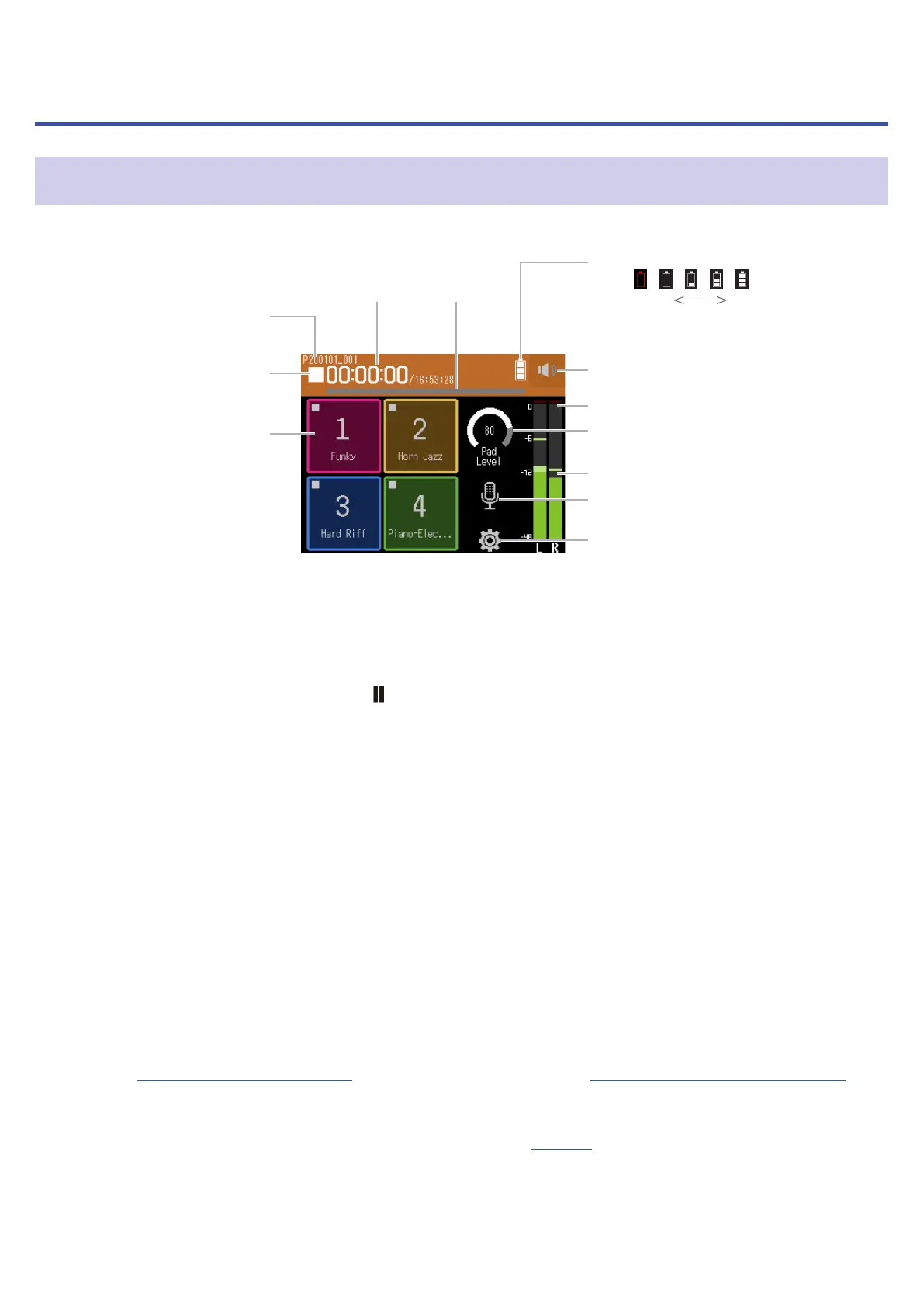
Display overview
⓫ Track settings button
⓬ Settings button
❿ Level meters
❽ Clipping indicators
❾ Pad Level
❼ Headphone/speaker volume
button
❻ Remaining battery charge
Empty Full
❺ Progress
bar
❹ Time
display
❸ Sound pads
❷ Status icon
❶ Recording/playback
project name
❶
Recording/playback project name
❷
Status icon
This shows the recording/playback status.
■
: Stopped
●
: Recording
: Recording/playback paused
▶
: Playing
❸
Sound pads
Sounds assigned to each pad can be played.
❹
Time display
Left: Current elapsed recording/playback time
Right: Remaining available recording/playback time
❺
Progress bar
This shows the current playback location.
Mark positions are shown above the progress bar.
Slide
▼
to change the playback position.
❻
Remaining battery charge
This shows the remaining battery charge. When the remaining battery charge becomes low, replace the bat-
teries (
→
“Using batteries” on page 16) or connect an AC adapter (
→
“Using an AC adapter” on page 16).
❼
Headphone/speaker volume button
Touch this to show the headphone/speaker volume slider. (
→
page 40)
78



 To Next Page