Recording with the FIELD app
Display overview
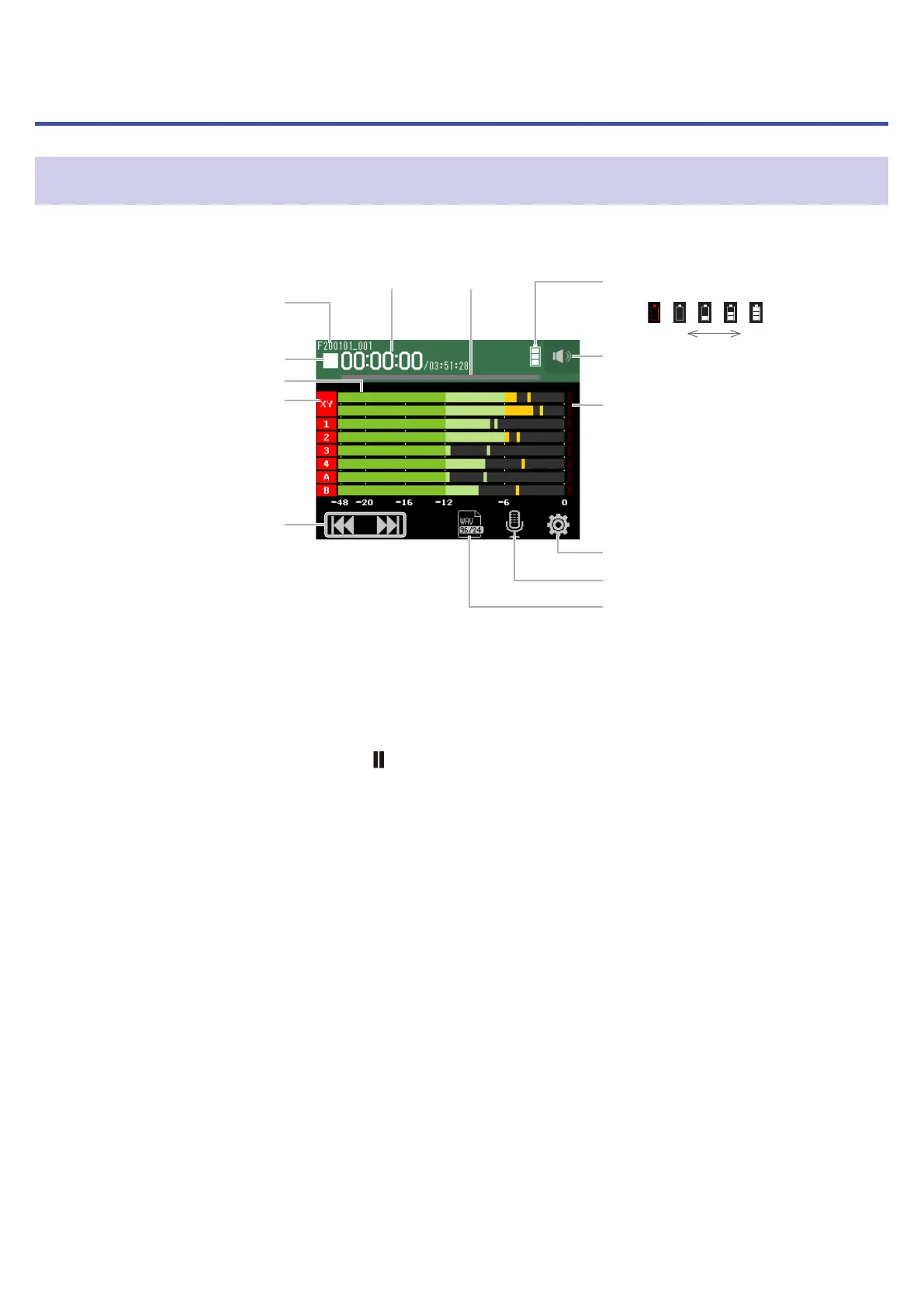
⓬ Track settings button
⓭ Recording format button
⓫ Settings button
❿ Clipping indicators
❾ Headphone/speaker
volume button
❽ Remaining battery charge
Empty Full
❼ Progress
bar
❻ Time
display
❺ REW/FF buttons
❹ Track numbers
❸ Level meters
❷ Status icon
❶ Recording/playback
project name
❶
Recording/playback project name
❷
Status icon
This shows the recording/playback status.
■
: Stopped
●
: Recording
: Recording/playback paused
▶
: Playing
❸
Level meters
❹
Track numbers
Red: Input enabled
Green: Playback track enabled
Gray: Input disabled
Adjacent track numbers are connected to show input link settings.
❺
REW/FF buttons
Use to select projects and to search backward and forward.
❻
Time display
00:00:00/00:00:00
Left: Current elapsed recording/playback time
Right: Remaining available recording/playback time
❼
Progress bar
This shows the current playback location.
43



 To Next Page