Recording with the MUSIC app
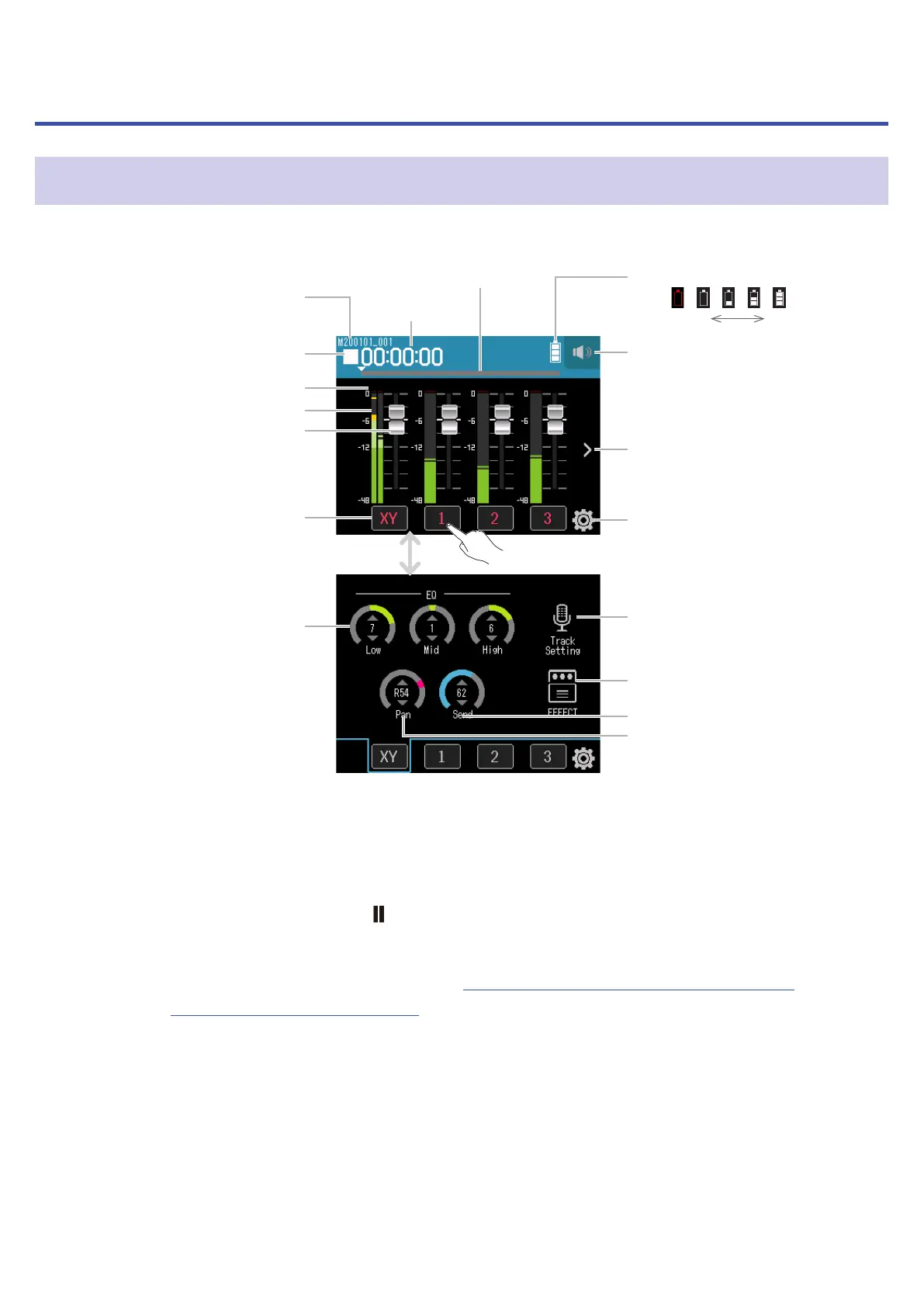
Display overview
❾ Remaining battery charge
Empty Full
❷ Status icon
❸ Clipping indicators
❹ Level meters
❺ Faders
❻ Track buttons
⓭ Low/Mid/High equalization
❼ Time
display
❽ Progress
bar
❿ Headphone/speaker
volume button
⓫ Track display
switching button
⓬ Settings button
⓮ Track Setting button
⓯ EFFECT settings button
⓰ Eect Send
⓱ Pan
Tap to change screens
❶ Recording/playback
project name
❶
Recording/playback project name
❷
Status icon
This shows the recording/playback status.
■
: Stopped
●
: Recording
: Recording/playback paused
▶
: Playing
❸
Clipping indicators
If a clipping indicator lights, adjust the input level (
→
“Setting recording (input) levels” on page 26) or set
the limiter (
→
“Comp/Limiter/Gate” on page 32).
❹
Level meters
❺
Faders
❻
Track buttons
Tap these to open track channel strip screens.
56



 To Next Page