22
T58W
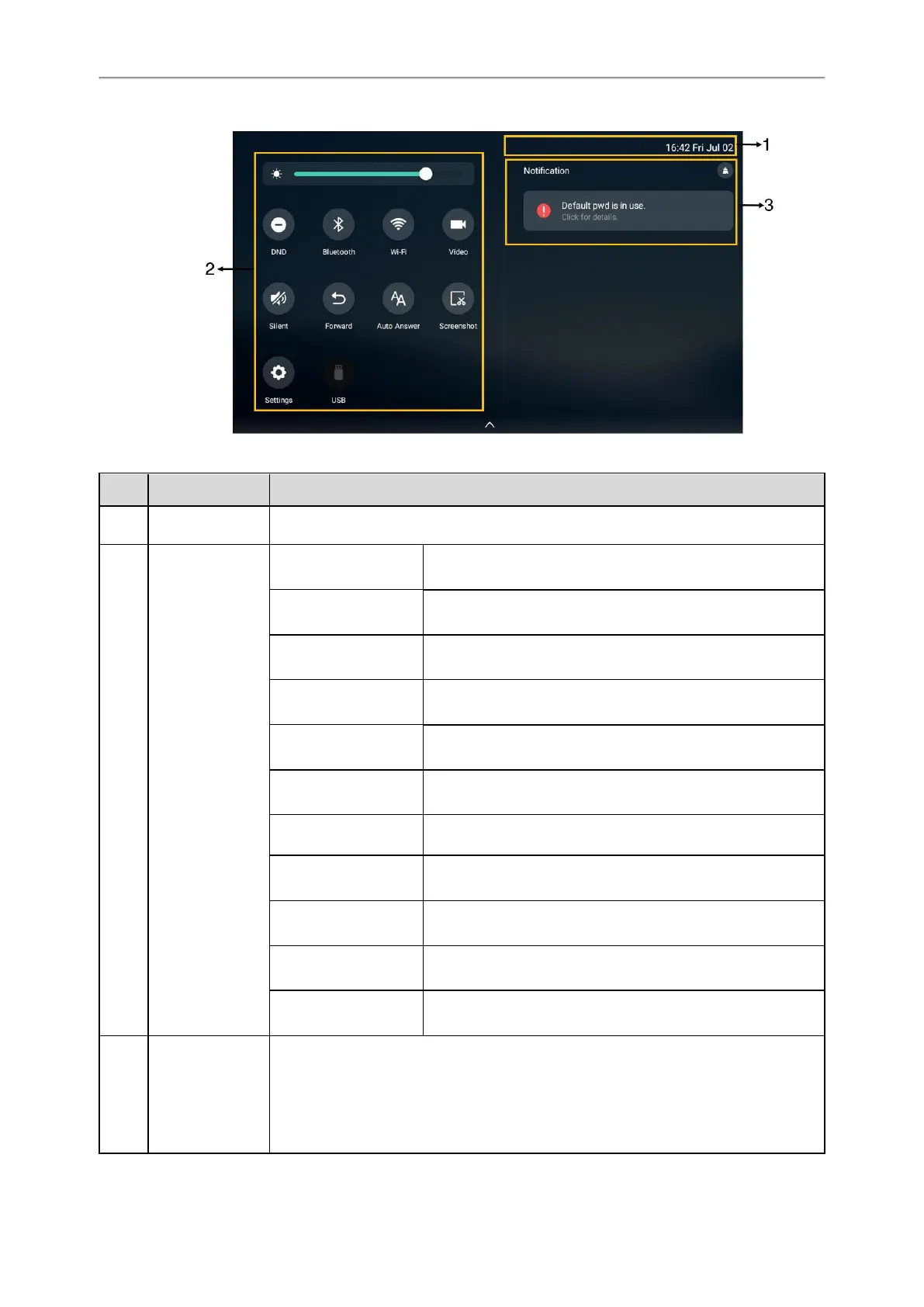
No. Name Description
1 Time and date Display the phone’s time and date.
2 Control Center
Video
l
Tap to access the Camera when the phone is idle.
l Tap to stop transmitting video during a video call.
DND Tap to turn on/off DND quickly.
Forward Tap to enter Call Forward setting screen.
Auto Answer Tap to enter Auto Answer setting screen.
Silent Tap to turn on/off Silent quickly.
Wi-Fi
l Tap to turn on/off Wi-Fi quickly.
l Long tap to enter the Wi-Fi setting screen.
Bluetooth
l Tap to turn on/off Bluetooth quickly.
l Long tap to enter the Bluetooth setting screen.
Screenshot Tap to capture a screenshot.
USB
Tap to access the File Manager to manage the files in the USB
flash drive.
Settings Tap to enter the Settings screen.
Backlight Drag the slider to adjust the screen brightness quickly.
3 Notification Center
l
Tap Notification/Missed Calls/Voice Mail/Forwarded to view the corresponding noti-
fication list. (not available to T58W)
l Tap the desired notification message to view the details.
l Swipe left or right to delete a specific notification.



 To Next Page