Getting Started
27
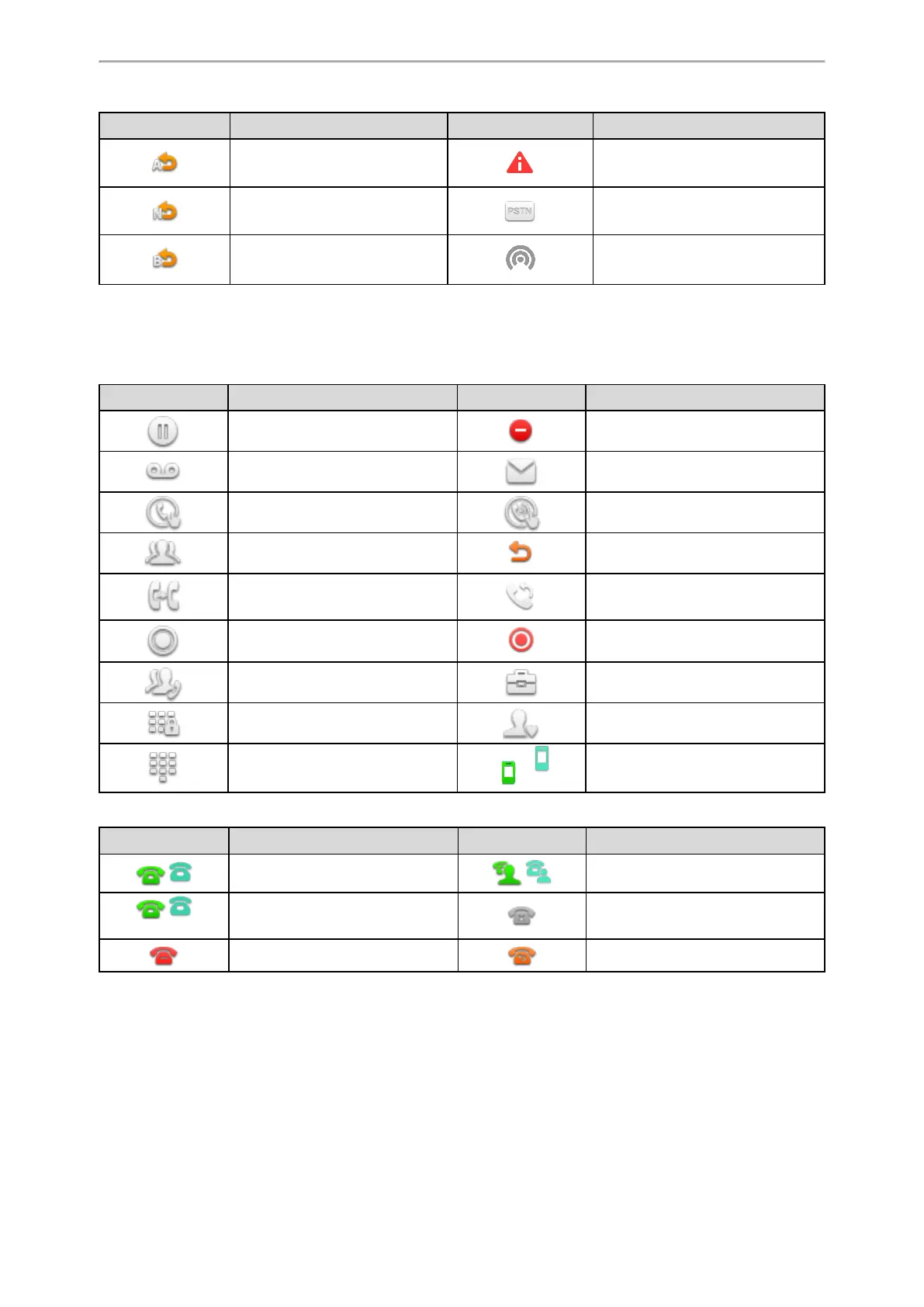
Icons Description Icons Description
Always Forward Phone Warning
No Answer Forward PSTN box is detected
Busy Forward Wireless Access Point
Line Key Icons
By viewing the line key icons, you can easily get the function of the line key.
Icon indicators (associated with line key features)
Icons Description Icons Description
Hold DND
Voice Mail SMS
Direct Pickup Group Pickup
Conference Forward
Transfer Recall
Record Recording in process
Multicast Paging
Paging List
Hot Desking
Phone Lock Directory
Speed Dial
/
DECT Intercom
Icon indicators (associated with line)
Icons Description Icons Description
/
The private line registers suc-
cessfully.
/
The shared/bridged line registers
successfully.
/
(Flashing)
Registering. Register failed.
DND is enabled on this line. Call forward is enabled on this line.
Navigating Menus and Fields
You can use different gestures on the touch screen to perform various operations.
Procedure
1.
To operate your phone using gestures, follow these tips:



 To Next Page