55
Performing Transfer with a Transfer Key
Performing a Blind Transfer
You can transfer a call to another contact immediately without consulting with her/him first.
Topics
Performing a Blind Transfer Normally
Performing a Blind Transfer Conveniently
Performing a Blind Transfer Normally
You can enter the number, or select a contact from directory or history to perform a blind transfer.
Procedure
1.
Pressthe TRANSFER key or select Transfer during a call.
2.
Do one of the following:
l
Enter the number you want to transfer the call to, and pressthe TRANSFER key orselect Transfer( ).
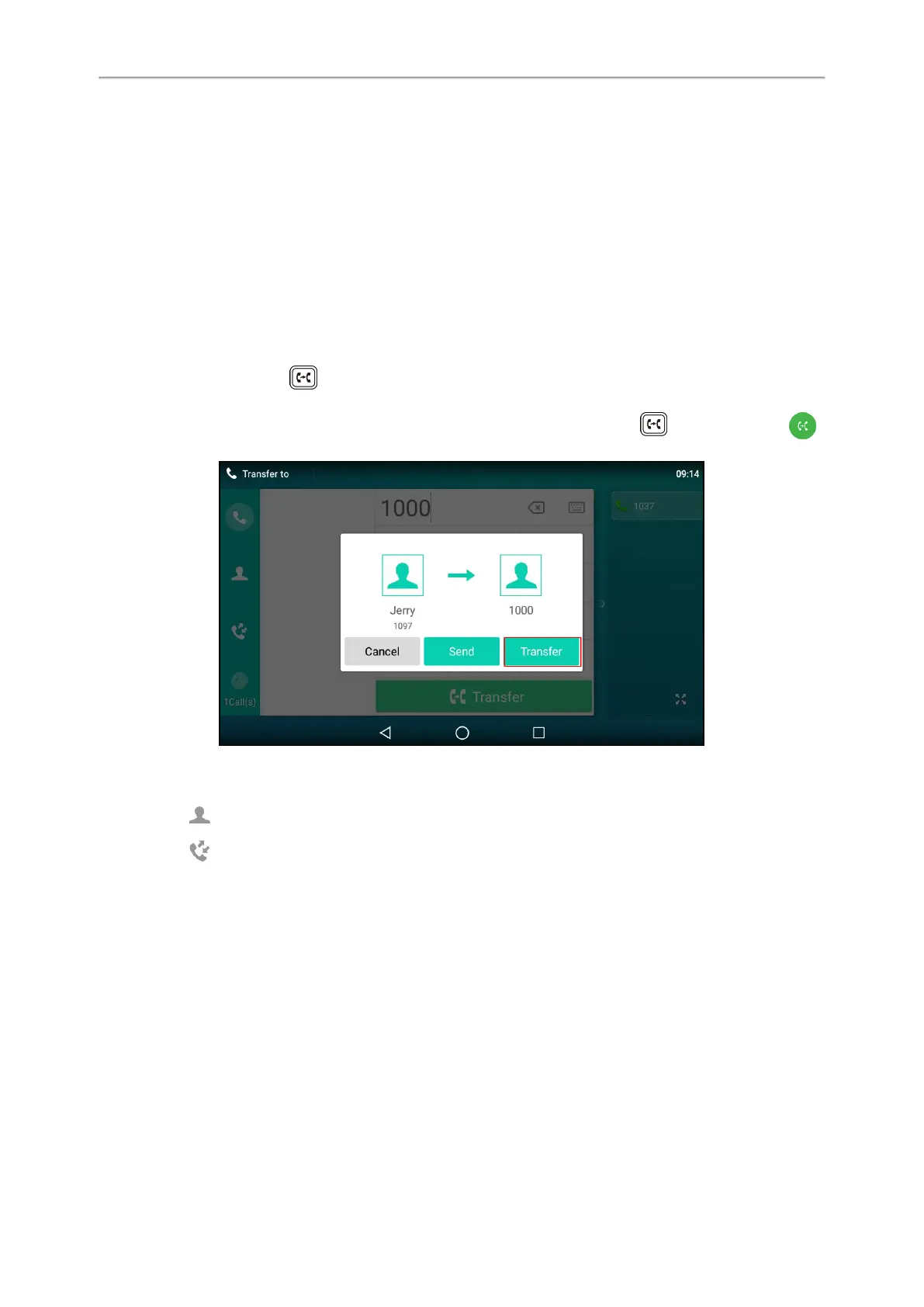
For T58A/VP59, the phone will prompt a dialog box as the following shows:
Select Transfer to complete the transfer. (The call will automatically dial out in about 5 seconds if you do not
select Transfer.)
l
Select (Local Directory), and select the desired contact to complete the transfer.
l
Select (Local Calls), and select the desired list. Select the desired entry to complete the transfer.
Performing a Blind Transfer Conveniently
You can perform a blind transfer conveniently by dragging the far-site window to a target speed dial or BLF key, or
to another one.
It is not available to T58W phones.
Procedure
You can do one of the following:
l When there is an active call for the account which is related with the speed dial or BLF key. Drag the far-site win-
dow to that speed dial or BLF key.



 To Next Page