24
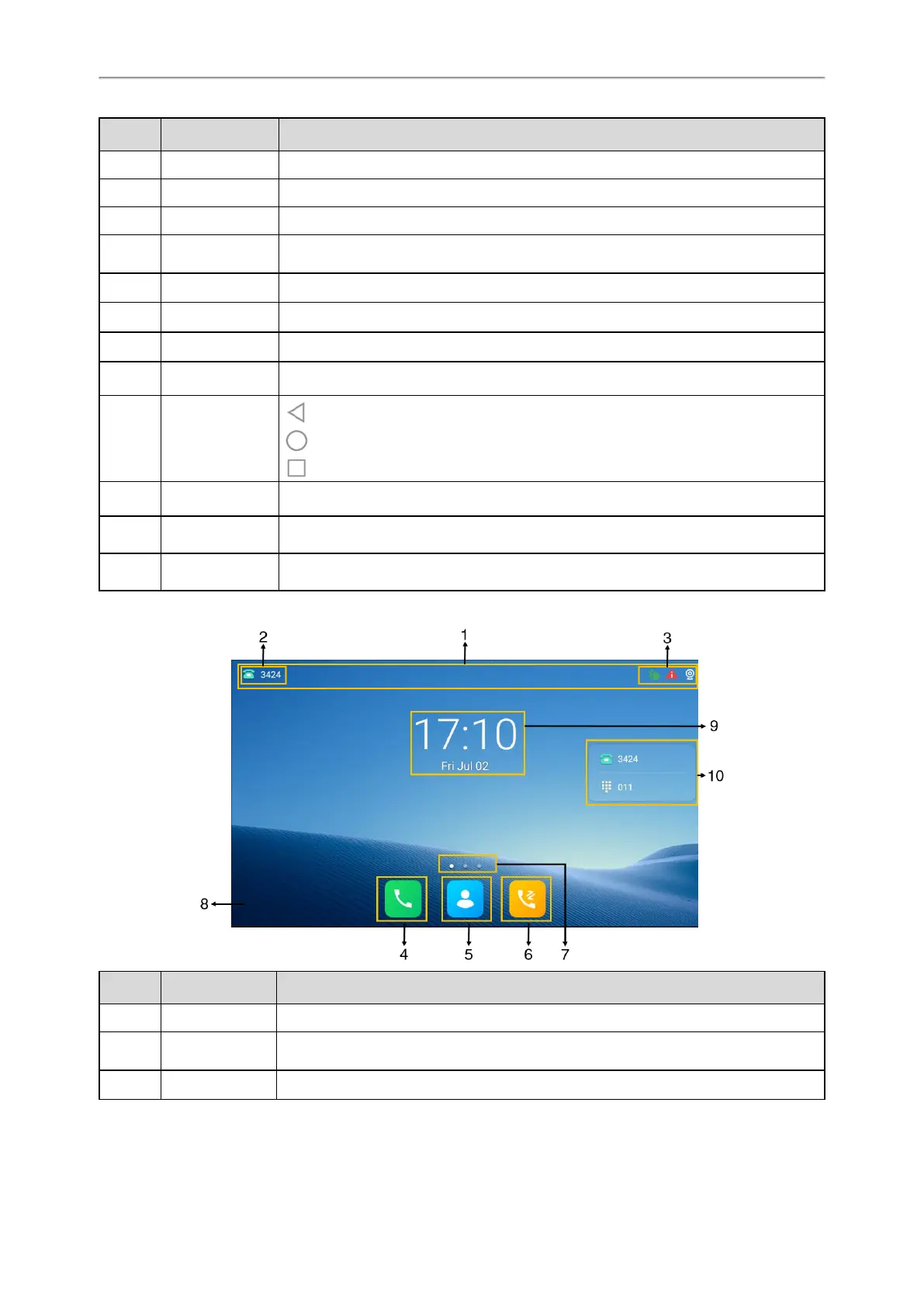
No. Name Description
1 Status Bar Displays the phone’s default account, icons and time.
2 Time The phone’s time is displayed on the right of the status bar.
3 Icons Icons are displayed in the middle of the status bar.
4 Default account
The label of the default account is displayed on the left of the status bar.
If there is no account registered on the IP phones, this field will display No Service.
5 Phone Dialer Tap to enter the dialing screen.
6 Directory Tap to enter the Directory screen and view contacts.
7 History Tap to enter the History screen and view call history.
8 Wallpaper Shows the specified wallpaper, which can be customized.
9 Android Keys
: tap to go back to the previous screen.
: tap to return to the idle screen.
: tap to view and manage the list of recently used applications.
10 Screen Indicator Indicates which idle screen is displayed.
11
DSS Key (Dss-
key)
Tap to add a line key, and then the line key list will be displayed on the right of the
home screen.
12
Digital Clock Wid-
get
Displays the phone’s time and date.
For T58W:
No. Name Description
1 Status Bar Displays the phone’s default account, icons and time.
2 Default account
The label of the default account is displayed on the left of the status bar.
If there is no account registered on the IP phones, this field will display No Service.
3 Icons Icons are displayed on the right of the status bar.



 To Next Page