Chapter 2 Design the Relative Standard Curve Experiment
Define the Experiment Properties
Applied Biosystems 7500/7500 Fast Real-Time PCR System Getting Started Guide for Relative Standard Curve
and Comparative C
T
Experiments
22
Notes
Define the Experiment Properties
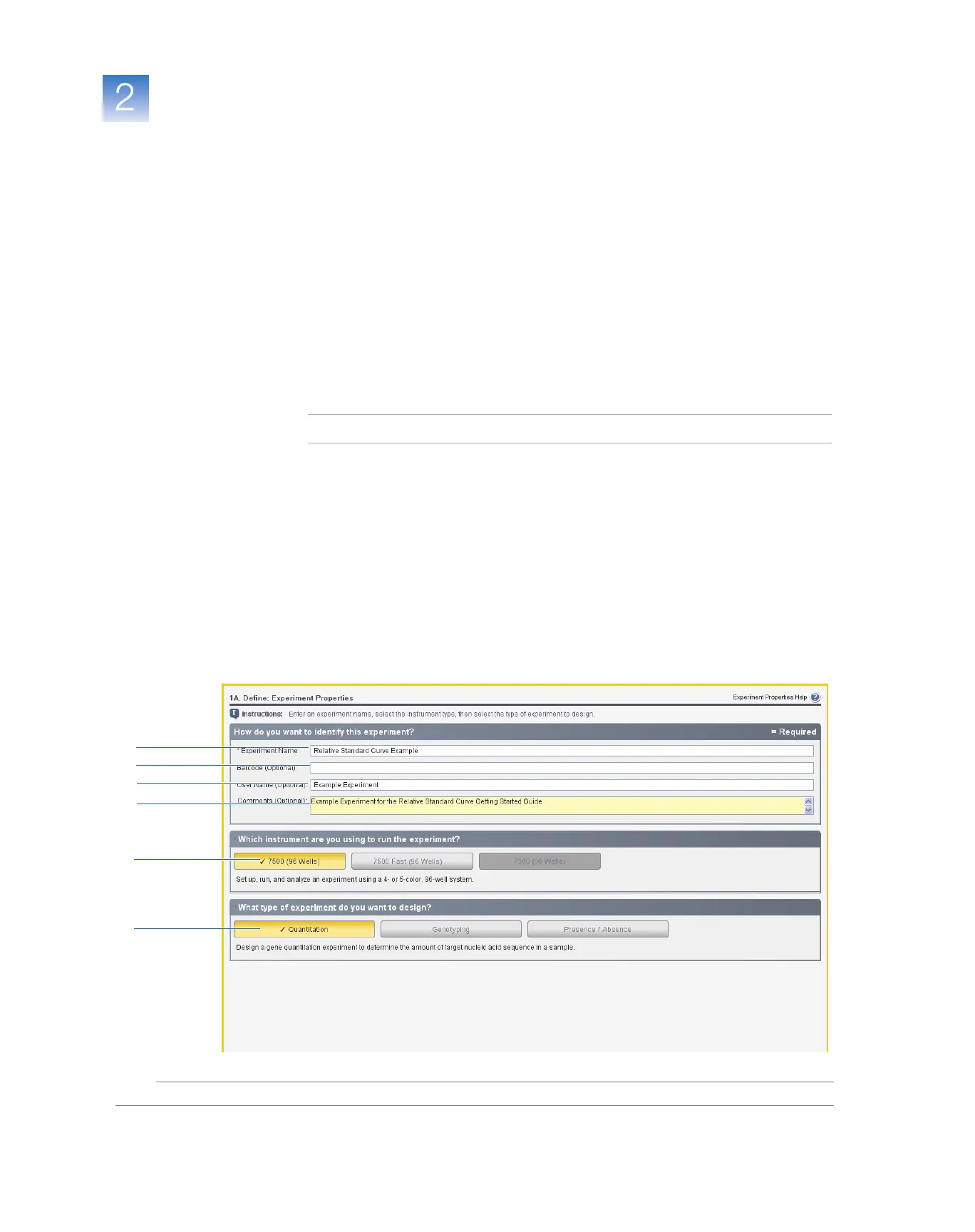
In the Experiment Properties screen, enter identifying information for the experiment,
select the instrument type, then select the type of experiment to design.
About the
Example
Experiment
In the relative standard curve example experiment:
• The experiment is identified as an example.
• The instrument that is selected to run the experiment is the 7500 instrument.
•A MicroAmp
®
Optical 96-Well Reaction Plate is used.
• The experiment type is quantitation.
Complete the
Experiment
Properties Screen
1. Click the Experiment Name field, then enter Relative Standard Curve Example.
Note: The experiment header is updated with the experiment name that you enter.
2. Leave the Barcode field empty.
3. Click the User Name field, then enter Example User.
4. Click the Comments field, then enter Example Experiment for the Relative
Standard Curve Getting Started Guide.
5. Select 7500 (96 Wells).
6. Select Quantitation for the experiment type.
7. Click Next.
1
2
3
4
6
5



 To Next Page