Chapter 9 Analyze the Comparative C
T
Experiment
Analyze the Study
195
Applied Biosystems 7500/7500 Fast Real-Time PCR System Getting Started Guide for Relative Standard Curve
and Comparative C
T
Experiments
Notes
Analyze the Study
This section explains how to use the 7500 software to analyze the comparative C
T
example study. It also describes Applied Biosystems recommended best practices as you
perform the analysis.
Note: The Comparative Ct Study Example.edm file is not designed to demonstrate the
use of biological replicate groups; an additional example study provided with the 7500
software provides a better example. You can find the alternate study file on your
computer at: <drive>:\Applied Biosystems\<software name>\experiments\
Comparative Ct Study Example (Biological Groups).edm.
Open the
Example Study
1. Double-click (7500 software) or select StartAll Programs
Applied Biosystems7500 Software<software name>
where <software name> is the current version of the 7500 software.
2. In the Home screen, click Open.
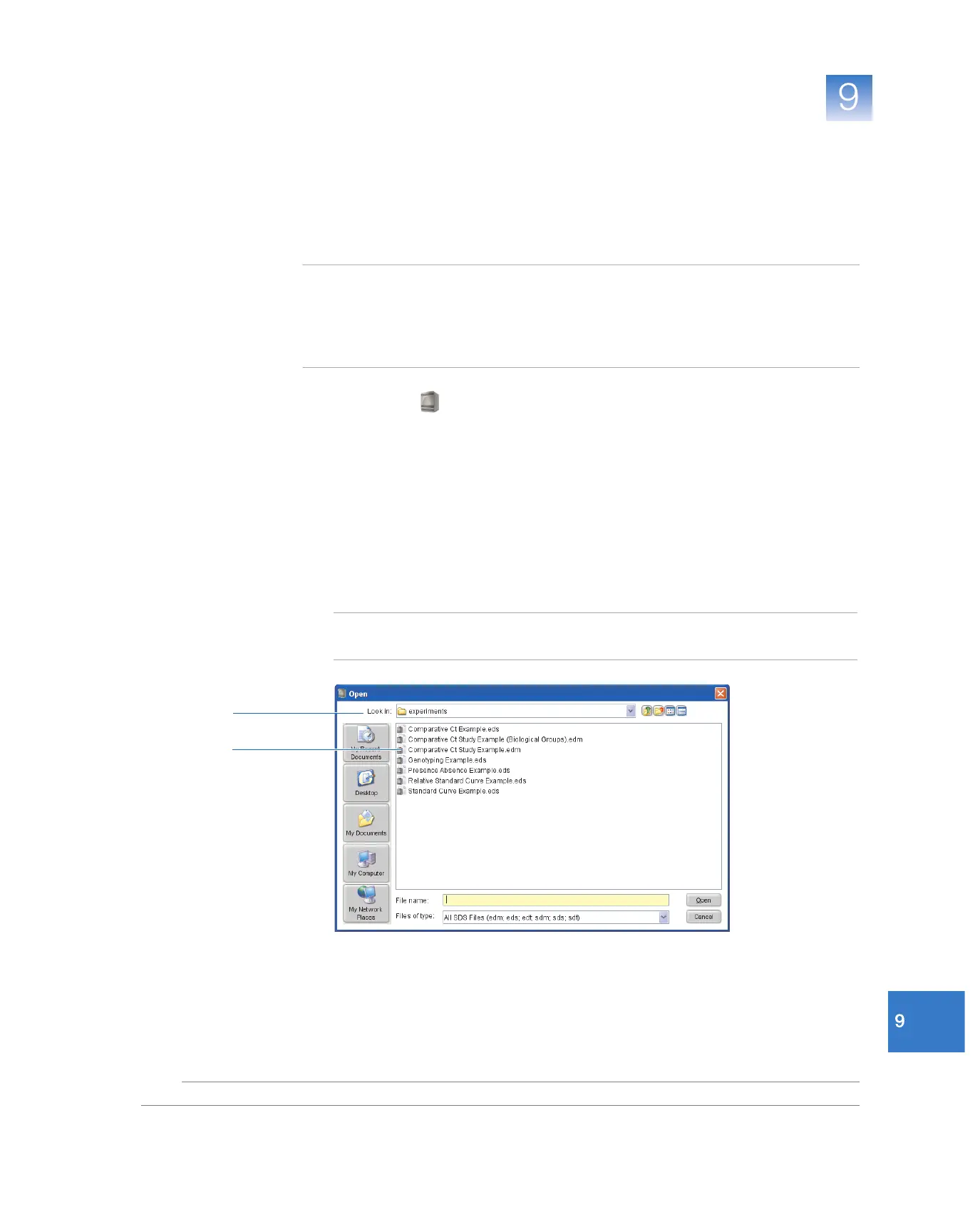
3. In the Open dialog box, navigate to the experiments folder at:
<drive>:\Applied Biosystems\<software name>\experiments\
4. Double-click Comparative Ct Study Example.edm to open the example study data
file.
Note: The examples folder contains several data files; be sure to select
Comparative Ct Study Example.edm.
4
3



 To Next Page