Chapter 2 Design the Relative Standard Curve Experiment
Set Up the Run Method
35
Applied Biosystems 7500/7500 Fast Real-Time PCR System Getting Started Guide for Relative Standard Curve
and Comparative C
T
Experiments
Notes
Set Up the Run Method
In the Run Method screen, review the reaction volume and the thermal profile for the
default run method. If needed, you can edit the default run method or replace it with one
from the Run Method library.
About the
Example
Experiment
In the relative standard curve example experiment, the default run method is used
without edits.
Review the Run
Method Screen
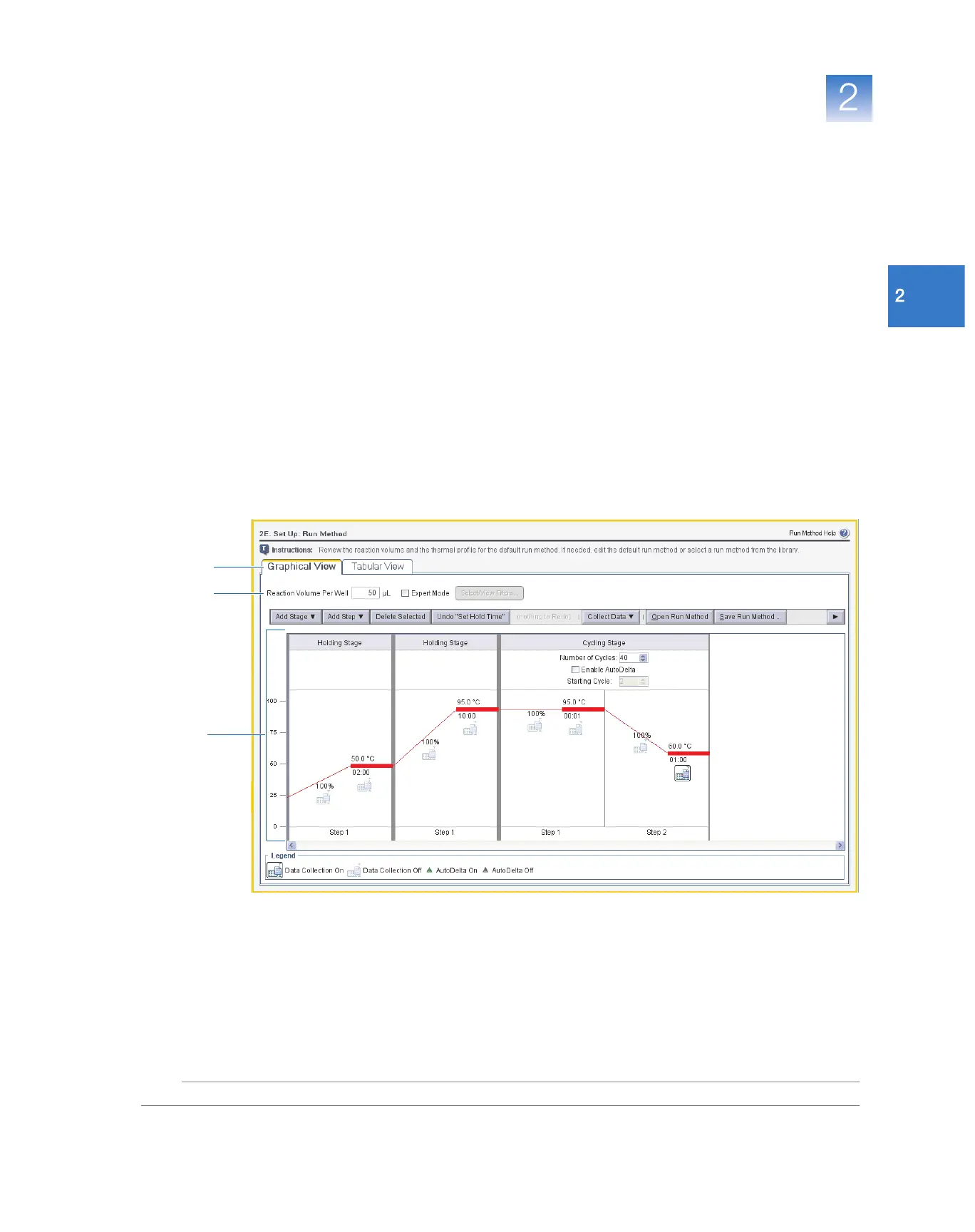
1. In the Run Method screen, select either the Graphical View tab (default) or
Tabular Vi ew tab.
2. Make sure the Reaction Volume Per Well field displays 50 µL.
3. Make sure the thermal profile displays the holding and cycling stages shown below.
If necessary, click a temperature or time setting, then change it.
4. Click Next.
2
1
3



 To Next Page