51
Pressure Settings
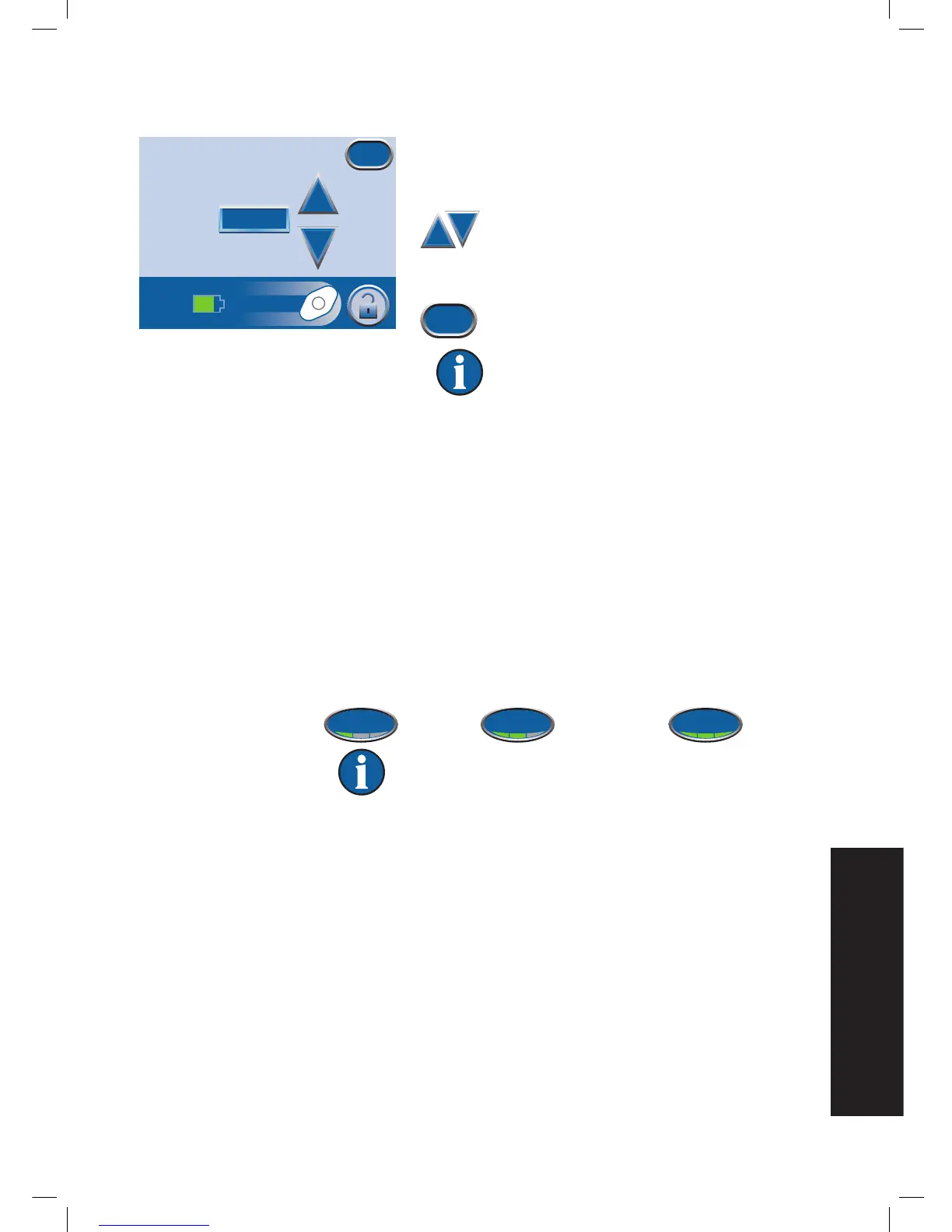
1. From the Clinician Mode
Home
screen, press Therapy,
then Next, then Settings, then Pressure to access this
screen.
2. Use the + and - buttons to change the
desired pressure. Pressure can be set
from 25 to 200 mmHg in increments of
25 mmHg.
3. Press Exit to return to the
Settings
screen.
Default setting is 125 mmHg (accuracy +
/ - 10 mmHg).
Intensity Control
1. From the Clinician Mode
Home
screen, press Therapy, then Next, then
Settings, then Intensity to change intensity level.
• Intensity is related to the time it takes to reach the target therapy level
after the initiation of therapy.
• The lower the intensity setting, the slower the target therapy level will
be reached.
• It is recommended that new patients begin therapy at the lowest
intensity setting as this allows for slower increase of negative pressure
once the foam is compressed in the wound.
• The intensity can remain at the minimum setting throughout the entire
length of treatment, if desired.
2. Press to change levels. Green crescent changes with each setting.
Low Medium High
Default setting is Low.
Pressure
+
_
125 mmHg
Exit


 To Next Page