52
Continuous and Intermittent Modes
1. From the Clinician Mode
Home
screen, press Therapy,
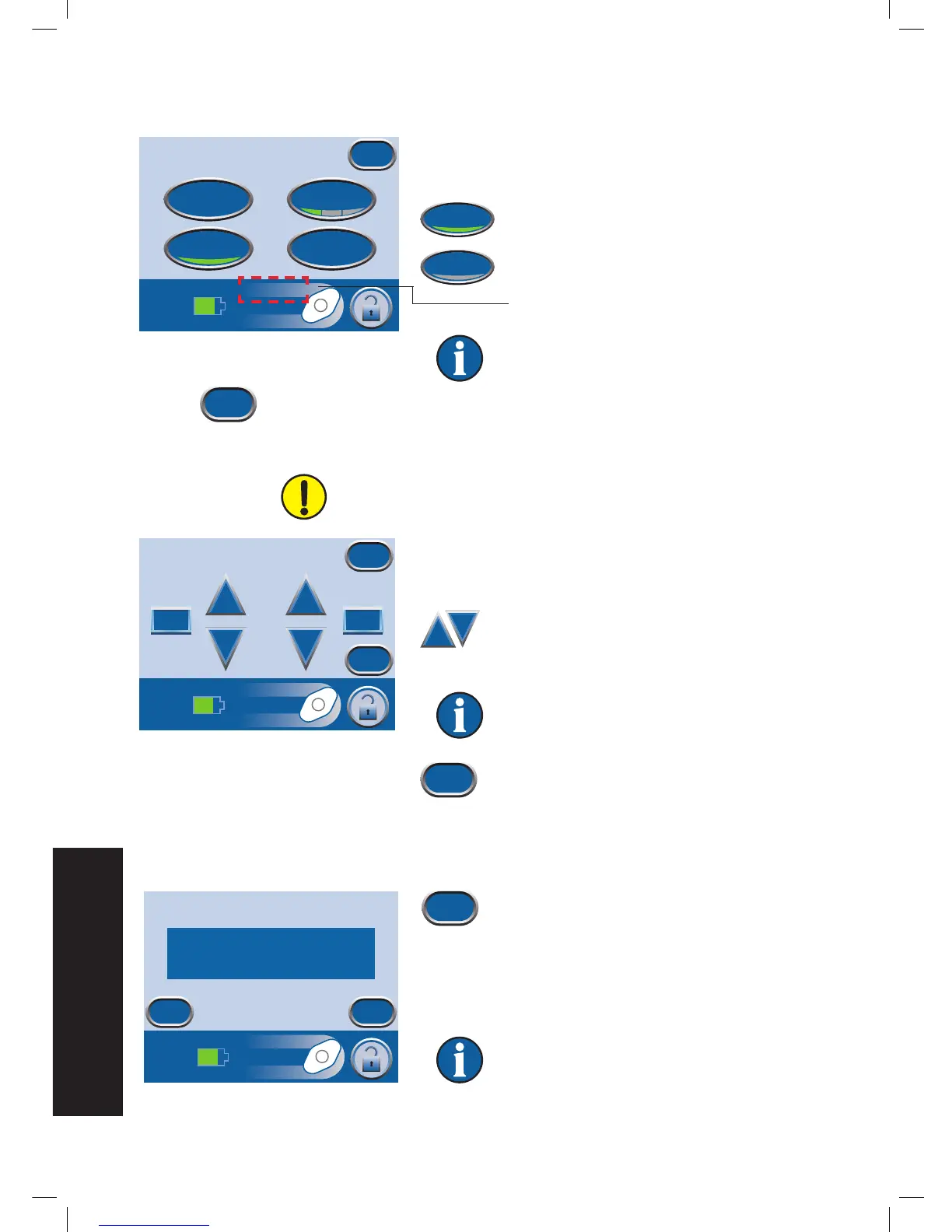
then Next, then Settings, then Continuous to toggle
between Continuous and Intermittent therapy.
Green = Continuous mode is active.
Gray = Intermittent mode is active.
Continuous or Intermittent will appear here as
modes are switched.
Default setting is Continuous.
2. Press Exit to continue to the
Confirm
screen.
Intermittent Settings
Changes to Intermittent time intervals will take effect next therapy
cycle.
1. From the Clinician Mode
Home
screen, press Therapy,
then press Settings, then press Intermittent to access
this screen.
2. Use the + and - buttons to change the
desired on and off time. Both times can
be set from one minute to ten minutes
in one minute increments.
Default setting is On Time = five minutes,
Off Time = two minutes.
3. Press Exit to return to the
Settings
screen.
Settings Confirmation
1. Press Exit when finished with the
Settings
screen to go to the
Confirm
screen.
2. Press OK to continue to the Clinician Mode
Home
screen if the displayed settings are as desired, or press
Back to change settings.
If settings were changed with V.A.C.®
Therapy off, press On / Off to start therapy.
Settings
Pressure
Intermittent
Continuous
Exit
Intensity


 To Next Page