Data management software
NA-0116
3. Windows and Operation
3.1 Collection / Data Registration window(Starting window)
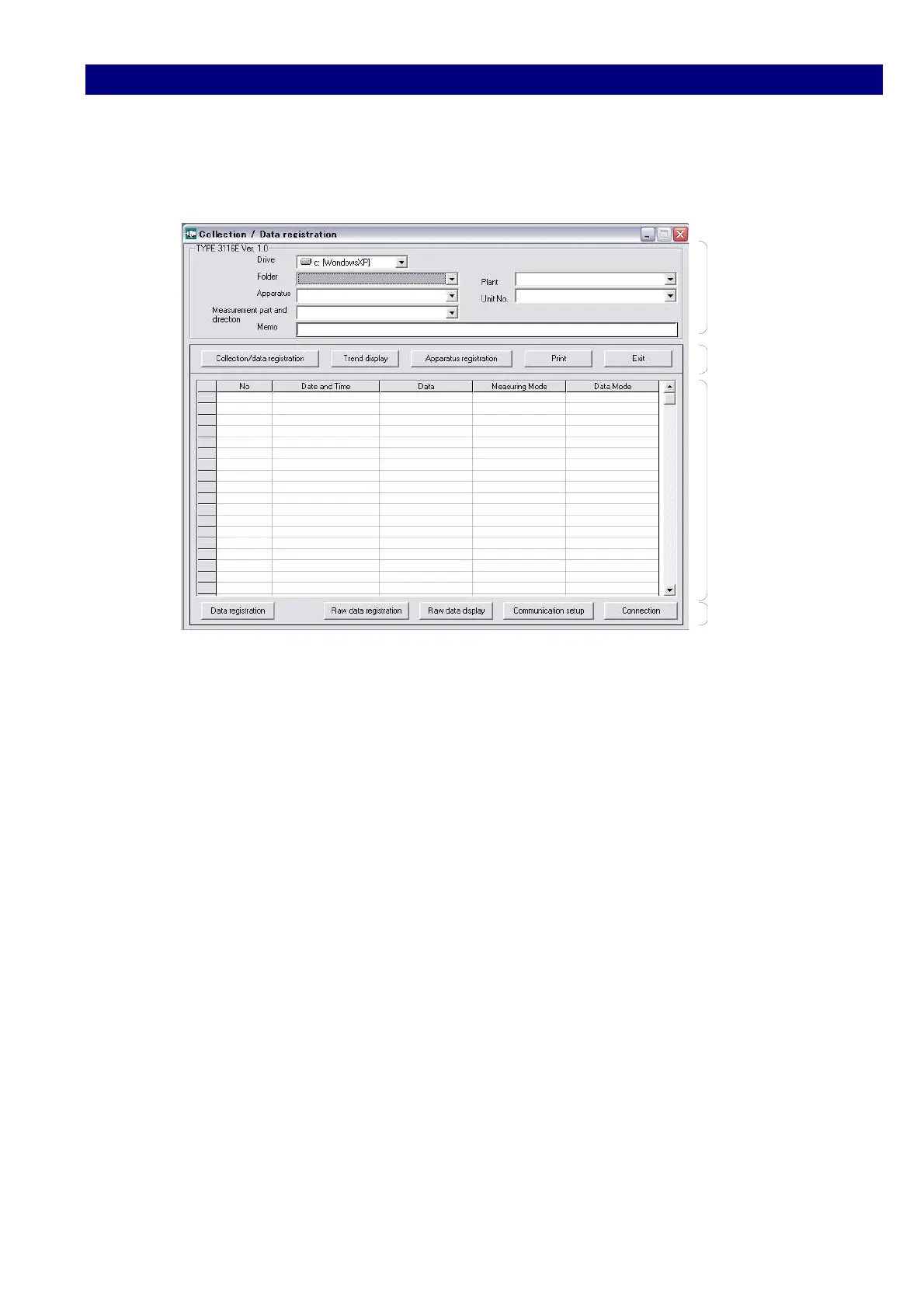
The first window which was shown just after starting up the [ Type 3116E Ver1.0.EXE ].
Folder
Menu 1
Data
Menu 2
1) [Folder] screen
Select the registered folder registered at apparatus registration.
2) [Menu 1] screen
Collection / Data Registration : Displayed each time of starting the software
Trend display : A graph displayed to indicate the registered data.
Apparatus registration : Registration folder for name, object apparatus, etc.
Print : Prints the current window.
Exit : Used to quit the software.
3) [Data] screen
Displays the data collected.
4) [Menu 2] screen
Data registration : Used to register the collected data.
Raw data registration : Used to save the collected data in CSV file.
Raw data display : Used to display the collected data saved in CSV form.
Data Communication setting : Sets and displays the condition of data communication.
Connection : Connects the data folder with Compact Size
Vibration Meter TYPE 3116.



 To Next Page