― 40 ―
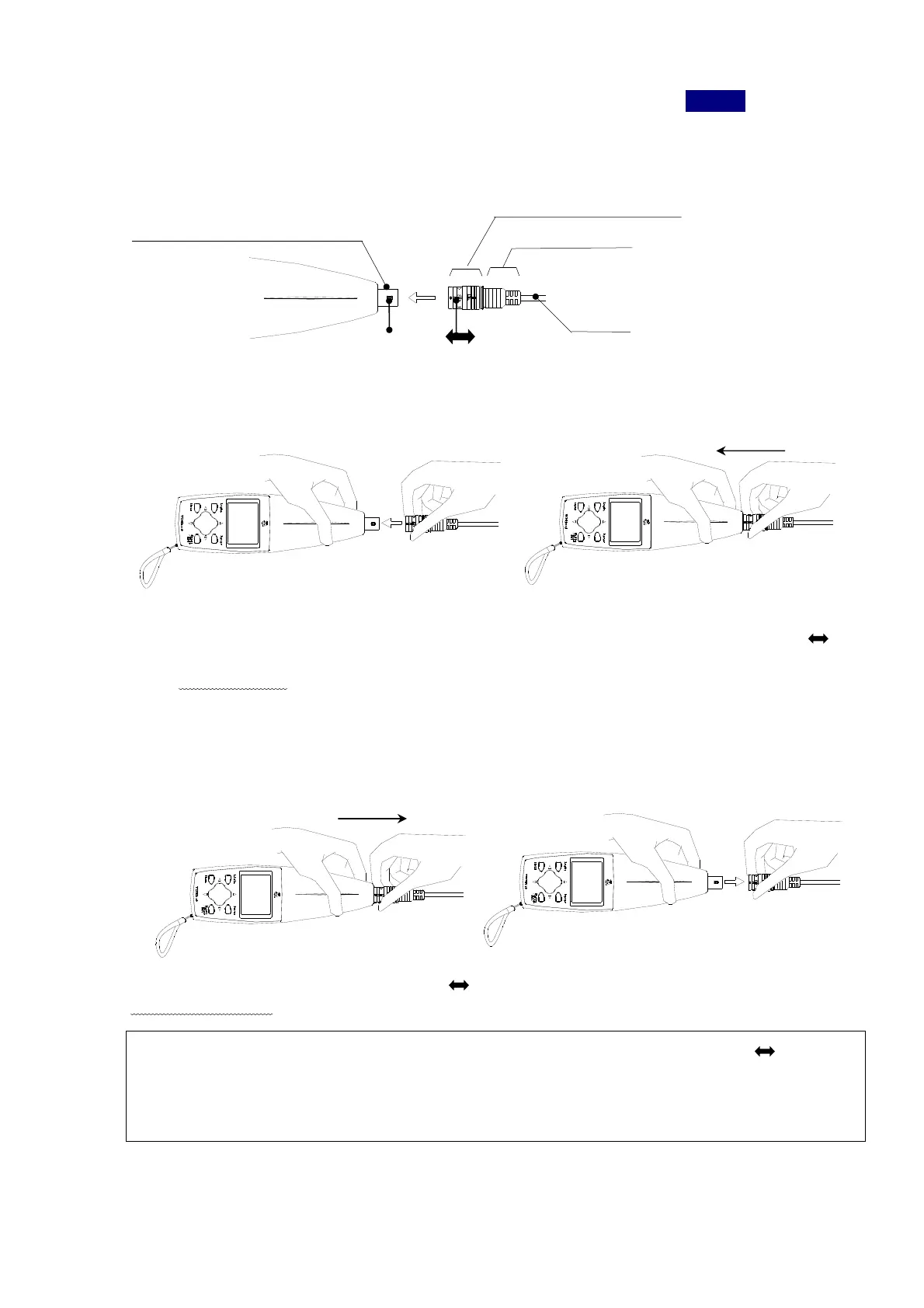
Part of boss
Mark
①
②
Input terminal of main body
③
④
How to connect/disconnect the cable
First, when the unit is in operation, turn off the power by pressing the
Power
switch.
1)How to connect/disconnect BNC one-touch connector of the curl cable to/from the input
terminal of 3116 main body.
<Connection>
① Hold up 3116 main body and BNC one-touch connector of curl cable to fit mark
of BNC connector to the boss of the main body.
② Push straight the BNC one-touch connector into the main body unit it clicks.
<Disconnection>
③ Hold up 3116 main body and the mark portion of BNC one-touch connector of curl cable.
④ Draw out straight BNC one-touch connector.
※The connector is one-touch type BNC connector. Do try to hold up the mark portion
todisconnect, not the accordion portion or the curl cable itself.
Also, during/after connection, make sure you do not try to rotate the connector itself,
which may leads failure or malfunction of any type.
BNC one-touch connector
Accordion portion



 To Next Page