― 16 ―
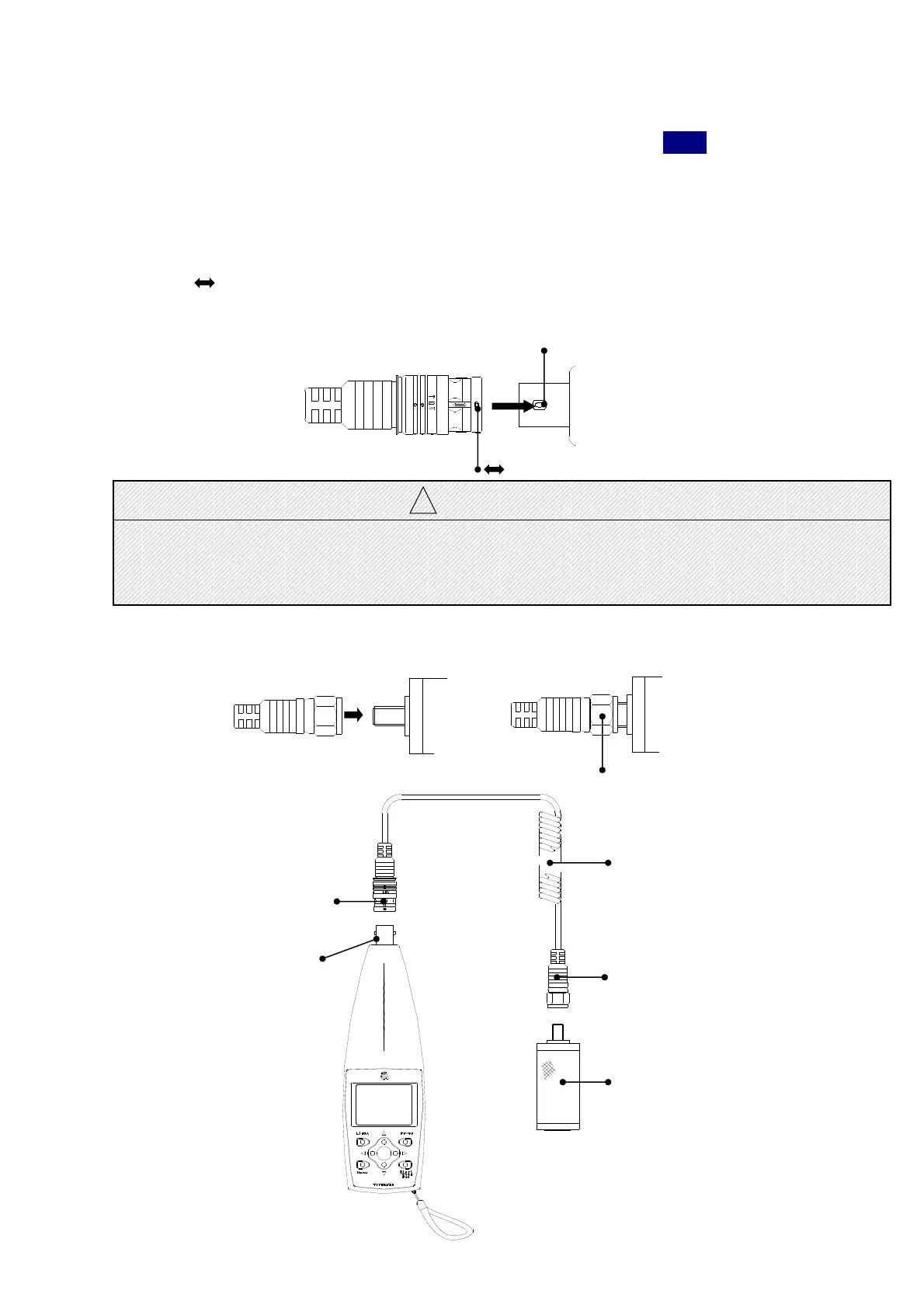
BNC CONNECTOR
Curl cable
F TYPE CONNECTOR
Accelerometer
TYPE7812B
Preparation
Connection of a connection code
1)When the unit is in operation, turn off the power by pressing the
Power
switch.
Acceleration pickup TYPE 7812B and Compact size vibration meter TYPE3116 are connected
by curl cable as shown in the following figure.
2)The BNC connector of a curl cable is connected to the input terminal of a main part.
Mark( ) of the BNC connector(a input terminal) projection portion by the side of a main
body and the BNC connector of a curl cable is united, and it pushes in straightly.
It draws out straightly at the time of removal.
Projection portion
Mark
! CAUTION
● The connection connector of a main part and a curl cable is one-touch type BNC connector.
Please do not turn by the connector part at the time of connection, or after connection.
It becomes the cause of failure or incorrect operation.
3)Accelerometer connect to Connector of F TYPE.
This portion is turned
clockwise and put in.
Input connector



 To Next Page