Megohmmeter Models 5050/5060
43
NOTE: If Autorun is disabled, it will be necessary to open Windows Explorer, then
locate and open the USB stick drive labeled “DataView” to view the files on the
drive.
3. IntheAutoPlaywindow,selectOpen Folder to view Files.
4. Double-clickonSetup.exefromtheopenedfolderviewtolaunchtheData-
Viewsetupprogram.
NOTE: If installing onto a Vista based computer the User Account Control dialog
box will be displayed. Select the Allow option to proceed.
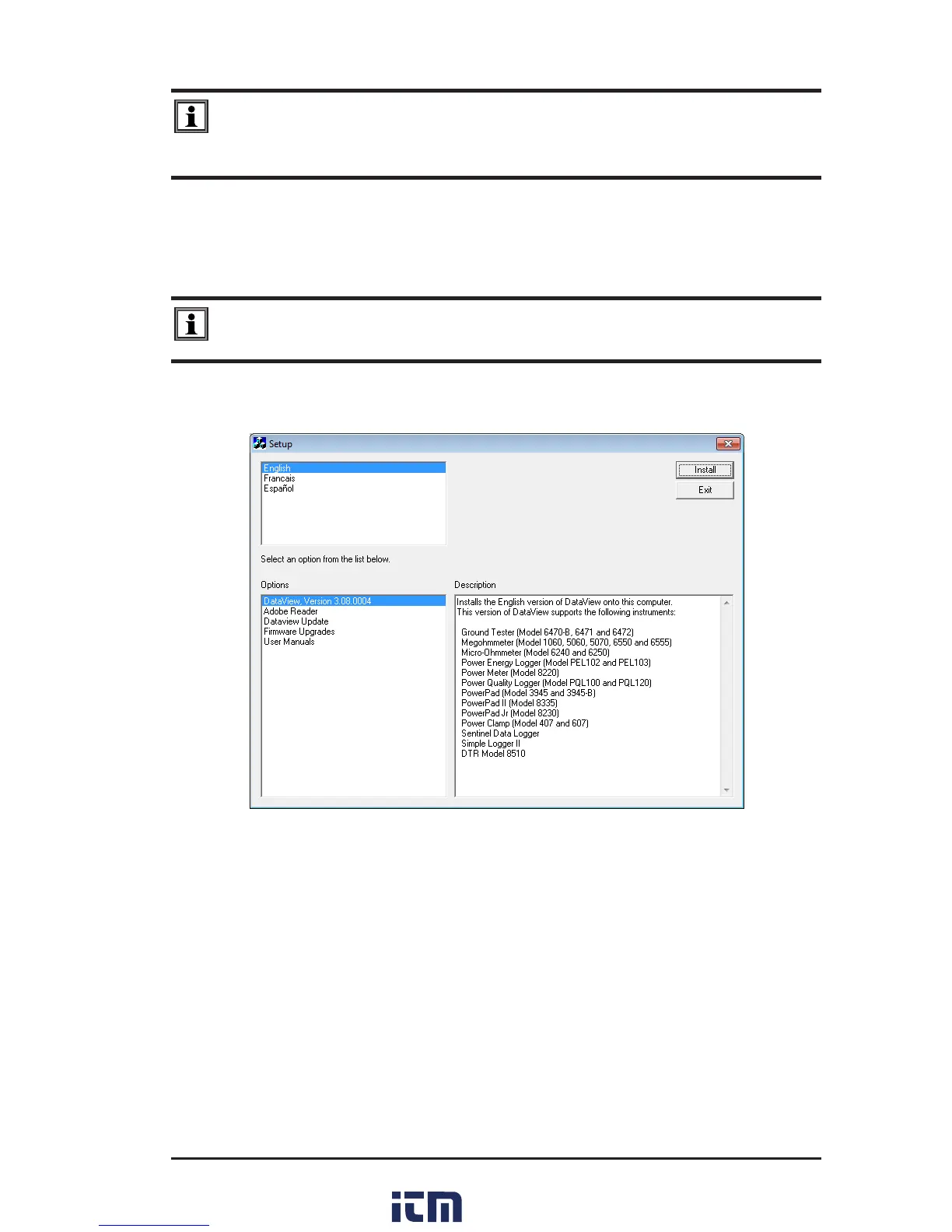
5. A Set-up window,similartotheonebelow,willappear.
Figure 7-1
There are several dierent options to choose from. Some options
(
*
)
require an
internet connection.
• DataView, Version x.xx.xxxx-InstallsDataView
®
ontothePC.
• *Adobe Reader-LinkstotheAdobe
®
websitetodownloadthemostrecent
versionofAdobe
®
Readertothecomputer.Adobe
®
Reader is required for
viewing PDF documents supplied with DataView
®
.
• *DataView Updates- Linkstotheonline DataView
®
softwareupdates to
checkfornewsoftwareversionreleases.
• *Firmware Upgrades-Linkstotheonlinermwareupdatestocheckfor
newrmwareversionreleases.
w ww . . co m
information@itm.com1.800.561.8187



 To Next Page