Megohmmeter Models 5050/5060
47
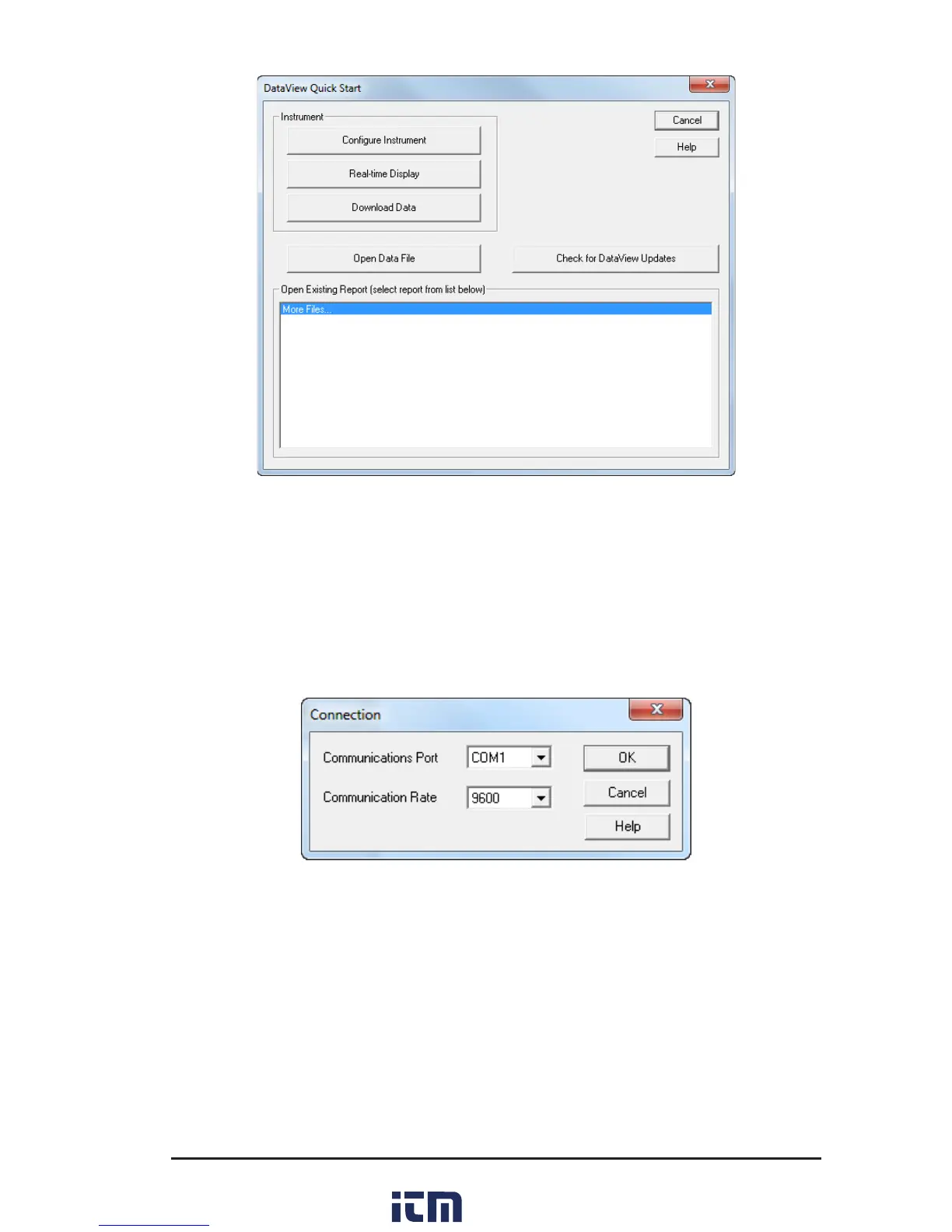
Figure 7-4
7.3.1 Configuring the Instrument
Toconguretheinstrument,performthefollowingsteps.
1. ClicktheCongure Instrumentbutton.Adialogboxwillopen,allowingyou
toselecttheCommunicationRateandtheSerialPortforcommunicatingwith
theModel5060.
Figure 7-5
2. Makesurethattheserialportdisplayedinthedialogboxmatchestheportyou
pluggedtheserialcableinto.Ifthecorrectserialportisnotselected,clickon
thedropdownarrowandselecttheproperone.
3. TheCommunicationRate will default to 9600andshouldbe acceptable to
anycomputer.ThisisalsothedefaultratefortheModel5060.Youmayselect
adierentratebyclickingontheCommunicationRatedrop-downmenuand
selectingfromtheavailablevalues.
4. Oncethepropercommunicationparametershavebeenspeciedclickonthe
OKbutton.
w ww . . co m
information@itm.com1.800.561.8187



 To Next Page