44
Megohmmeter Models 5050/5060
• Documents- Showsa listofinstrumentrelateddocumentsthatyoucan
view. Adobe
®
ReaderisrequiredforviewingPDFdocumentssuppliedwith
DataView
®
.
6. DataView, Version x.xx.xxxxoptionshouldbeselectedbydefault.Select
thedesiredlanguageandthenclickonInstall.
7. TheInstallation Wizardwindowwillappear.ClickNext.
8.
Toproceed,acceptthetermsofthelicenseagreementandclickNext.
9. IntheCustomer Informationwindow,enteraNameandCompany,thenclick
Next.
10.
IntheSetup Typewindowthatappears,selectthe“Complete”radiobutton
option,thenclickNext.
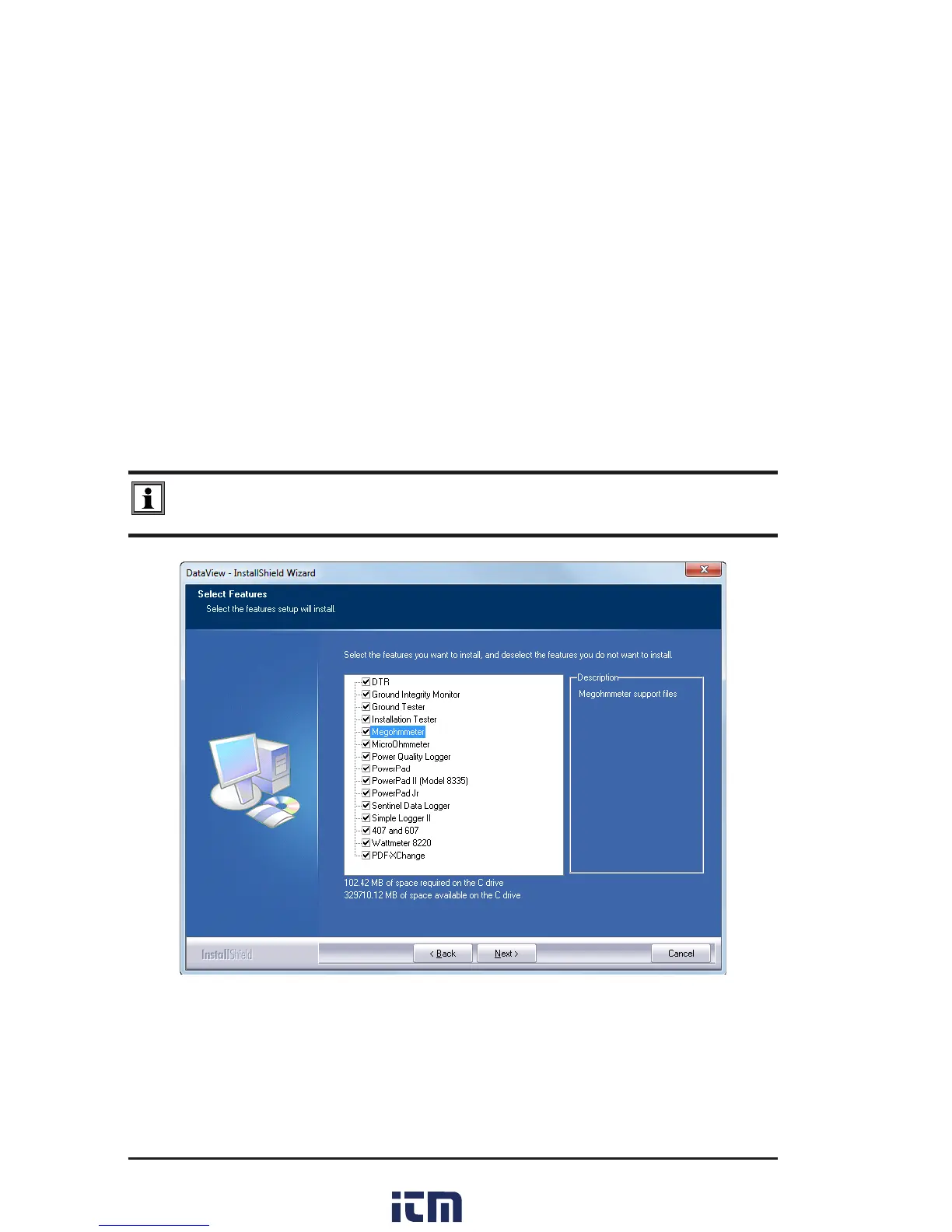
11. IntheSelect Featureswindowthatappears,selecttheinstrument’scontrol
panelthatyouwanttoinstall,thenclickNext.
NOTE: The PDF-XChange option must be selected to be able to generate PDF
reports from within DataView
®
.
Figure 7-2
12. IntheReady to Install the Programwindow,clickonInstall.
13. Iftheinstrumentselected for installation requirestheuse of a USBport,a
warningboxwillappear,similartoFigure7-3.ClickOK.
w ww . . co m
information@itm.com1.800.561.8187



 To Next Page