22
EN
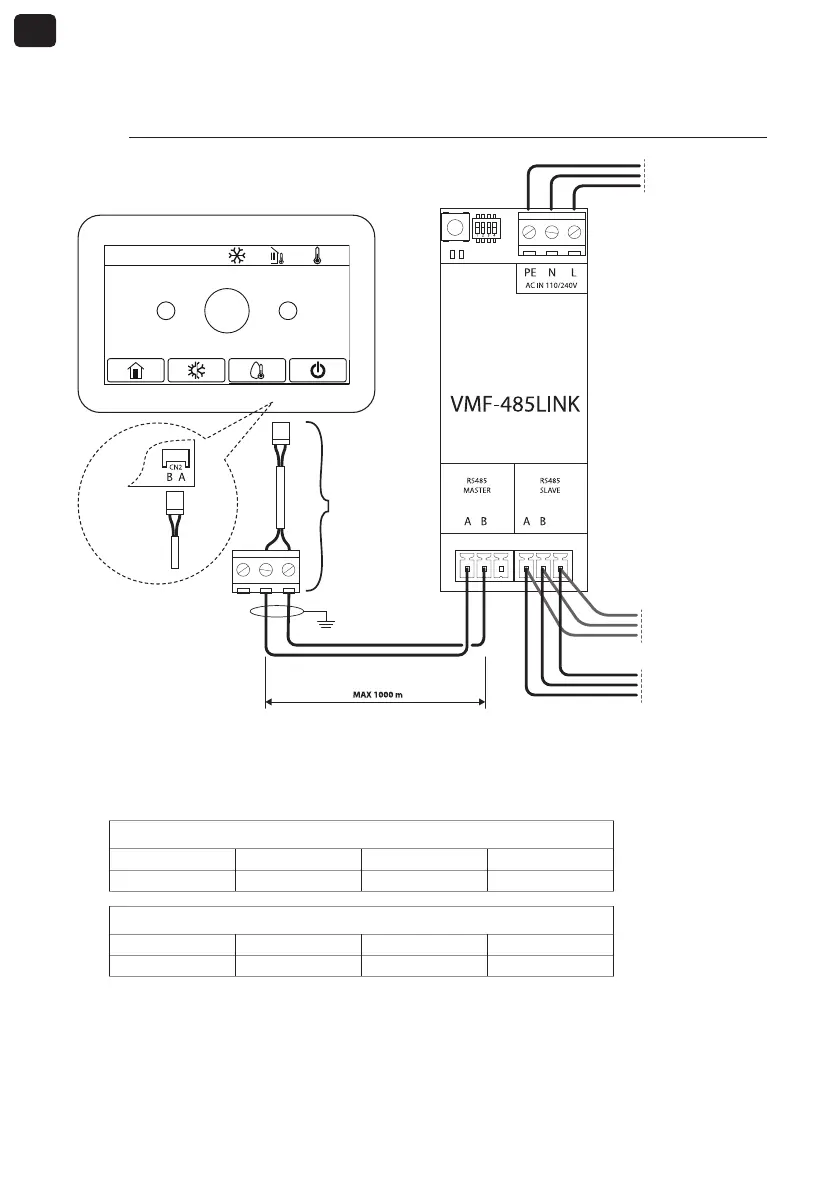
4. CONNECTION WITH HMI / BHP
4.1. PHASE 1 - Electrical connections
GND GND
2020-02-20 08:52 0.0°C 0.0°C
+
-
25°C
Previous node
VMF network
Subsequent node
VMF network
Vin: 230 Vac
50/60 Hz
Imax: 0.15 A
IC-2P
(accessory)
Rear of the
panel
NOTES:
1. for HMI or BHP units, an IC-2P accessory connector available as an accessory is required;
2. before proceeding further, make sure that the SW1 dip-switches are correctly configured:
SW1 (HMI or BHP with integrated domestic hot water management)
DIP 1 DIP 2 DIP 3 DIP 4
ON OFF OFF ON
SW1 (HMI or BHP without integrated domestic hot water management)
DIP 1 DIP 2 DIP 3 DIP 4
ON OFF OFF OFF
HMI / BHP control panel



 To Next Page