23
EN
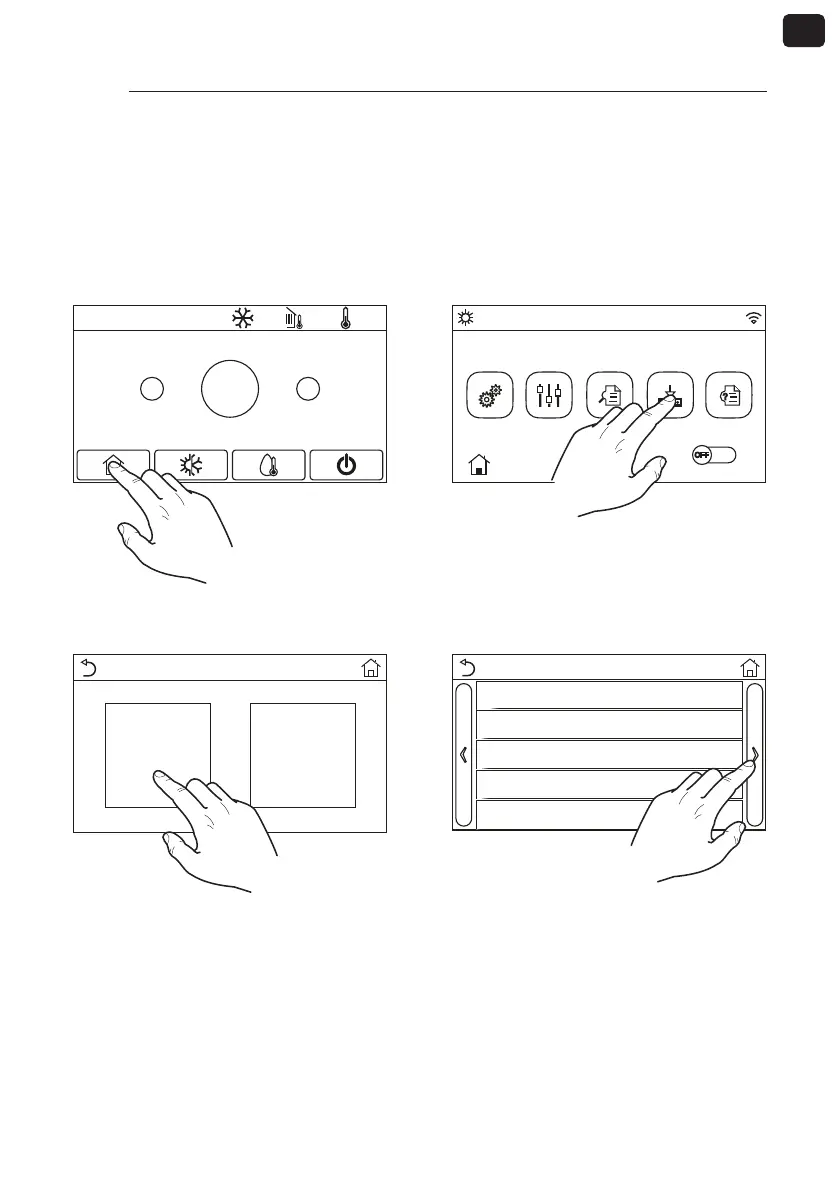
4.2. PHASE 3 - Serial address setting of the HMI/BHP units
To connect the units to the supervisor, it is necessary to set the correct modbus address to be assigned
to the unit;please note that on VMF-E6, VMF-E5 or MULTICONTROL supervisors, the addresses dedicated
to the chillers are:200, 201, 202, 203. For more information, refer to the documentation of the supervisor
to be used.To set a supervision address on the units, the following steps must be followed:
2020-02-20 08:52 0.0°C 0.0°C
+
-
25°C
(1) From the main screen, press the key for the
HOME screen:
16:41
2017-05-04 Ven
Funzioni Parametri Visual Avviamento Generale
(2) From the HOME screen, press the key to
access the “Start-up menu“:
Avviamento
Funzioni Parametri
(3) From the “Start-up” menu, select the “Func-
tions” sub-menu :
Funzioni (1/4)
Temp di Controllo: T mandata
Valv. 2 Vie in Raff: On
Valv. 2 Vie in Risc: Off
Impostazione Solare: Non Attivo
Serbatoio ACS: Attivo
(4) From the “Functions” sub-menu, scroll the
pages to the “Functions (4/4)“ page:



 To Next Page