10
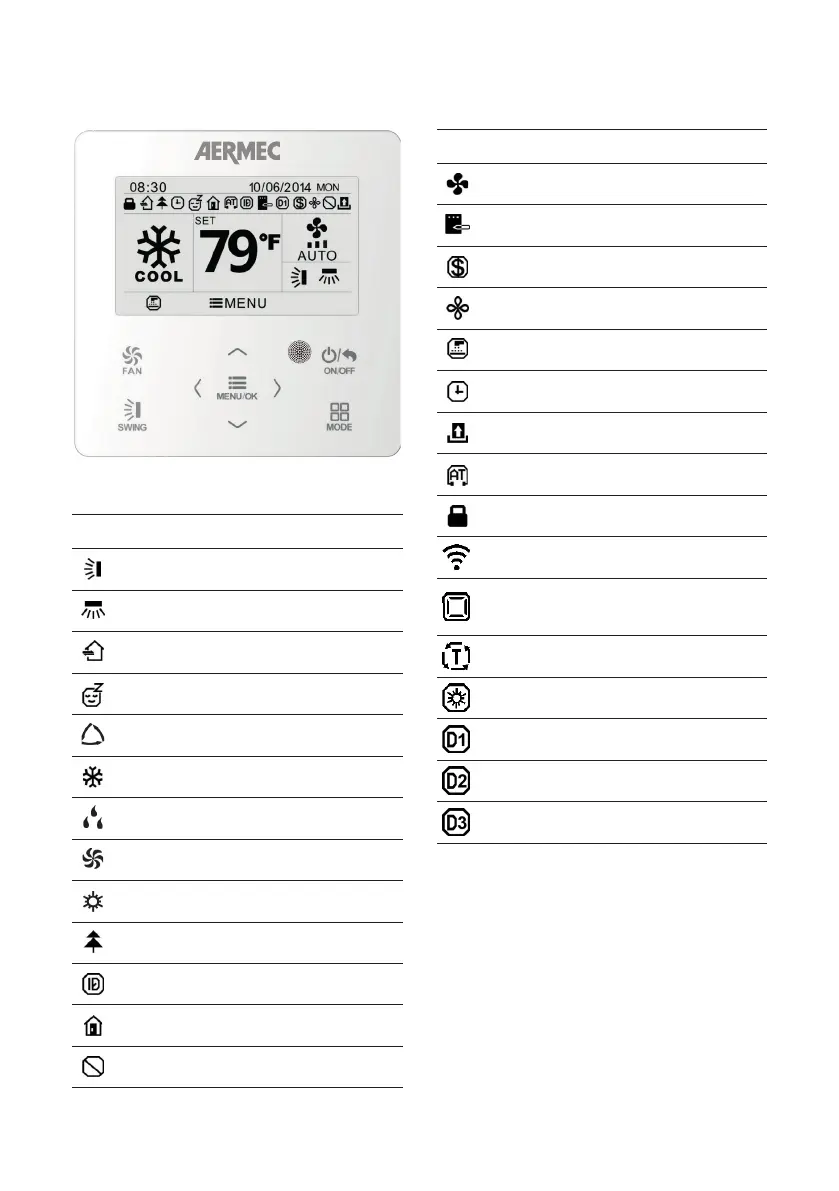
Icon Function
The VERTICAL SWING function is active
The HORIZONTAL SWING function is
active
NOT AVAILABLE
The night-time comfort program is
active
AUTOMATIC mode is active
COOLING mode is active
DEHUMIDIFICATION mode is active
VENTILATION ONLY mode is active
HEATING mode is active
The air ioniser is active
Indicates that the I-DEMAND function
is active
The anti-freeze function is active
A panel lock has been activated
USER INTERFACE DISPLAY
Icon Function
Indicates the current fan speed setting
Indicates that the settings are saved on
the wired panel memory
The energy-saving function is active
The prolonged ventilation function is
active (X-FAN)
The air filter in the indoor unit must be
cleaned
Indicates any hourly settings that may
be active
FUNCTION NOT AVAILABLE
The "quiet operation" function has been
enabled
Indicates the total locking of all the
functions
Indicates that the WI-FI function was
activated
Indicates that the control function
independent of the air delivery fins is
active
Indicates that a minimum and/or
maximum temperature value is set
FUNCTION NOT AVAILABLE
DRED Status
DRED Status
DRED Status



 To Next Page