24
Setting date and time
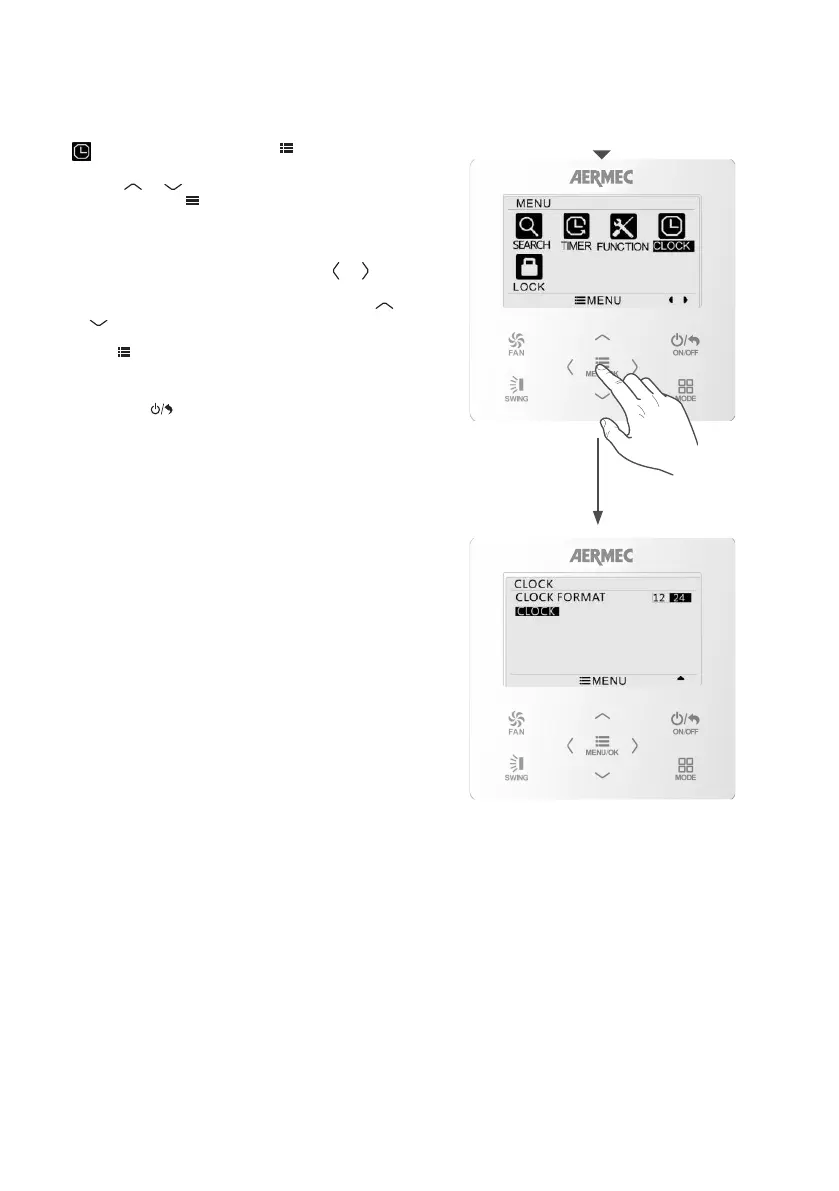
SET CLOCK OF THE SYSTEM
From the main menu of the control panel, select the
CLOCK icon and then press
MENU/OK
FAN
ON/OFF
MODE
SWING
to access the
required menu.
Use the
MENU/OK
FAN
ON/OFF
MODE
SWING
or
MENU/OK
FAN
ON/OFF
MODE
SWING
button to select the required
item, then press
MENU/OK
FAN
ON/OFF
MODE
SWING
to confirm. The available
items are:
CLOCK FORMAT: to set the format for viewing the
time on the panel display (12- or 24 - hour).
CLOCK: to set the time and date. Use the
MENU/OK
FAN
ON/OFF
MODE
SWING
or
MENU/OK
FAN
ON/OFF
MODE
SWING
button to select the value you want to change
(hours, minutes, year, month or day), then press
MENU/OK
FAN
ON/OFF
MODE
SWING
or
MENU/OK
FAN
ON/OFF
MODE
SWING
to set the correct value.
Press
MENU/OK
FAN
ON/OFF
MODE
SWING
to save the settings.
To quit the sub-menu and return to the previous
levels, press
MENU/OK
FAN
ON/OFF
MODE
SWING
.



 To Next Page