20
Daily timer programming
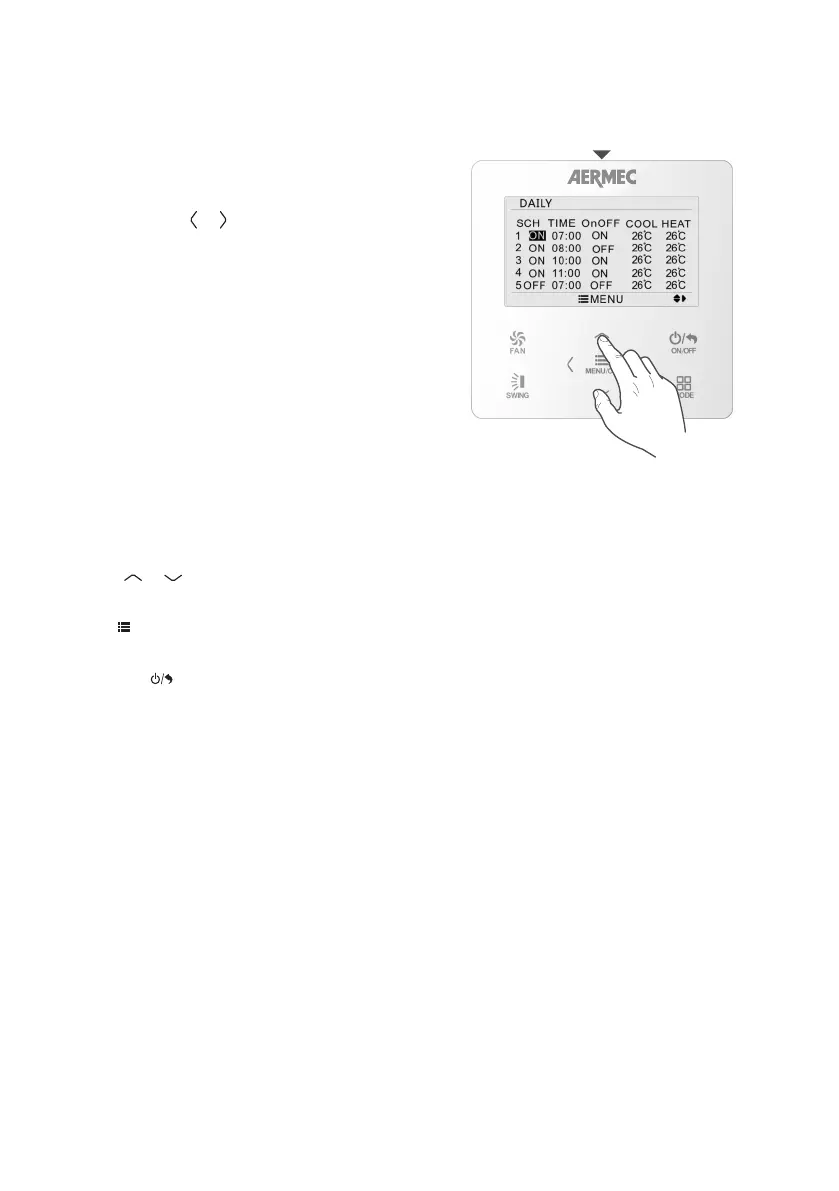
DAILY TIMER DAILY TIMER
PROGRAMMING
With daily timed programming, up to 8 actions can
be programmed (timed switch-on or switch-off
operations) over a 24-hour period, thereby creating
daily time bands.
To set daily timed programming, enter the DAILY
menu and use the
MENU/OK
FAN
ON/OFF
MODE
SWING
or
MENU/OK
FAN
ON/OFF
MODE
SWING
button to select the value
you want to change (when the last value on the
right has been reached, the cursor will automatically
move onto the next line). The values to be set for
this function are:
SCH: indicates the number and status (ON - active,
OFF - not active) of the selected action.
TIME: indicates the time when the selected action
must be implemented.
OnOFF: indicates the command (ON activates the
unit, OFF deactivates it) associated with the selected
action.
COOL: indicates the cooling setting to be assigned
if necessary during the implementation of the
selected action (if the command of the action itself
requires unit switch-on).
HEAT: indicates the heating setting to be assigned
if necessary during the implementation of the
selected action (if the command of the action itself
requires unit switch-on).
Use the
MENU/OK
FAN
ON/OFF
MODE
SWING
or
MENU/OK
FAN
ON/OFF
MODE
SWING
button to define the required
setting for the selected value (the value being
defined is shown in black).
Press
MENU/OK
FAN
ON/OFF
MODE
SWING
to save the settings.
To quit the sub-menu and return to the previous
levels, press
MENU/OK
FAN
ON/OFF
MODE
SWING
.



 To Next Page