19
Timer programming
Single timer programming
SETTING OR DELETING A TIMED SWITCH
ON OR SWITCHOFF TIMER ON/TIMER
OFF
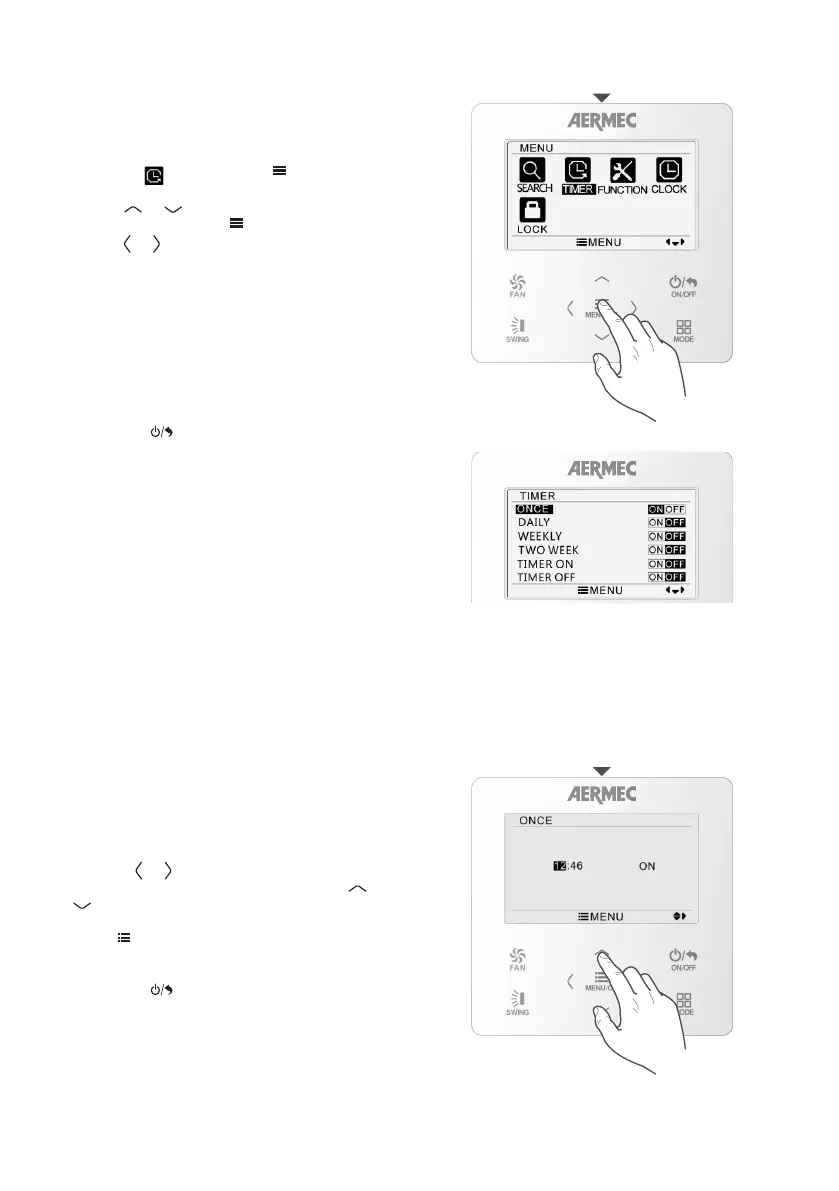
From the main menu of the control panel, select the
TIMER icon and then press
MENU/OK
FAN
ON/OFF
MODE
SWING
to access the
required menu.
Use the
MENU/OK
FAN
ON/OFF
MODE
SWING
or
MENU/OK
FAN
ON/OFF
MODE
SWING
button to select the item you
want to see, then press
MENU/OK
FAN
ON/OFF
MODE
SWING
to confirm.
Use the
MENU/OK
FAN
ON/OFF
MODE
SWING
or
MENU/OK
FAN
ON/OFF
MODE
SWING
button to activate or deactivate the
required timer.
The available items are:
ONCE: programming of a single timer
DAILY: programming of a daily timer
WEEKLY: programming of a weekly timer
TWO WEEK: programming of a fortnightly timer
TIMER ON: switch-on programmed
TIMER OFF: switch-off programmed
To quit the sub-menu and return to the previous
levels, press
MENU/OK
FAN
ON/OFF
MODE
SWING
.
ONCE TIMER SINGLE TIMED
PROGRAMMING
With single timed programming, the unit can be
switched on or off at a specific time (if the unit
is ON, switch-off is set; if the unit is in standby,
timed programming refers to switch-on). Once the
switch-on or switch-off has been implemented, the
function is automatically disabled.
To set single programming, access the ONCE menu
using the
MENU/OK
FAN
ON/OFF
MODE
SWING
or
MENU/OK
FAN
ON/OFF
MODE
SWING
button and select the value you
want to change (hours or minutes). Use the
MENU/OK
FAN
ON/OFF
MODE
SWING
or
MENU/OK
FAN
ON/OFF
MODE
SWING
button to set the required value for the number
selected (the value being defined is shown in black).
Press
MENU/OK
FAN
ON/OFF
MODE
SWING
to save the timer.
To quit the sub-menu and return to the previous
levels, press
MENU/OK
FAN
ON/OFF
MODE
SWING
.



 To Next Page