25
Setting the system locks
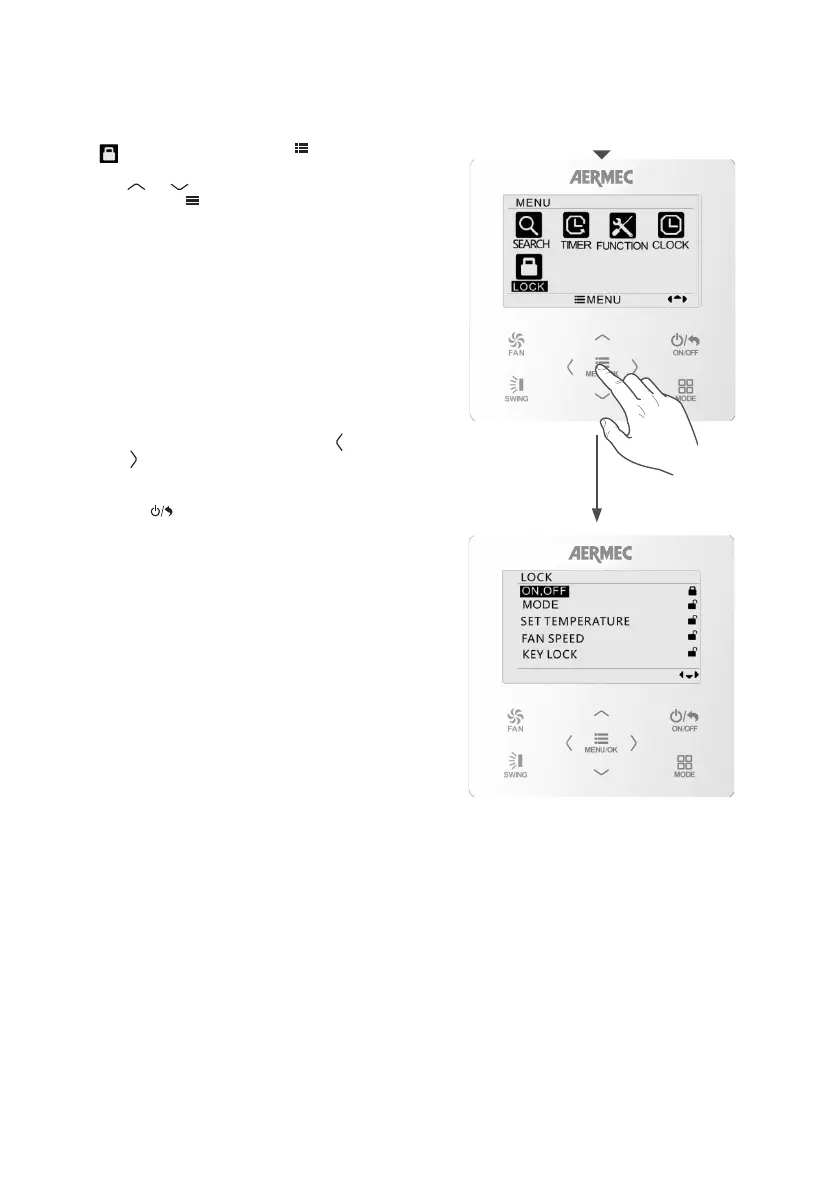
SETTING A SYSTEM LOCK
From the main menu of the control panel, select
the LOCK icon and then press
MENU/OK
FAN
ON/OFF
MODE
SWING
to access the
required menu.
Use the
MENU/OK
FAN
ON/OFF
MODE
SWING
or
MENU/OK
FAN
ON/OFF
MODE
SWING
button to select the required
item, then press
MENU/OK
FAN
ON/OFF
MODE
SWING
to confirm. The available
items are:
ON,OFF: activates or deactivates the lock on unit
switch-on or switch-o via the wired panel.
MODE: activates or deactivates the lock on the
choice of operating mode via the wired panel.
SET TEMPERATURE: activates or deactivates the
lock on the modication of the operating setting via
the wired panel.
FAN SPEED: activates or deactivates the lock on the
modication of the ventilation speed via the wired
pane.
KEY LOCK: activates the full locking of the keys on
the wired panel. To deactivate this lock, follow the
indications given on the screen. Press the
MENU/OK
FAN
ON/OFF
MODE
SWING
key and
then the
MENU/OK
FAN
ON/OFF
MODE
SWING
key.
To quit the sub-menu and return to the previous
levels, press
MENU/OK
FAN
ON/OFF
MODE
SWING
.



 To Next Page