DD+DIS155
.11E
Controls, Connections, and Setup Procedures
DOCUMENT CONTROL NOTE:
The controlled version of this document is available from the Agfa HealthCare Library. Any printed copy of this document is uncontrolled.
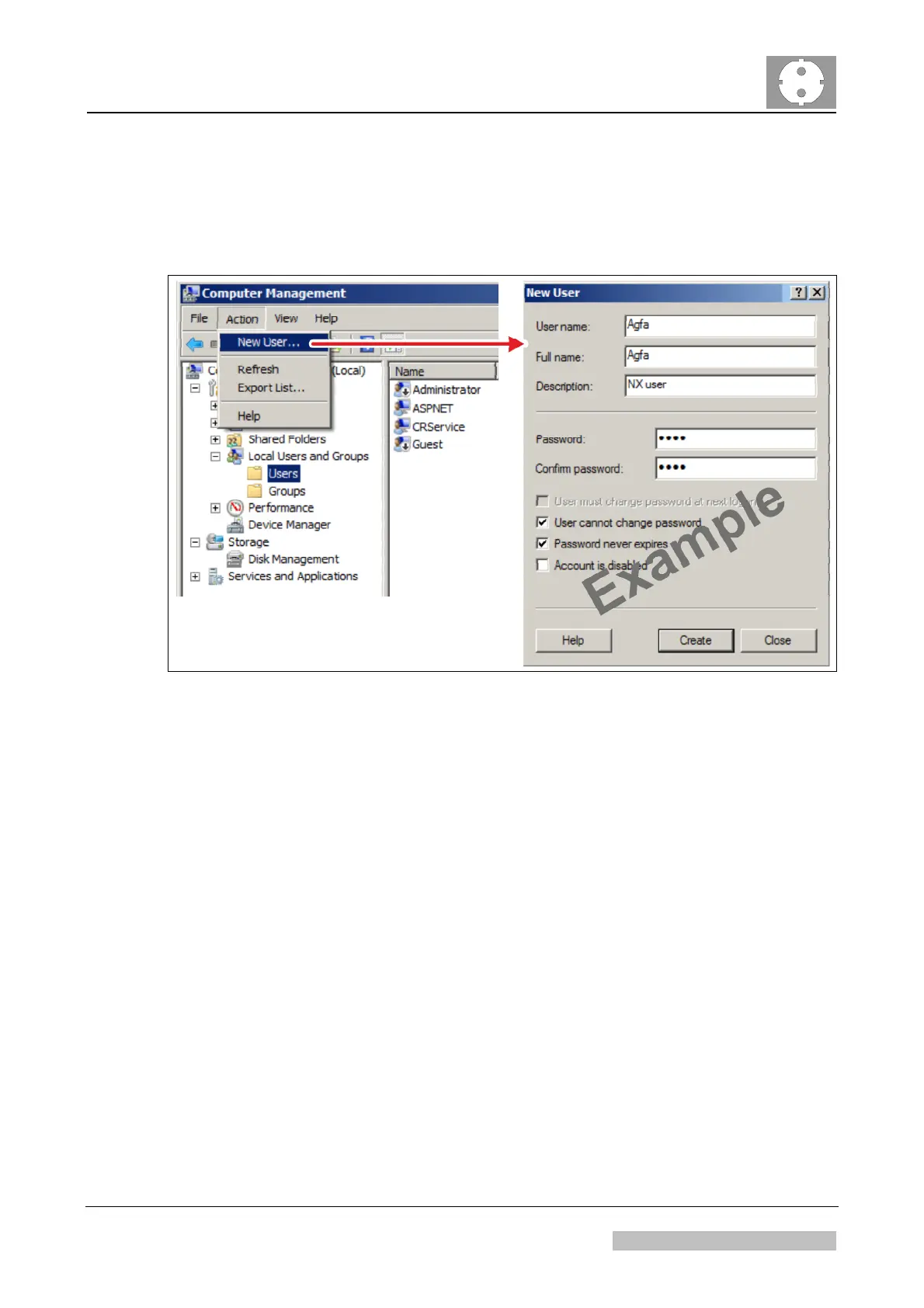
(1) Add Windows users in following menu:
Start > Control Panel > Administrative Tools > Computer
Management > Local Users and Groups > Users > New User
Figure 7
(2) Start the NX Configurator (via Desktop Shortcut).
(3) Select: <Load active configuration>
(4) Select: Security > Manage Users > Add User
(5) Add NX users and roles. For an example see Figure 8 and Figure 9.
Edition 1, Revision 4 CR 10-X / CR Reader / CR 12-X / CR Advanced Reader Chapter 1 / Page 12 of 47
03-2013 Type 5151 / 100 / 110 / 200 / 210 Agfa Company Confidential


 To Next Page