ProST Hardware Installation User Guide
Page 37 Commercial in Confidence UWB-D00111 Rev L
Figure20‐Mountingbracket
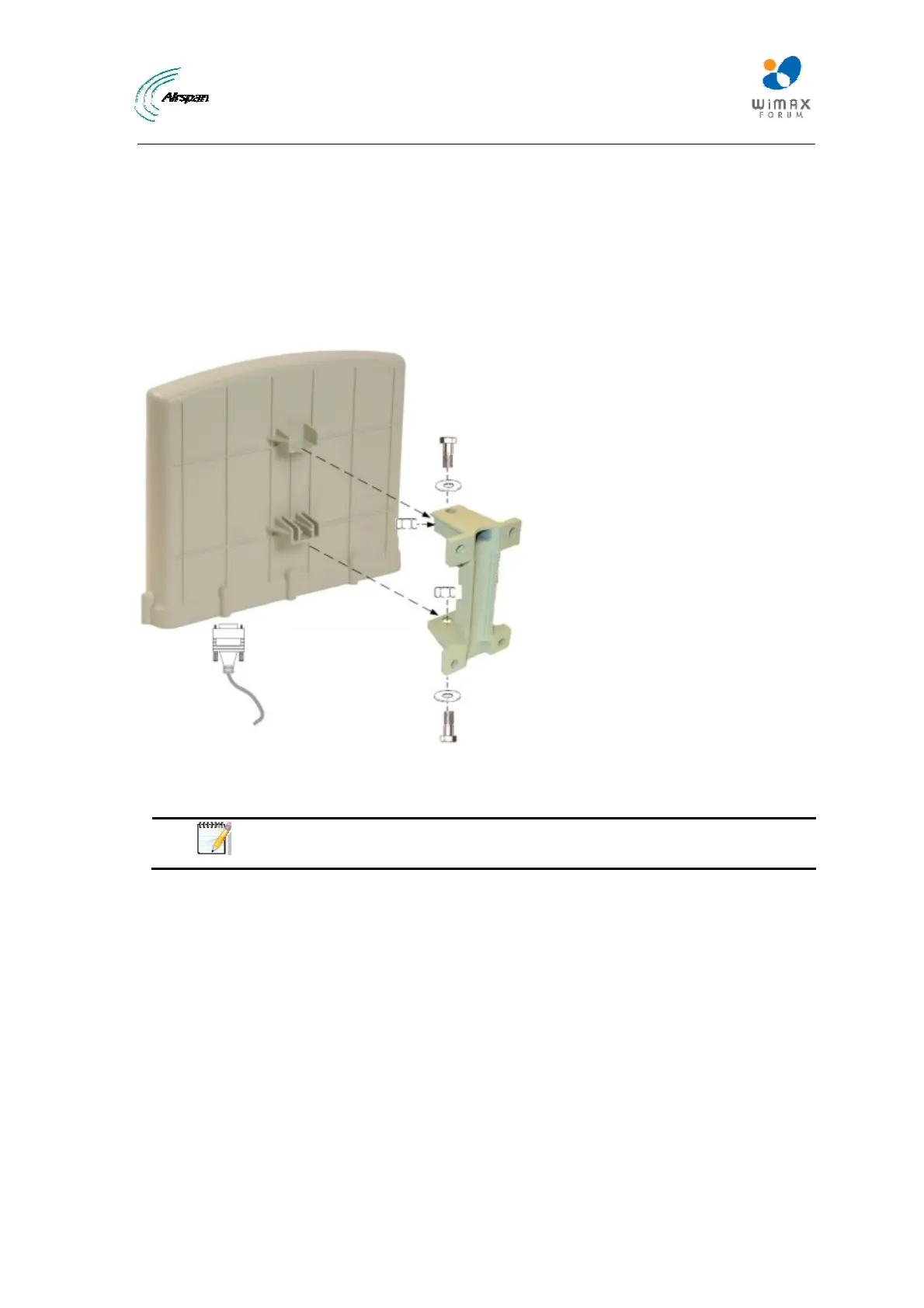
5. Attach the ProST to the mounting bracket by performing the following:
a) Slide an M10-spring lock washer and then an M10-plain washer onto each M10 x 1.5
hex head screw (20mm length) – (ensure lock washer is nearest to head of screw bolt).
b) Align the mounting bracket's holes with the ProST's mounting holes as displayed below.
(The mounting bracket side that provides a groove for inserting a nut must be aligned
with the ProST's mounting hole that is nearest to the ProST's rear panel.)
c) From the external sides, insert the M10-hex head screws through the mounting
bracket's holes and ProST's mounting holes. Loosely fasten with the M10-hex nuts.
Figure21‐Mountingtobracket
6. Adjust the horizontal positioning of the ProST, and then tighten the two M10 x 1.5-hex head
screws (20mm length) with the M10 hex nuts. Max torgue for M10 is 44Nm (32lbf.ft.).
Note: A third-party thread-locking compound must be applied to the M10-hex
head screws to prevent the bolts from working loose.
Rotation is restricted in the horizontal plane only, as shown in the figure below:



 To Next Page