ProST Hardware Installation User Guide
Page 48 Commercial in Confidence UWB-D00111 Rev L
6.2.1 Connecting the SDA-1 Type II
The SDA-1 Type II provides a single 100BaseT interface with the subscriber's LAN network.
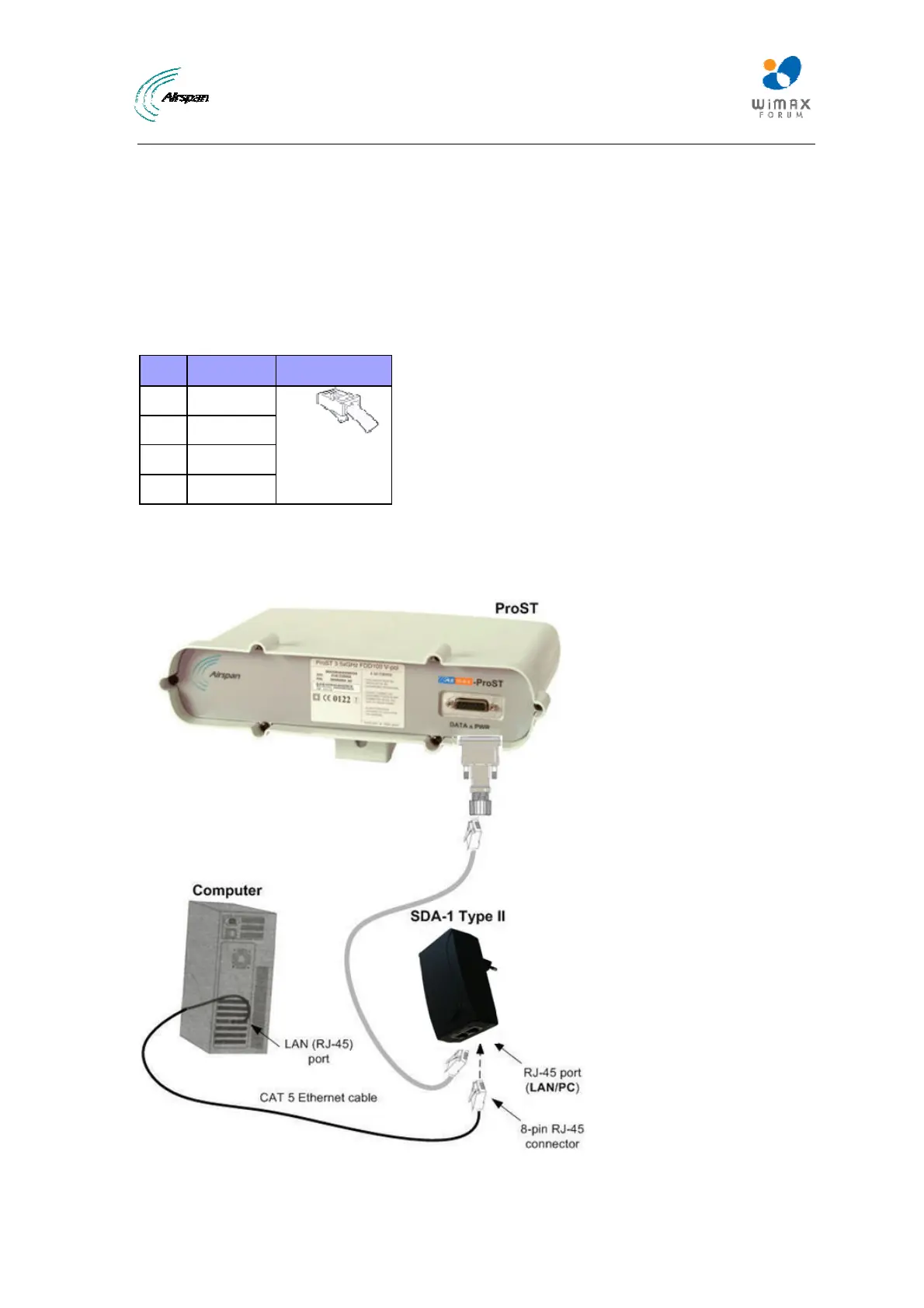
The cable setup for SDA-1 Type II connectivity is as follows:
¾ Cable: Straight-through CAT 5e Ethernet cable
¾ Connectors: 8-pin RJ-45
¾ Connector pinouts:
Table13‐SDA‐1
Pin Function 8-Pin RJ-45
1 Tx+
2 Tx-
3 Rx+
6 Rx-
To connect the ProST to the subscriber's network/PC (via SDA-1 Type II):
1. Plug the supplied Category 5e Ethernet cable into the SDA-1's RJ-45 port labeled LAN/PC.
2. Plug the loose end of the Category 5e Ethernet cable into the computer's LAN port.
Figure36‐ProST&SDA1&PC



 To Next Page