— 37 —— 36 —
SYSTEM MENU SYSTEM MENU
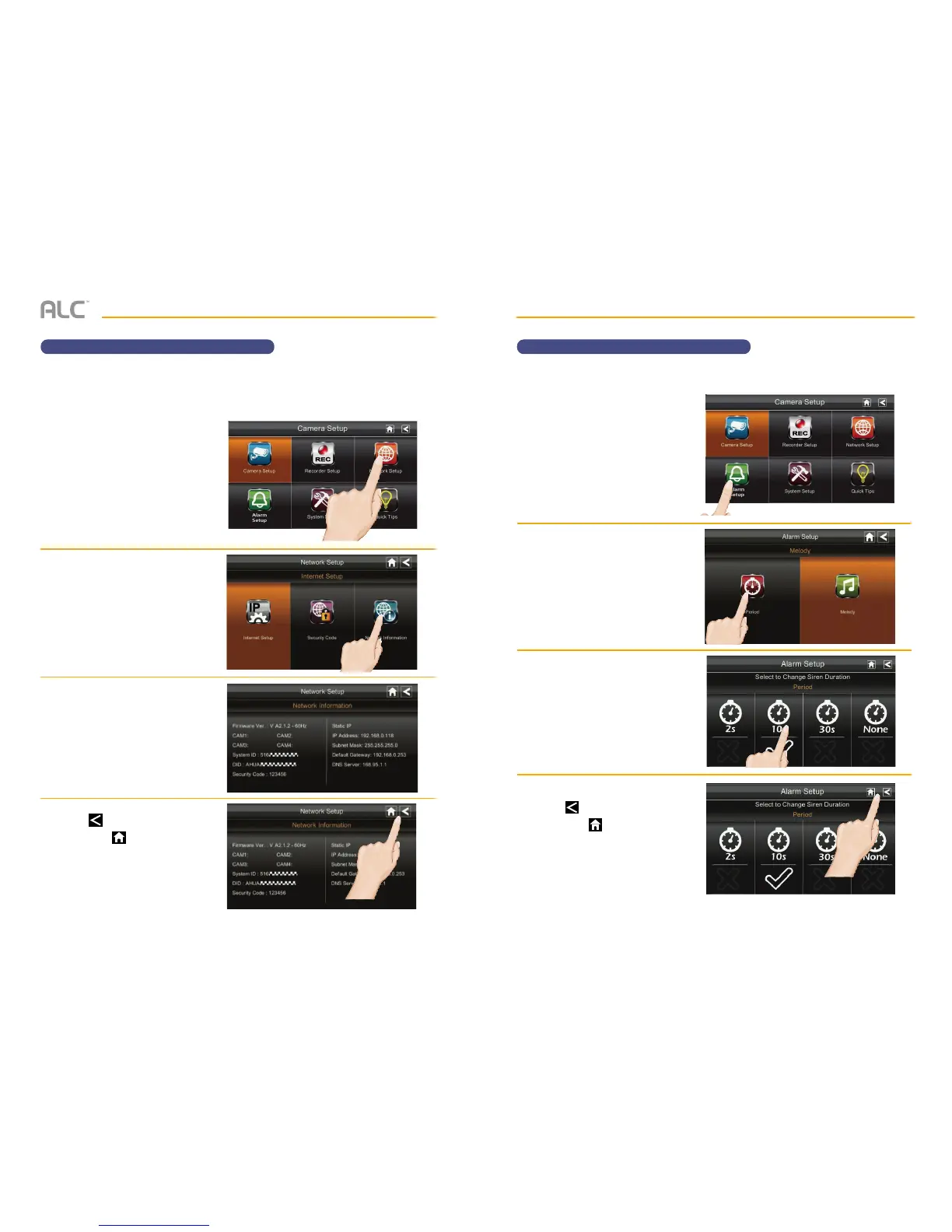
Network Information Alarm Setup – Siren Period
u
Follow steps 1 through 3 on page
24 to access the System Setup.
Tap Network Setup to access
the Network Setup screen.
v
Tap Network Information.
w
The Network information will
appear on the screen.
x
Tap to return to the previous
screen or to return to the Live
Quad view.
u
Follow steps 1 through 3 on page
24 to access the System Setup.
Tap Alarm Setup to access the
Alarm Setup screen.
v
Tap Period.
w
This screen will show the alarm’s
siren duration. To change, tap
the duration you want the siren to
last. You can choose 2, 10 or 30
seconds or select None to turn
the sirens off.
x
Tap to return to the previous
screen or to return to the Live
Quad view.
The Network Information page will display important information about your network
connection. It is especially important to note the DID number in order to use with remote
access.
Set the duration the alarm will sound as follows:


 To Next Page