— 53 —— 52 —
REMOTE ACCESS REMOTE ACCESS
Connecting to the InternetConnecting to the Internet
u
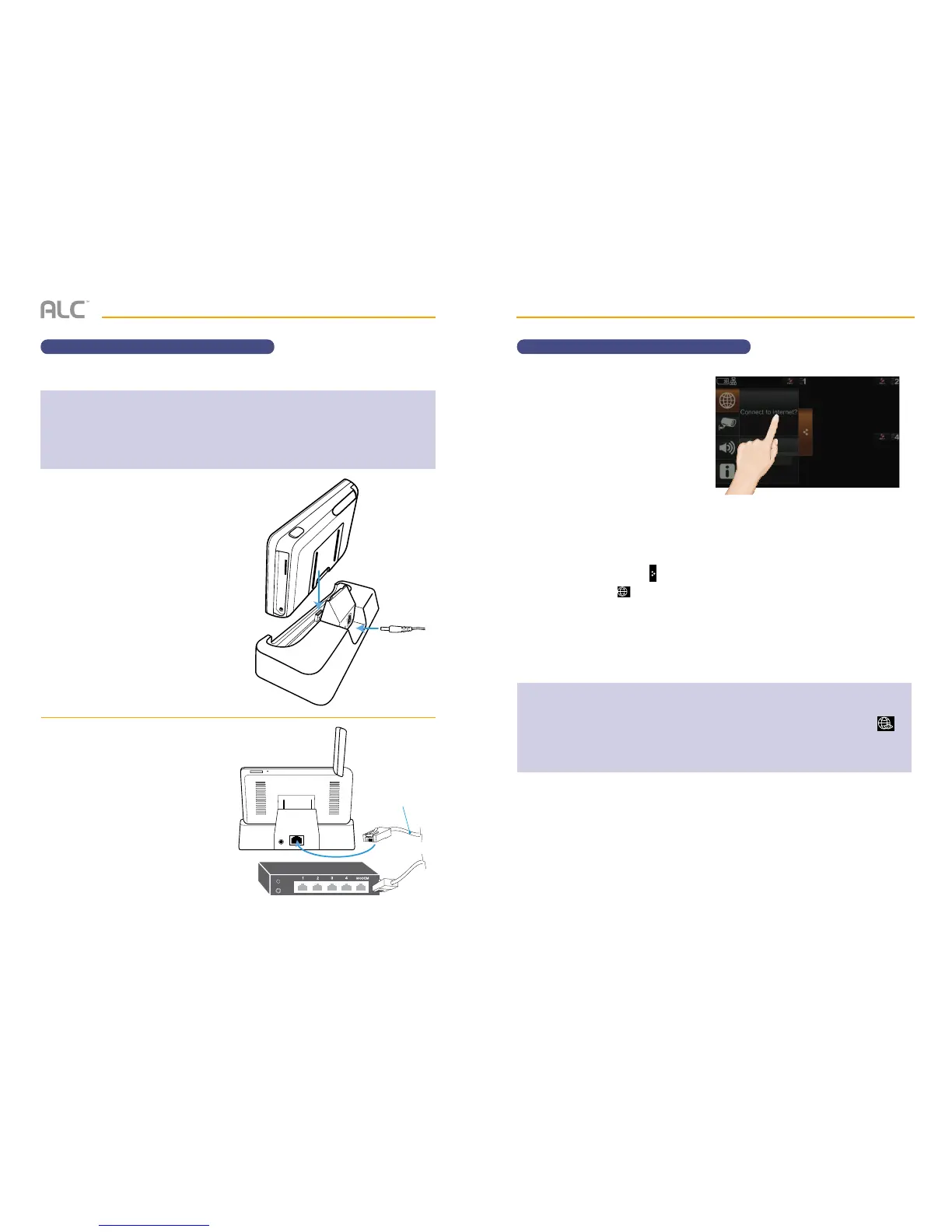
Insert the monitor into the
docking station and connect the
AC adapter to the Power jack on
the back of the docking station.
v
Connect one end of the supplied
Ethernet cable into the back of
the docking station and the other
end to your primary router (from
your internet service provider).
w
A screen asks if you want to
connect to the internet or only
charge the monitor.
Tap Connect to the Internet;
the Internet Connection Status
Indicator appears on the upper
left of the live screen indicating
that the system is connected to
the internet.
You can now view live video
through your mobile devices as
shown on page 56 for Android
devices or page 58 for Apple
devices.
You can tap the Pop Up Menu
tab and then the icon to
change this option.
The docking station charges your monitor as well as provides an internet connection.
Charge Only
IMPORTANT NOTES:
• When you are connected to the internet, live video will continue to display on the monitor, but the monitor’s
touch screen operation will become limited.
• The monitor’s touch screen operation will return to normal after disconnecting from the internet, by selecting
the Charge option (see below) or by removing the monitor from the Docking Station.
• For this procedure, the AC adapter must be connected to the Docking Station and not to the monitor.
Included
Ethernet Cable
Internet Router (not included)
NOTES:
• While the system is connected to the internet, the live screen display rate may reduce to 2 - 3 frames
per second.
• When you connect remotely to the monitor, the Internet Connection Status Indicator will show to
indicate remote view is in progress.
• Once internet connectivity is set, the system will memorize the setting and the next time you place the
monitor back into the docking station, the system will automatically connect to the internet.


 To Next Page