8.2 XC Modality
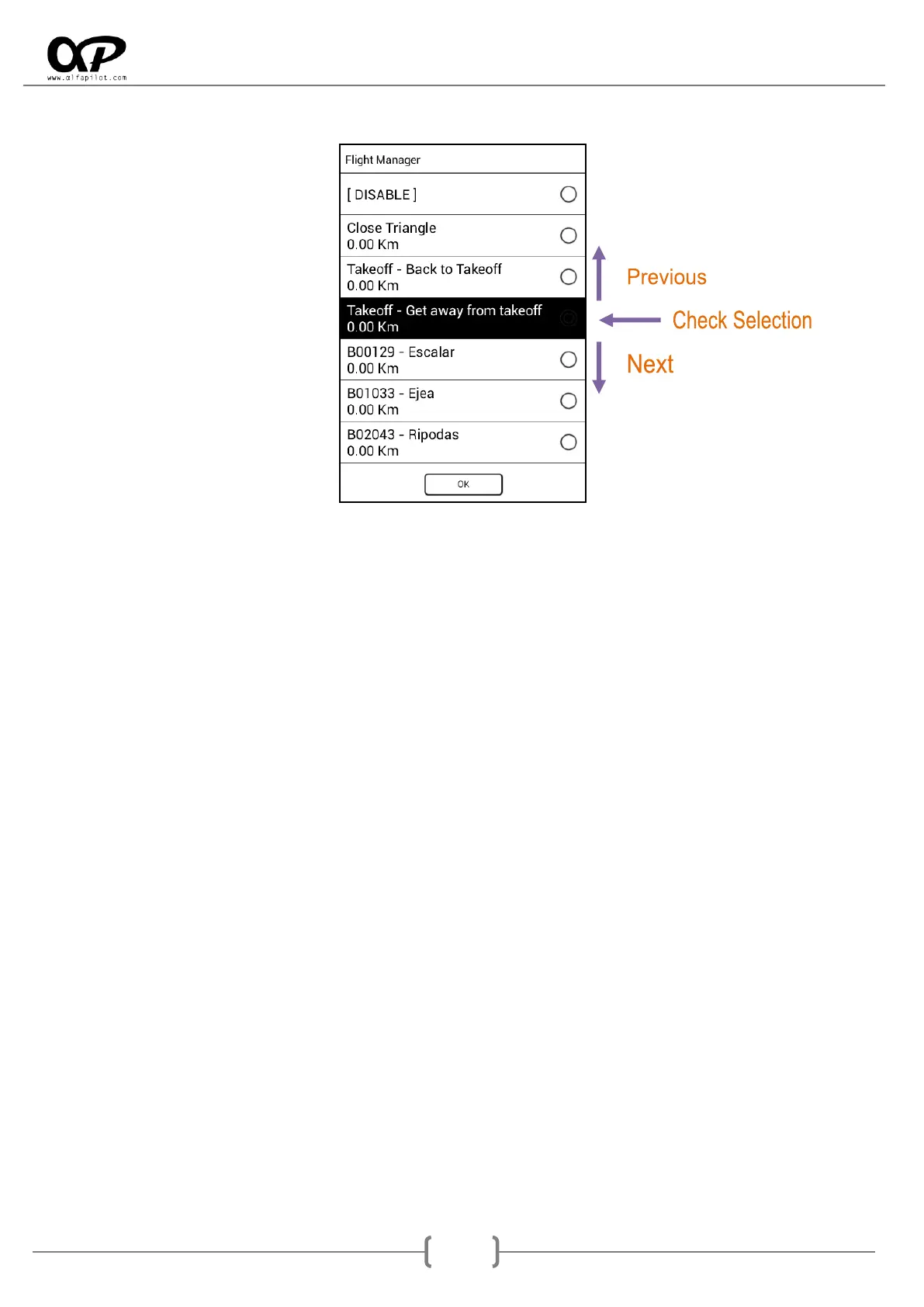
In flight XC, the Flight Manager will show us several possibilities, the first ones are related to flight XC,
and the following are the list of available WayPoints (see section 6.7.2), these can be ordered by
alphanumeric order or by distance depending on how we have configured it in settings (see section
6.8.5). With the Previous and Next buttons we will change the selected option (it is shown with black
background), to validate the option we will press the Validate button, if on the contrary we want to
cancel we will press the Back button.
[DISABLE]: allows us to disable any other previously selected option and continue with the XC
distance flight based on 3 TurnPoints.
Close Triangle: activates the triangle assistants, showing on the map the possibilities to make a
triangle, its sectors, as well as closing cylinder, etc..
Back to Takeoff: It gives us the directions and direction to return to the takeoff, as well as
necessary planes, height on take-off, distance, etc..
Get away from Takeoff: is an exclusive function of alfapilot, is designed for distance flights without
turning points, and makes it easier to follow the best bearing to get as far away as possible from
the takeoff. This system will create a virtual WayPoint on the map, in the direction opposite to the
takeoff and at a distance of 30 Km from us, each time we go near the point it will be re calculated.
WayPoints list: we have the list of WayPoints, to make a GOTO.



 To Next Page