5.2.3 Export
Clicking on this option will start the export of the flight book, it will be stored in the folder
"SeRiFLY\FLYBOOK" with the extension ".ser". It is interesting to export our flight book periodically, as a
Backup copy. Once exported we can also copy these files to our PC for greater security.
5.2.4 Show Info/Track
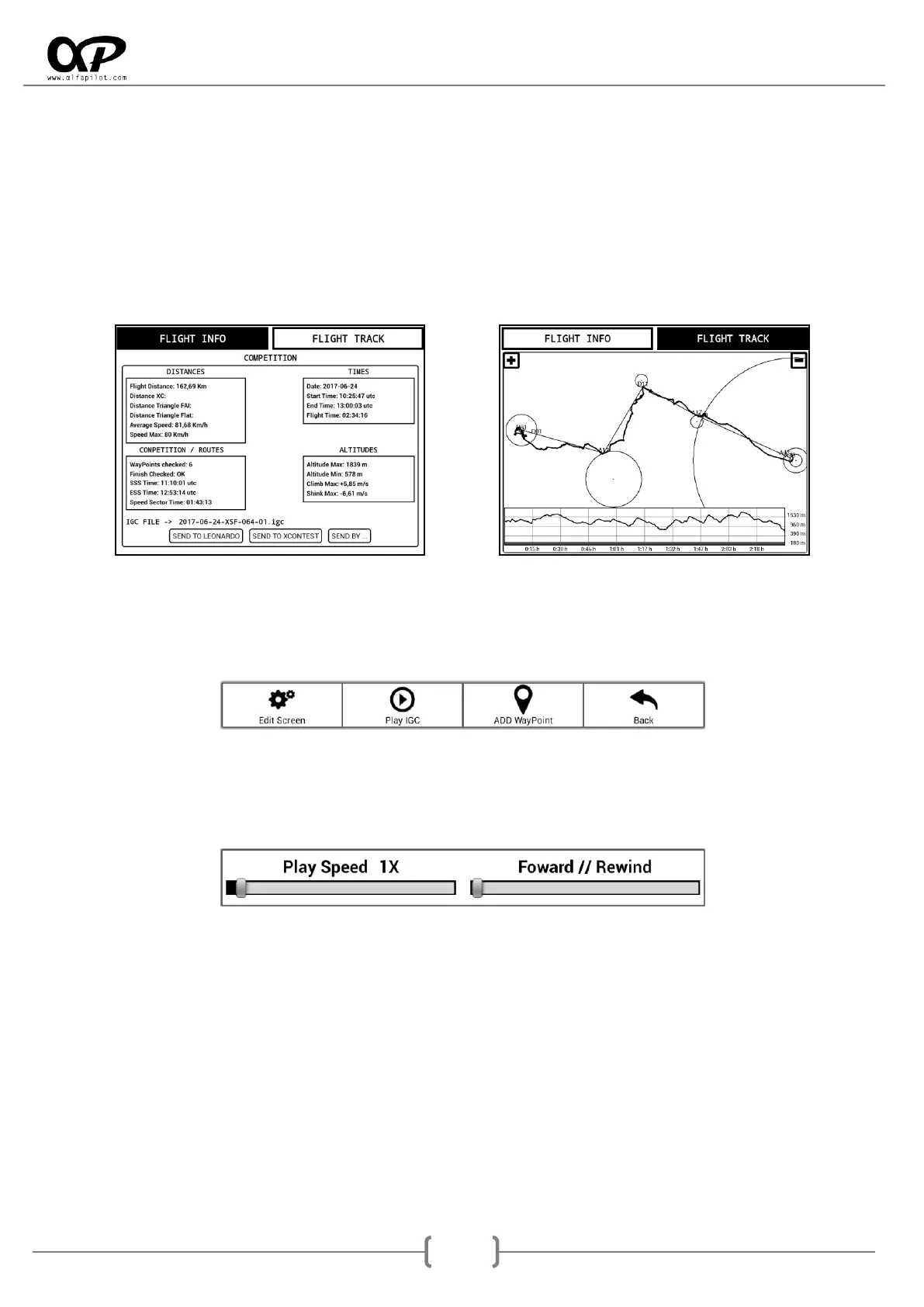
It will open a new screen in which we will be able to see the information of the flight, as well as its Track. It
will also allow us to send our IGC flight file directly to a Leonardo server, XContest or send by... (Gmail,
Drive...)
5.2.5 IGC Play
It allows us to directly reproduce the flight, in the same modality in which it was recorded. When the IGC is
played we can press the physical "Menu" button and select IGC Play. This allows us to see 2 options:
1. Play Speed, we can accelerate from 1X up to 25X times the normal speed.
2. Foward // Rewind, It allows us to advance or go back the reproduction of the flight, the left
being the beginning of the flight and the right the end of the flight.
5.2.6 Delete
It will show us a dialog to confirm if we want to eliminate the flight from our flight book. When accepting,
the data will be deleted from the flight book, but the IGC file will continue to remain in the "Tracks" folder.



 To Next Page