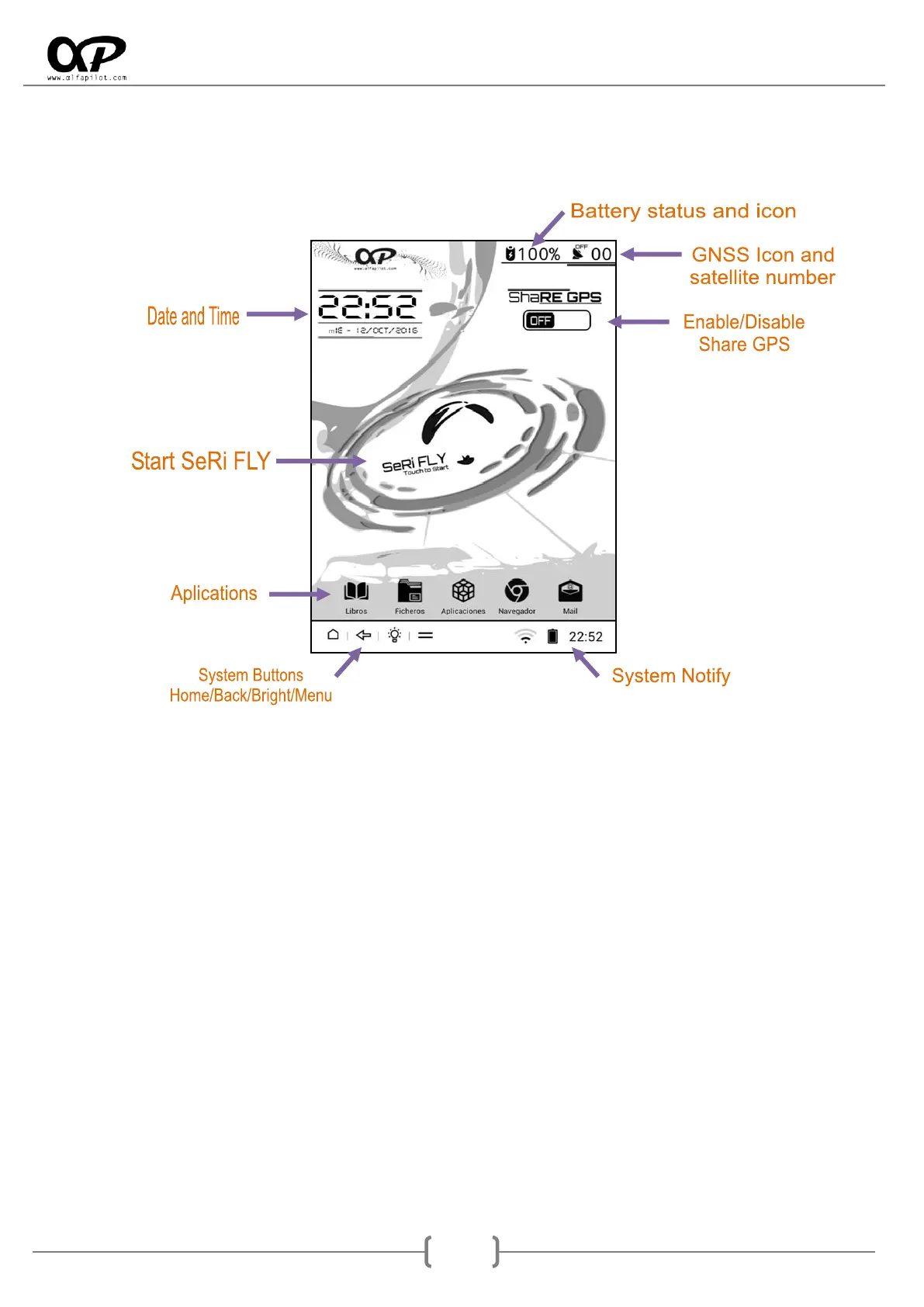
3. Main Screen
When you start the device screen is displayed (also known as Launcher), at this screen will have the
following:
3.1 Enable/Disable share GPS
This option allows you to activate the GPS to make it available in third-applications*, the GPS status icon
will change to search and indicate the number of satellites in use, also will activate the internall Vario. It has
a few settings (Menu button) that allow us to:
Use barometric altitude - Compensated, allows us to indicate that we want to use the (more
accurate) barometric altitude instead of the GPS altitude, this facilitates applications that
incorporate vario and glide ratio based on altitude calculations are also more precise.
Vario settings, see section 6.4.1.
Update Launcher, allows updating the system launcher.
Update system, allows updating the Android system (more information on our website).
About us, information about the developers.
* third-applications: GPS sharing allows us to provide GPS location to applications such as gaggle, xcsoar, xctrack, google earth, oruxmaps, etc. IT IS
NOT NECESSARY TO USE THIS FUNCTION WITH SeRi FLY.



 To Next Page