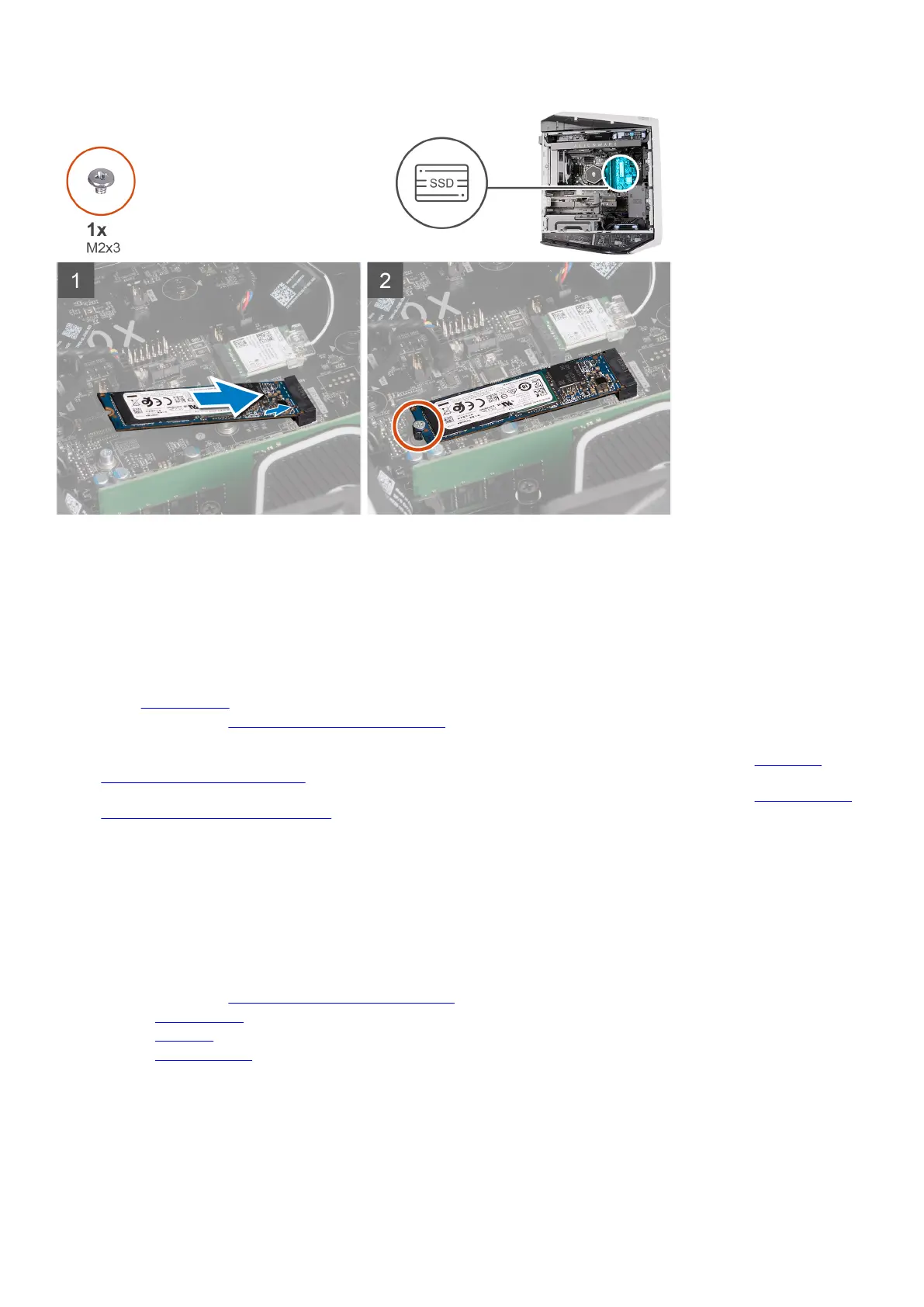
Steps
1. Align the notch on the 2280 solid-state drive with the tab on the SSD slot two on the system board.
2. Insert the 2280 solid-state drive at a 45-degree angle into the system board.
3. Press the other end of the 2280 solid-state drive down and replace the screw (M2x3) that secures the 2280 solid-state drive to
the system board.
Next steps
1. Install the
left-side cover.
2. Follow the procedure in After working inside your computer.
3. Verify if the storage device is installed correctly (optional):
a. If you are replacing a storage device which does not have the operating system installed, follow the steps in
Identifying
storage device in device manager.
b. If you are replacing a storage device which does not have the operating system installed, follow the steps in Identifying your
storage device in system setup (BIOS).
Top bezel
Removing the top bezel
Prerequisites
1. Follow the procedure in Before working inside your computer.
2. Remove the left-side cover.
3. Remove the top cover.
4. Remove the right-side cover.
About this task
The following images indicate the location of the top bezel and provide a visual representation of the removal procedure.
51















 To Next Page